Ecommerce
What Is B2B Ecommerce?
B2B ecommerce stands for Business-to-business ecommerce.
B2B ecommerce (business-to-business ecommerce) is the online sale of products or services from one business to another, such as a manufacturer selling to distributors or a wholesaler selling to retailers, through a website or online ordering portal.
What B2B ecommerce means in plain English
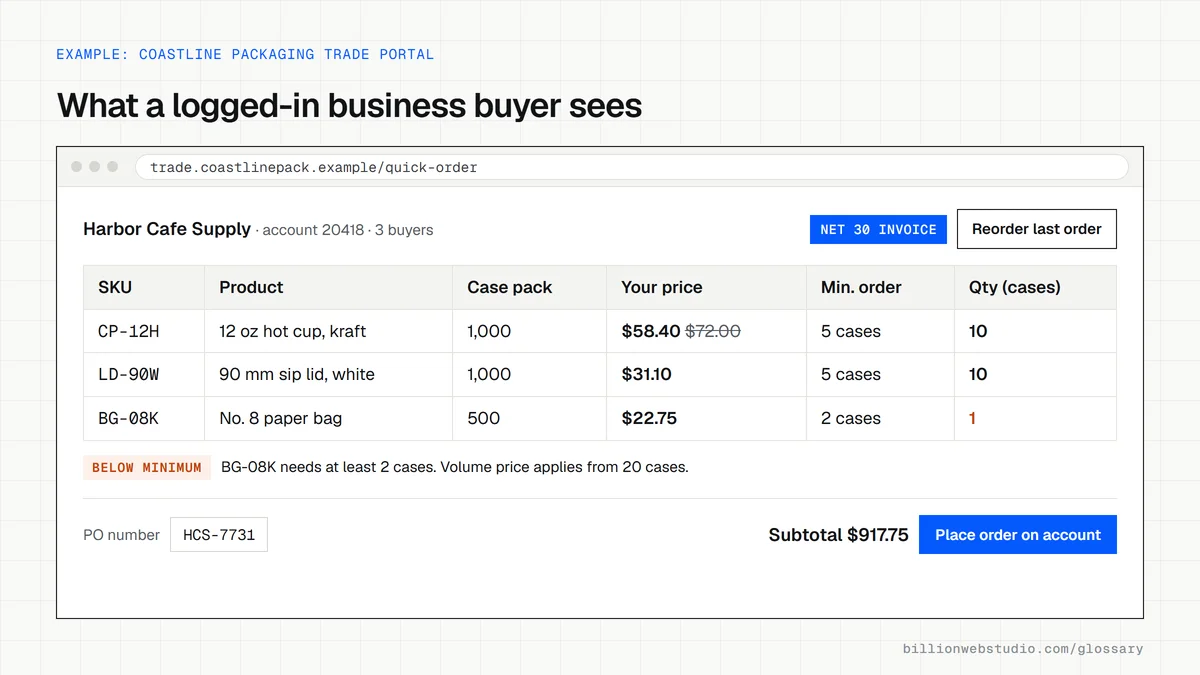
B2B ecommerce moves trade orders, which once came in by phone, email or a sales rep's visit, onto a website. Buyers log in, see the products and prices agreed for their company, reorder in a few clicks and pay on the terms in their contract. The seller receives orders in a consistent format instead of retyping them from emails.
It differs from a consumer store in a few clear ways. Prices often vary by customer, orders come in larger quantities with minimums, several people at one company may share an account, and many buyers pay by invoice weeks after delivery rather than by card at checkout.
Why B2B ecommerce matters for a business
An ordering portal lets trade buyers check prices and stock and reorder at any hour without waiting for a rep. For the seller, self-service ordering frees sales staff to chase new accounts, cuts order entry errors and builds a record of what each customer buys. Public product pages with full specifications also bring in search traffic from buyers who have never heard of you.
A B2B ecommerce example
A packaging manufacturer sells to 300 regular business customers. It sets up a B2B store where each customer logs in to see its own price list, minimum order quantities and 30-day payment terms. Buyers reorder from past orders, sales reps stop typing up emailed purchase orders, and the public catalog still shows product specs to new prospects, who can request a quote.
B2B ecommerce features to plan for
- Company accounts with several buyers, each with their own permissions.
- Customer-specific price lists and catalogs instead of one public price.
- Minimum quantities, case packs and volume price breaks.
- Payment by invoice on net terms, alongside card payments.
- Quick reorder and bulk order forms for buyers who already know their part numbers.
- A connection to the ERP or accounting system that holds stock levels and customer records.
Copy this B2B store requirements checklist
B2B STORE REQUIREMENTS (attach to your RFP or quote request)

Accounts
[ ] Company accounts with several buyers and per-buyer permissions
[ ] Order approval for buyers above a spending limit

Pricing and catalog
[ ] Price list per company or customer group
[ ] Catalog limited per company (hide products they cannot buy)
[ ] Minimum order quantities, case packs and volume price breaks

Ordering
[ ] Quick order by SKU and CSV upload
[ ] Reorder from order history
[ ] Purchase order number field at checkout

Payment
[ ] Net terms (Net 30, Net 60) with invoices and due dates
[ ] Card and bank transfer for new accounts
[ ] Tax exemption certificates stored per company

Integration
[ ] Two-way ERP sync for stock, prices, customers and orders (state how often)
[ ] Public catalog pages indexable, trade prices behind login
How to test a B2B store the way a trade buyer uses it
- Ask your developer for a test company account with two buyer logins and a sample price list.
- Log in as the first buyer and confirm the company's prices, not public retail prices, appear on product, cart and checkout pages.
- Enter a quantity below the minimum and one that should trigger a volume price, and check the cart enforces both.
- Check out on the account's payment terms, such as Net 30, and confirm the order shows as unpaid with the right due date.
- Log in as the second buyer, place a quick reorder, and confirm it reaches your ERP or accounting system under the correct customer account.
What good looks like: Each buyer sees only their company's catalog and prices, minimums and volume breaks apply automatically, invoice orders carry the correct due date, and orders reach your back office without retyping.
Questions to ask your web developer
“How do prices, stock and orders stay in sync with our ERP, and how often?”
A good answer: They name the integration method, the direction of sync for each type of data and the interval, for example stock every 15 minutes and orders in real time, plus what happens when a sync fails.
“Can buyers see the catalog before they log in?”
A good answer: They recommend public product pages with full specifications, so search engines and new prospects can find them, and show trade prices, stock and ordering only after login.
“How are new trade accounts approved?”
A good answer: A form collects company and tax details, a staff member approves it in the admin, and approval assigns the right catalog, payment terms and buyer permissions in one step.
B2B ecommerce: common questions
What is the difference between B2B and B2C ecommerce?
B2C ecommerce sells to individual consumers, usually at one public price with card payment at checkout. B2B ecommerce sells to other businesses, often with negotiated prices, larger orders, approval steps and invoice payment. The B2B buyer is purchasing for work and may reorder the same items many times a year.
Can Shopify do B2B ecommerce?
Yes. As of October 2026, Shopify B2B is available on the Basic, Grow, Advanced and Shopify Plus plans. The lower plans include quantity rules, quantity price breaks and net payment terms with up to 3 active catalogs, while Plus adds unlimited catalogs and catalogs assigned directly to individual companies.
Sources
Want a website that gets this right?
Every Billion Web Studio build includes technical SEO, schema and speed work as standard, with a fixed quote within 1 business day.