Ecommerce
What Is Headless Commerce?
Headless commerce is a way of building an online store where the storefront customers see is separate from the commerce back end that handles products, carts, checkout and orders. The two connect through APIs, so each side can change on its own.
What headless commerce means in plain English
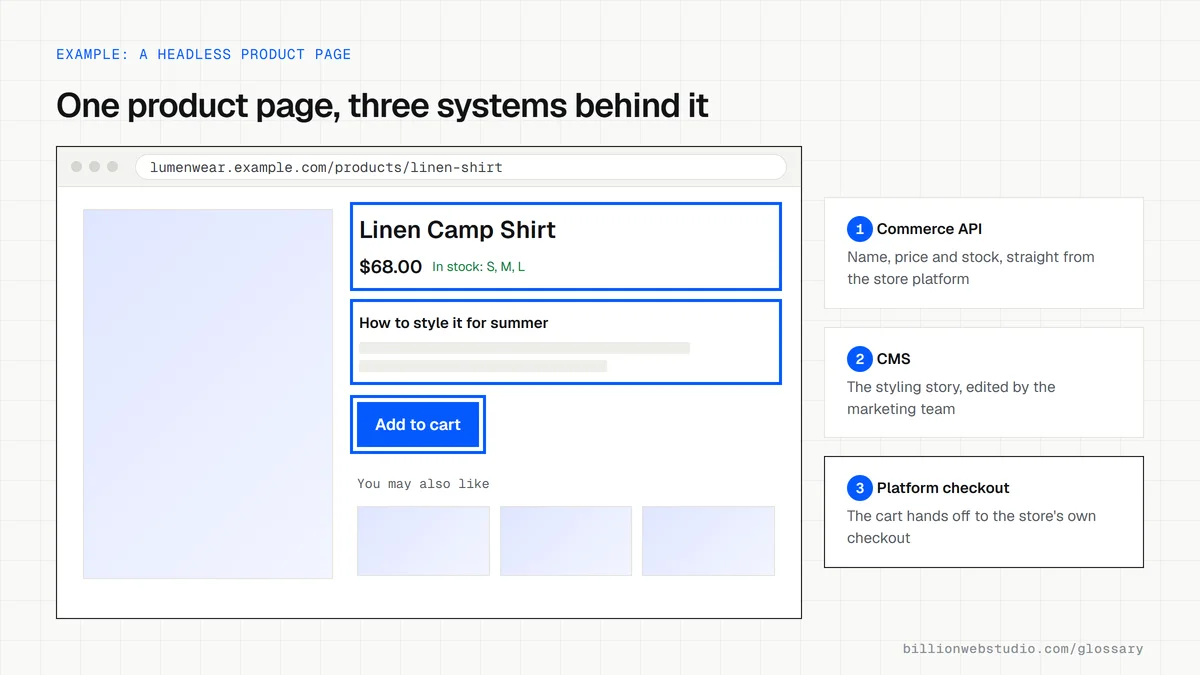
In a traditional store, the platform that holds products also produces every page from its own theme. In a headless store, that platform keeps running products, cart, checkout and orders, but the pages are built separately, often in a framework like Next.js. The storefront requests data through APIs, which are standard ways for software to exchange information.
Shopify, for example, offers its Storefront API for product and cart data, Hydrogen as a toolkit for building a custom storefront, and Oxygen for hosting it. Other commerce platforms offer similar APIs, so the same approach works whichever back end a business chooses.
Why headless commerce matters for a business
Headless gives full control over design, speed and content, and one product catalog can feed a website, a mobile app and in-store screens. The trade-off is cost: you run two systems, pay developers to maintain the storefront and rebuild features a theme or app would otherwise provide. It suits stores that have outgrown themes, not new shops testing demand.
A headless commerce example
A fashion brand on Shopify wants editorial lookbooks, fast page loads and content managed in a separate CMS. It keeps Shopify for products, inventory and checkout, builds the storefront in Next.js and pulls stories from the CMS. Shoppers browse the custom pages, and when they check out, Shopify's own checkout takes over.
Common headless commerce mistakes
- Going headless for speed alone, when a well-built theme could reach the same Core Web Vitals targets.
- Forgetting that apps which add features to a theme may not work on a custom storefront.
- Leaving out a CMS, so the marketing team needs a developer to change any page text.
- Changing URLs during the move without 301 redirects, which throws away existing rankings.
- Underestimating hosting, monitoring and upkeep costs for the separate front end.
Theme store vs headless store: what changes for your team
| Area | Theme on a hosted platform | Headless storefront |
|---|---|---|
| Page design | Edited in the theme editor, within the sections the theme offers | Built in code, often with Next.js or Hydrogen, with no theme limits |
| Content edits | Staff edit pages in the platform admin | Staff edit in a separate CMS, if one was set up |
| Apps | Most storefront apps install in a few clicks | Apps that change the storefront may need custom work or may not work |
| Checkout | The platform's own checkout | Usually still the platform's checkout, reached from the cart |
| Hosting | Included with the platform | A separate front end host to set up and monitor |
| Upkeep | Theme and platform updates | Developers maintain the storefront code and upgrade API versions |
How to check if headless would actually help your store
- Open PageSpeed Insights, paste your homepage address and click Analyze.
- Read the Core Web Vitals assessment on the Mobile tab, then repeat for one collection page and one product page.
- If all three pages pass, speed is not a reason to go headless; list the specific features your theme cannot deliver instead.
- In your store admin, list the installed apps that change what shoppers see, such as reviews, upsells, wishlists or bundles.
- Ask each of those app vendors whether it works on a headless storefront; any that do not will need a custom replacement.
What good looks like: Core Web Vitals pass when LCP is 2.5 seconds or less, INP is 200 milliseconds or less and CLS is 0.1 or less at the 75th percentile. If your theme passes and covers the features you need, a theme is the cheaper route.
Free tool: PageSpeed Insights
Questions to ask your web developer
“Which CMS will our marketing team use, and can they publish a new landing page without a developer?”
A good answer: A named CMS, a live demo of building and previewing a landing page, and editor training included in the quote.
“How will we keep our current URLs and search rankings when the storefront changes?”
A good answer: A full URL map with 301 redirects, the same titles, canonicals and product structured data, and a crawl of the staging site before launch.
“What will the storefront cost to host and maintain each year?”
A good answer: A written yearly estimate covering hosting, monitoring, dependency and API version upgrades, plus who responds when the storefront goes down.
Headless commerce: common questions
Is headless commerce worth it?
Headless pays off when a store needs a custom experience that themes cannot deliver, sells across several channels or has developers on hand. For most small and mid-sized stores, a fast theme on a hosted platform is cheaper to build and run. Weigh the extra build and upkeep cost against a gain you can measure.
Does Shopify support headless commerce?
Yes. Shopify provides the Storefront API for products, collections and carts, the Customer Account API for sign-in and order history, Hydrogen for building custom storefronts and Oxygen for hosting them. Shopify still runs checkout, so payments and order handling stay on the platform.
Sources
Want a website that gets this right?
Every Billion Web Studio build includes technical SEO, schema and speed work as standard, with a fixed quote within 1 business day.