Ecommerce
What Is a Payment Gateway?
A payment gateway is the service that securely passes a customer's card or wallet details from a website checkout to the banks for approval, then returns an approved or declined result. Stripe, PayPal, Razorpay and Square are common examples.
What a payment gateway means in plain English
A payment gateway is the online version of the card machine at a shop counter. When a customer clicks Pay, the gateway encrypts the payment details and sends them on to the payment processor and the card network. The customer's bank approves or declines, and the answer travels back to your checkout in seconds.
People often mix up three terms. The gateway carries the payment details. The processor handles authorization and moves the money between banks. A merchant account is where funds land before they reach your business bank account. Providers like Stripe bundle all three, which is why small businesses rarely deal with them separately.
Why a payment gateway matters for an online store
The gateway decides which payment methods you can offer, what each sale costs in fees, how quickly money reaches your bank and how much security work falls on you. Any business that accepts cards must do so in line with the PCI DSS security standard, and a hosted or embedded checkout keeps raw card numbers off your servers, which reduces that work.
A payment gateway example
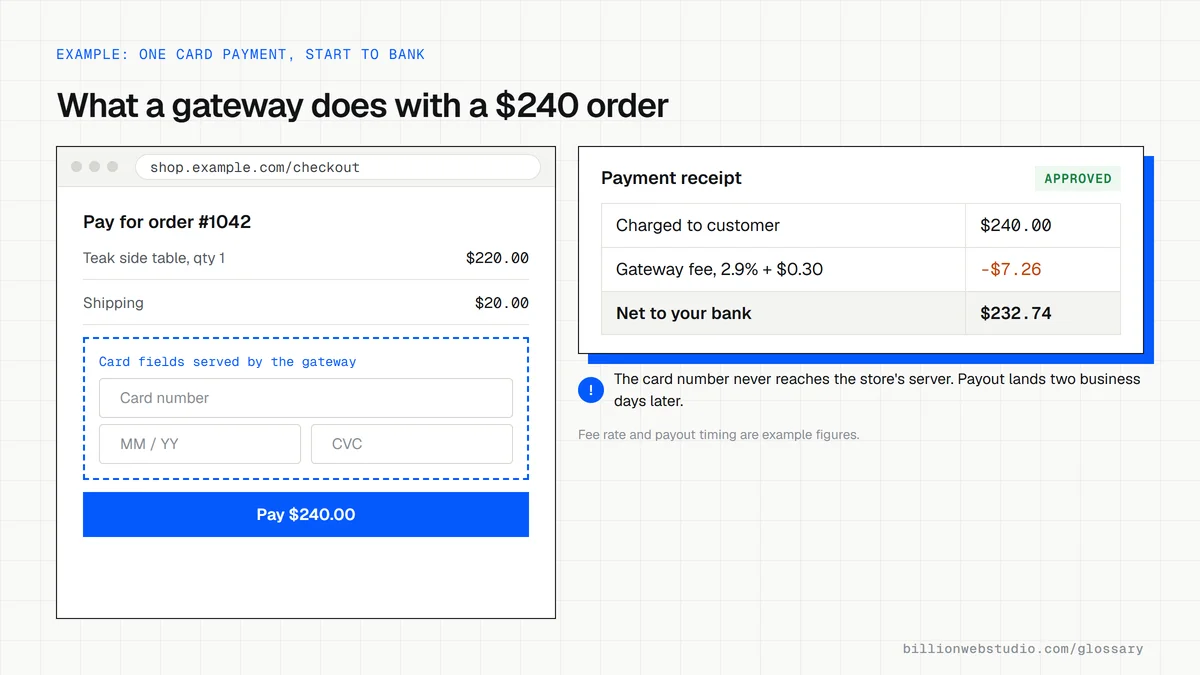
A furniture store on WooCommerce adds Stripe as its gateway. At checkout, the card form is supplied by Stripe, so the card number goes straight to Stripe rather than through the store's own server. The payment is approved, WooCommerce marks the order as paid, and Stripe later pays the money out to the store's bank account, minus its fees.
How to choose a payment gateway
- Check that the gateway supports your country, currency and the payment methods your buyers prefer, such as UPI, wallets or buy now, pay later.
- Compare the full cost, including international cards, currency conversion, refunds and chargebacks, not just the headline rate.
- Confirm that it has a ready-made integration for your platform, such as Shopify, WooCommerce or a custom build.
- Prefer a hosted or embedded checkout so raw card numbers never touch your own server.
- Read the payout schedule and any reserve rules so cash flow holds no surprises.
Hosted, embedded or direct: how the card form affects your PCI work
| Integration | Where the card number is typed | Usual PCI self-assessment | Good fit |
|---|---|---|---|
| Hosted payment page | On the gateway's own page after a redirect | SAQ A, the shortest | Stores that want the least security work |
| Embedded fields | In fields on your checkout served from the gateway's domain in an iframe | SAQ A | Stores that want checkout to stay on their own site |
| Your form sent by script | In a form your site serves, passed to the gateway by JavaScript | SAQ A-EP | Older custom builds |
| Direct API | On your own server, which forwards it to the gateway | SAQ D, the most demanding | Large businesses with a security team |
How to check your payment gateway setup and real fees
- Open your checkout in Chrome, right-click inside the card number field and choose Inspect.
- In the Elements panel, look just above the highlighted line for an iframe tag; a src address on your gateway's domain means the card form is hosted by the gateway.
- Place a small real order with your own card, then refund it from the store admin.
- In the gateway dashboard, open that payment and note the fee charged and the net amount.
- Open the payouts page and check how many days the money took to reach your bank account.
What good looks like: The card fields sit in an iframe or hosted page from the gateway, the fee on your test order matches the rate you were quoted, and payouts arrive on the schedule in your agreement.
Questions to ask your web developer
“Will card numbers ever pass through our server, and which PCI questionnaire will we complete?”
A good answer: No. The card form is hosted or embedded from the gateway, so the business typically qualifies for SAQ A, and the developer shows where to find it in the gateway dashboard.
“What happens if a payment succeeds but the shopper closes the tab before the order page loads?”
A good answer: Gateway webhooks mark the order as paid anyway. The endpoint checks webhook signatures and keeps a log of failed deliveries that retry.
“Which payment methods will buyers see in each country we sell to?”
A good answer: A list per market, such as cards, wallets and local methods, switched on in the gateway dashboard and tested in its test mode before launch.
Payment gateway: common questions
What is the difference between a payment gateway and a payment processor?
The gateway is the secure channel that takes payment details from your checkout and returns the result. The processor works behind it, sending the transaction through the card networks and banks and settling the money. Many providers, including Stripe and PayPal, act as both, so you only sign up once.
Do I need a payment gateway for my website?
You need one if customers will pay on your site by card, wallet or bank payment. Hosted platforms such as Shopify include built-in payment options, while WordPress stores running WooCommerce connect a gateway through a plugin. If you only take payment by invoice or in person, you may not need one yet.
Sources
Want a website that gets this right?
Every Billion Web Studio build includes technical SEO, schema and speed work as standard, with a fixed quote within 1 business day.