Ecommerce
What Is a SKU?
SKU stands for Stock Keeping Unit.
A SKU (stock keeping unit) is a code a business creates to identify each product and variant it sells, such as TSH-BLU-M for a blue medium T-shirt, so it can track stock and sales. A SKU is internal and differs from a barcode.
What a SKU means in plain English
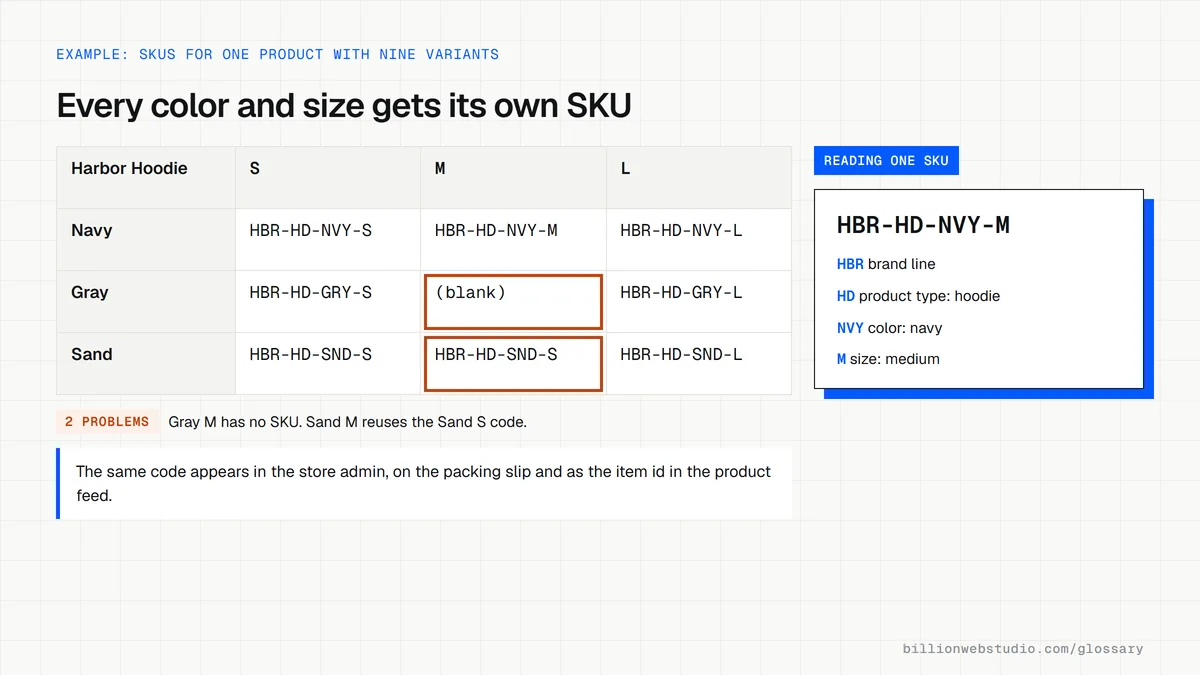
A SKU is your own label for one sellable item. Every version a customer can choose gets its own code, so a shirt in three sizes and four colors needs twelve SKUs. The code is usually a short mix of letters and numbers that captures useful details like product type, color and size.
A SKU is different from a UPC or other GTIN barcode. Manufacturers get GTINs through a global registry, so the same product carries the same number in every store. SKUs are made up by each seller, so two shops can use completely different SKUs for the identical item.
Why SKUs matter for an online store
SKUs keep the store, warehouse, marketplaces and accounting software talking about the same item. They speed up reorders, show which variants actually sell and help prevent selling a size that is out of stock. Google Merchant Center also recommends using your SKU as the product ID in your product feed, which keeps shopping listings and inventory in sync.
A SKU example
A coffee roaster sells beans by origin, roast and bag size. Its format reads COF-ETH-LT-250 for an Ethiopian light roast in a 250 gram bag and COF-ETH-LT-1K for the one kilo bag. Staff can read the code at a glance, and the online store, packing slips and stock sheets all point to the same item.
How to create good SKUs
- Give every product and every variant its own code, since platforms such as Shopify require SKUs to be unique.
- Keep codes short, ideally 16 characters or fewer, with the most important detail first.
- Use letters and numbers only, with dashes to separate parts, and avoid spaces and symbols.
- Avoid formats where the letters O and I can be confused with the numbers 0 and 1.
- Never reuse a retired SKU for a new product, or old sales data will mix with new.
SKU vs GTIN vs MPN: which product code does what
| Code | Who creates it | Same in every store? | Where it is used |
|---|---|---|---|
| SKU | Each seller | No | Inventory, orders, picking lists and the id in a product feed |
| GTIN (UPC, EAN, ISBN) | The brand owner, through GS1 or an ISBN agency | Yes | Barcodes, marketplace listings and the gtin field in Merchant Center |
| MPN | The manufacturer | Yes, for that brand | Products with no GTIN, sent with the brand name in feeds |
| ASIN | Amazon | Only on Amazon | Amazon product listings |
| Variant ID | The store platform, automatically | No | Links between the store, its apps and orders |
How to find missing and duplicate SKUs in your store
- In the Shopify admin, go to Products and click Export.
- Choose All products, pick the CSV for Excel or Numbers, then click Export products.
- Open the file and sort by the SKU column; blank cells are variants without a SKU.
- Select the SKU column in Excel and choose Home, then Conditional Formatting, Highlight Cells Rules, Duplicate Values to color any code used twice.
- Compare a few SKUs with your shelf labels or inventory app to confirm they match.
What good looks like: Every variant has a SKU, no code appears twice, and the same code is used in the store, the warehouse and the product feed.
Free tool: Shopify Help: Exporting products
Questions to ask your web developer
“What SKU format will you use, and will it still work when we add new colors, sizes or product lines?”
A good answer: A written pattern, such as brand, type, color, size, with a code list for each part and room to grow, applied to every variant during import.
“How will SKUs stay in sync between the store, the inventory app, marketplaces and accounting?”
A good answer: One system is named the source of truth, the others match on SKU, and a sync report flags any code that does not match.
“Will our product feed use the SKU as the item id?”
A good answer: Yes. The feed id equals the SKU and never changes, with the gtin and brand fields filled wherever the product has a barcode.
SKU: common questions
What is the difference between a SKU and a UPC?
A SKU is an internal code each seller creates to track its own stock, so it differs from store to store. A UPC is a type of GTIN barcode assigned to the product itself through a global registry, so it stays the same wherever the item is sold.
Does every product need a SKU?
Not always, and many platforms let you leave the field blank. In practice, any store that tracks stock, sells on more than one channel or uses a warehouse should give every product and variant its own SKU, because inventory apps and product feeds match items by these codes.
Sources
Want a website that gets this right?
Every Billion Web Studio build includes technical SEO, schema and speed work as standard, with a fixed quote within 1 business day.