Ecommerce
What Is Checkout Optimization?
Checkout optimization is the work of making an online store's checkout faster, clearer and more trustworthy so that more shoppers who start paying actually complete their order, mainly by removing extra steps, surprise costs and form problems.
What checkout optimization means in plain English
The checkout is the short sequence of screens between the cart and the order confirmation: contact details, delivery address, shipping choice and payment. Checkout optimization looks at each of those screens, asks what could make a ready buyer hesitate or give up, then fixes it and measures the result.
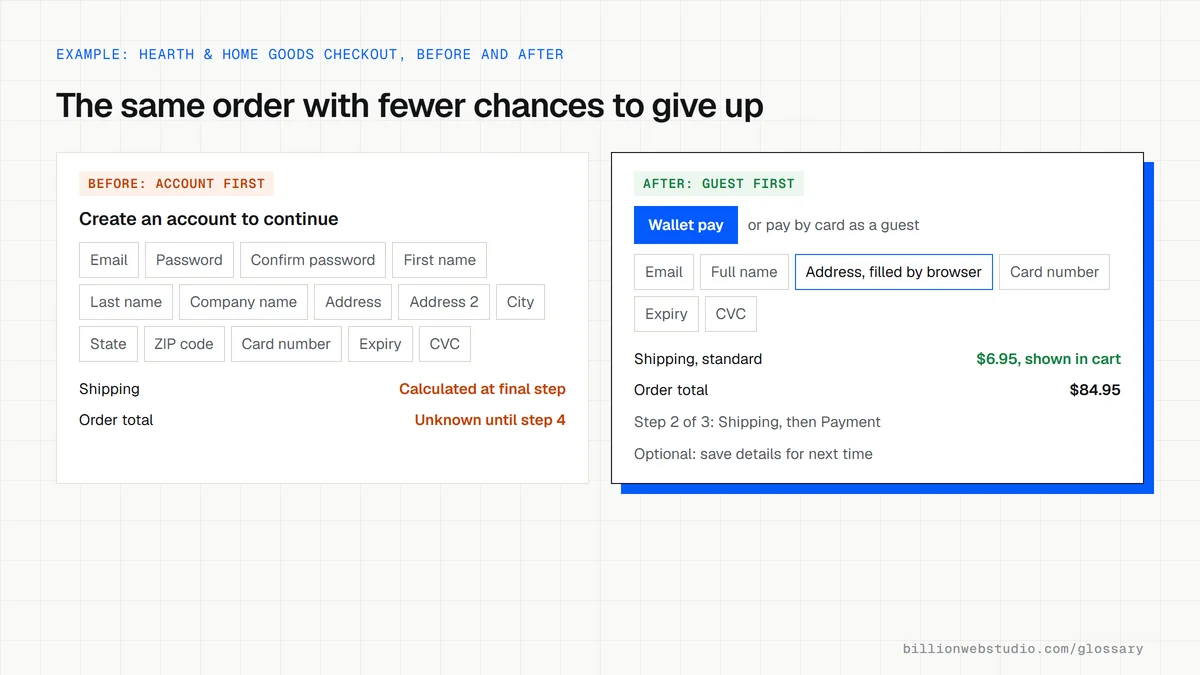
Google's web.dev guidance on payment and address forms gives a useful checklist: make guest checkout the default, show progress through the steps, ask only for data you need, use a single input for names and card numbers, and add autocomplete attributes so browsers can fill details in automatically. Express wallets such as Apple Pay and Shop Pay cut typing further.
Why checkout optimization matters for an online store
Shoppers who reach checkout have already picked a product, so losing them wastes more marketing spend than losing a visitor at any earlier step. Checkout changes are also easy to measure, because you can compare the share of started checkouts that finish before and after each fix. Cart abandonment names the wider problem, and checkout optimization is the hands-on work on the final step.
A checkout optimization example
A home goods store on WooCommerce asks shoppers to create an account before paying and shows shipping costs only on the last screen. The team turns on guest checkout, displays a shipping estimate in the cart, removes an optional company name field and adds a wallet payment button. It then compares completed checkouts over the next four weeks with the previous four.
How to test your own checkout
- Buy something from your own store on a phone, using mobile data, and note every moment of friction.
- Check that browser autofill completes the name, address and card fields correctly.
- Confirm that the full cost, including shipping and taxes, appears before the payment step.
- Review the purchase funnel in GA4 or your platform's reports to find the step where most shoppers drop out.
- Enter a wrong card number or ZIP code on purpose and see whether the error message makes the fix clear.
Copy these checkout fields with autofill attributes
<!-- Card fields apply only if you do not use your payment provider's hosted fields -->
<form action="/checkout" method="post">
  <label>Email <input type="email" name="email" autocomplete="email" required></label>
  <label>Full name <input type="text" name="name" autocomplete="shipping name" required></label>
  <label>Address <input type="text" name="address1" autocomplete="shipping address-line1" required></label>
  <label>Apartment, suite (optional) <input type="text" name="address2" autocomplete="shipping address-line2"></label>
  <label>City <input type="text" name="city" autocomplete="shipping address-level2" required></label>
  <label>State <input type="text" name="state" autocomplete="shipping address-level1" required></label>
  <label>ZIP/postal code <input type="text" name="zip" autocomplete="shipping postal-code" required></label>
  <label>Phone, for delivery updates <input type="tel" name="phone" autocomplete="shipping tel"></label>
  <label>Name on card <input type="text" name="cc-name" autocomplete="cc-name" required></label>
  <label>Card number <input type="text" name="cc-number" autocomplete="cc-number" inputmode="numeric" required></label>
  <label>Expiry (MM/YY) <input type="text" name="cc-exp" autocomplete="cc-exp" required></label>
  <label>Security code <input type="text" name="cc-csc" autocomplete="cc-csc" inputmode="numeric" required></label>
  <button type="submit">Pay now</button>
</form>
How to find where shoppers leave your checkout
- In GA4, open Reports, then Monetization, then Checkout journey. In some properties it sits under Drive online sales instead.
- Read the abandonment rate under each bar: Begin checkout, Add shipping, Add payment and Purchase.
- If the Add shipping step is empty, the add_shipping_info event is missing. Shopify sends the other three events automatically, but this one needs separate setup.
- Open the step with the highest abandonment on your own phone and complete it with browser autofill, noting anything you have to type twice.
- Fix one thing at a time, then compare the same report over an equal period before and after.
What good looks like: Every step in the report has data, you can explain the biggest drop, and the share of shoppers who begin checkout and go on to purchase rises after each change.
Free tool: GA4 Help: Checkout journey report
Questions to ask your web developer
“Can shoppers check out as guests, and do wallet buttons appear early?”
A good answer: Yes. Guest checkout is the default, saving an account is offered after payment, and express wallet buttons show in the cart and at the top of checkout.
“Is every checkout step tracked, including add_shipping_info?”
A good answer: They show the GA4 Checkout journey report with data in all four steps, or name the missing event and when it will be added.
“Does the shopper see the full price before the payment step?”
A good answer: Yes. A shipping estimate appears in the cart, and the total with shipping and tax is final before any card details are entered.
Checkout optimization: common questions
How many steps should a checkout have?
As few as the order needs. Some stores use a single page and others use a short series of screens, and Google's guidance focuses less on the count than on showing progress clearly and removing distractions. What matters is that shoppers know where they are, what is left and exactly what they will pay.
Should I force customers to create an account at checkout?
Generally no. Google's web.dev guidance recommends making guest checkout the default rather than requiring an account first. On Shopify, requiring sign-in also hides accelerated payment buttons such as Apple Pay from the cart, which removes one of the quickest ways for a returning shopper to pay.
Sources
Want a website that gets this right?
Every Billion Web Studio build includes technical SEO, schema and speed work as standard, with a fixed quote within 1 business day.