Ecommerce
What Is Cart Abandonment?
Cart abandonment is when an online shopper adds products to a cart, or starts checkout, but leaves the store without completing the purchase. The cart abandonment rate is the share of carts created that never become orders.
What cart abandonment means in plain English
Cart abandonment is the online version of a customer leaving a full basket in the aisle and walking out. Some shoppers were only comparing prices or saving items for later. Others meant to buy but hit a problem, such as a surprise shipping charge, a forced account sign-up or a payment method they could not use.
Platforms often track a narrower version called checkout abandonment. Shopify, for example, counts a checkout as abandoned when the customer has entered an email address and the checkout stays incomplete for more than ten minutes. That email address is what makes a recovery message possible.
Why cart abandonment matters for an online store
An abandoned cart is one of the most valuable lost visitors you have, because the person already picked a product and showed intent to pay. Small fixes at checkout can recover revenue from shoppers you already paid to attract. Watching the rate also tells you when a change to shipping, prices or payment options has hurt sales.
How to calculate cart abandonment rate
Divide completed orders by carts created, subtract the result from one and multiply by 100. If a store sees 400 carts in a month and 120 orders, the rate is one minus 0.3, which is 70 percent. In GA4, the purchase journey report and funnel explorations show the exact checkout step where shoppers drop out.
Common causes of cart abandonment
- Extra costs, such as shipping, taxes or fees, appearing only at the last step.
- Forcing shoppers to create an account before they can pay.
- A long checkout form that asks for details the order does not need.
- Missing payment methods the shopper expects, such as a local wallet or buy now, pay later.
- Slow pages or a checkout that is hard to use on a phone.
- No reminder email, so shoppers who meant to come back simply forget.
Work out your Cart abandonment
Cart abandonment rate calculator
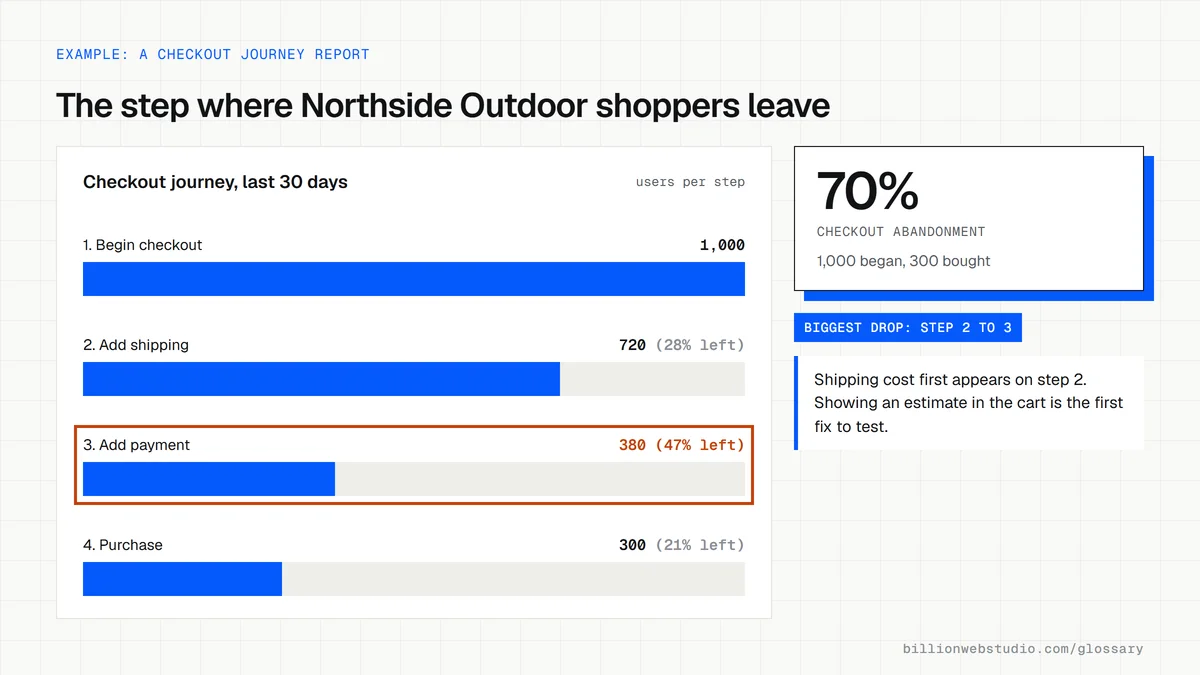
How to find where shoppers abandon checkout on your store
- In GA4, click Reports, open Monetization under the Life cycle collection and choose Checkout journey.
- Compare the users at Begin checkout, Add shipping, Add payment and Purchase, and note the step with the largest drop.
- If the Add shipping step is empty, ask your developer to send the add_shipping_info event, which Shopify does not collect automatically.
- In Shopify, go to Orders, then Abandoned checkouts, and open a few recent ones to see what was in the cart and whether a recovery email went out.
- Place a test order on your own phone and write down every cost, field and screen you meet before the Pay button.
What good looks like: Every checkout step reports data, and the biggest drop has a cause you can see and test, such as a late shipping charge. Compare the rate with your own previous months rather than a general benchmark.
Free tool: GA4 Checkout journey report
Questions to ask your web developer
“Which checkout events will you send to GA4, and how will we see drop-off by step?”
A good answer: begin_checkout, add_shipping_info, add_payment_info and purchase, each checked in GA4 DebugView before launch, so the Checkout journey report fills every step.
“Can shoppers see the full price, including shipping and tax, before they type card details?”
A good answer: Yes. A shipping estimate shows in the cart or on the product page, guest checkout is on, and the developer can show you both on a phone.
“How will abandoned checkout emails be set up and measured?”
A good answer: An automated message goes out within hours with a link back to the saved checkout, and a monthly report shows how many checkouts it recovered.
Cart abandonment: common questions
What is the difference between cart abandonment and checkout abandonment?
Cart abandonment covers anyone who adds a product to the cart and leaves without buying. Checkout abandonment is narrower: the shopper started checkout, often entering an email or address, then left. Checkout abandoners are closer to buying, and they are the ones most stores can email.
How do I recover abandoned carts?
Send an automated reminder email with a link back to the saved checkout after a short delay. Shopify includes abandoned checkout emails, and WooCommerce stores can add them with a plugin. Then fix the cause: show full costs early, allow guest checkout and offer the payment methods your customers use.
Sources
Want a website that gets this right?
Every Billion Web Studio build includes technical SEO, schema and speed work as standard, with a fixed quote within 1 business day.