Ecommerce
What Is Google Merchant Center?
Google Merchant Center is a free Google tool where online sellers upload and manage product information, such as titles, prices, images and stock levels, so their products can appear in free listings and Shopping ads across Google.
What Google Merchant Center means in plain English
Merchant Center is where Google gets your product catalog. You add products through a data source, the name Google now uses for what it used to call feeds. That source can be your online store through an integration, a file upload, a Google Sheets template or the Merchant API. Google uses this data to match your products to what shoppers search for.
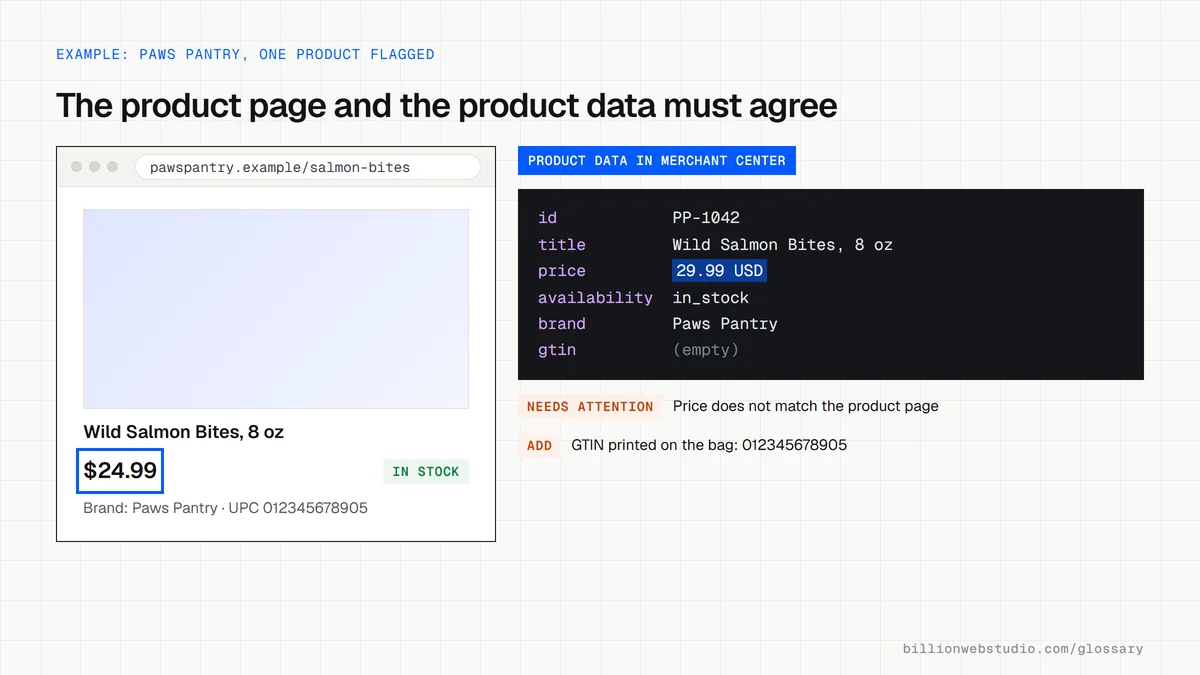
Every product needs a few required details: an ID, title, description, product page link, main image link, availability and price with its currency. Brand is required for most new products, and Google strongly recommends a GTIN, the barcode number, wherever one exists. Products with missing or conflicting details are flagged and may not show.
Why Google Merchant Center matters for an online store
Creating an account and showing products on Google costs nothing. Free listings are switched on by default for most accounts, and eligible products can appear on Google Search, the Shopping tab, Images, Lens, Maps, YouTube and Gemini. The same product data powers paid Shopping ads, which are billed through Google Ads, so one clean catalog serves both unpaid and paid visibility.
A Google Merchant Center example
A pet supplies store on Shopify connects Merchant Center, which imports its 400 products automatically. Twenty products are then flagged because their sale prices on the website and in the product data no longer match. The team fixes the sync, and those products return to free listings. Later the store runs a Shopping campaign in Google Ads using the same catalog.
Common Google Merchant Center mistakes
- Letting prices or stock in the product data drift out of step with the website.
- Using vague product titles that leave out the brand, size, color or material shoppers search for.
- Skipping GTINs for branded products that carry a barcode.
- Ignoring diagnostics and policy warnings until whole groups of products stop showing.
- Keeping an old custom integration on the Content API for Shopping, which Google sunset on August 18, 2026 in favor of the Merchant API.
Copy this product markup for automatic item updates
<script type="application/ld+json">
{
  "@context": "https://schema.org",
  "@type": "Product",
  "name": "Wild Salmon Bites, 8 oz",
  "image": "https://www.example.com/images/salmon-bites.jpg",
  "description": "Single-ingredient freeze-dried salmon treats for dogs.",
  "sku": "PP-1042",
  "gtin12": "012345678905",
  "brand": { "@type": "Brand", "name": "Paws Pantry" },
  "offers": {
    "@type": "Offer",
    "url": "https://www.example.com/salmon-bites",
    "price": "24.99",
    "priceCurrency": "USD",
    "availability": "https://schema.org/InStock",
    "itemCondition": "https://schema.org/NewCondition"
  }
}
</script>
How to check your products in Google Merchant Center
- Sign in to Merchant Center, open Products in the left menu and select the Needs attention tab.
- Open each issue card to see the affected products, the reason and the suggested fix. Account-level problems appear as a banner at the top.
- When many products share an issue, select the download icon to export the list as a CSV, then fix the values in your store or data source.
- Spot-check your five best sellers: compare price, sale price, availability and GTIN on the product page with the product data.
- Allow 24 to 72 hours, then confirm the issue no longer appears on the Needs attention tab.
What good looks like: The Needs attention tab is empty or holds only minor suggestions, prices and stock match the website, and every branded product carries its GTIN.
Free tool: Merchant Center Help: The Needs attention tab
Questions to ask your web developer
“How does our store send product data to Merchant Center, and how often?”
A good answer: They name the method, such as the platform's Google sales channel, a scheduled file or the Merchant API, give the update frequency, and confirm no custom integration still relies on the Content API for Shopping.
“Does every product page carry Product structured data that matches the product data?”
A good answer: Yes. Price, currency and availability in the markup are in the HTML the server sends, not added later by JavaScript, so automatic item updates can read them.
“Who checks the Needs attention tab, and how often?”
A good answer: A named person reviews it weekly and after every price change or sale, and fixes issues at the source rather than editing products one by one.
Google Merchant Center: common questions
Is Google Merchant Center free?
Yes. Creating a Merchant Center account and showing products in free listings costs nothing. You pay only if you choose to run Shopping ads or other paid campaigns, and those are billed through Google Ads with a budget you set yourself.
What is the difference between Google Merchant Center and Google Ads?
Merchant Center holds and checks your product data, while Google Ads runs paid campaigns and handles billing. Free listings need only Merchant Center. Shopping ads and Performance Max campaigns for products need both accounts linked, with Merchant Center supplying the products and Google Ads setting the budget and bids.
Sources
- Google for Retail: Merchant Center
- Google Merchant Center Help: Free listings for products
- Google Merchant Center Help: Product data specification
- Google Merchant Center Help: Glossary
- Google Merchant Center Help: Shopping ads
- Google for Developers: Content API for Shopping deprecation and sunset
- Merchant Center Help: The Needs attention tab
- Merchant Center Help: Automatic item updates
- Google Search Central: Merchant listing structured data
Want a website that gets this right?
Every Billion Web Studio build includes technical SEO, schema and speed work as standard, with a fixed quote within 1 business day.