Accessibility and privacy
What Are ARIA Labels?
ARIA labels stands for Accessible Rich Internet Applications.
ARIA labels are HTML attributes, mainly aria-label and aria-labelledby, that give a button, link or form field an accessible name for screen readers to announce when the element has no visible text, such as an icon-only search or menu button.
What ARIA labels mean in plain English
ARIA stands for Accessible Rich Internet Applications, a W3C standard whose current version, WAI-ARIA 1.2, became a W3C Recommendation in June 2023. It adds attributes to HTML that tell assistive technology what an element is and what it is called. An ARIA label supplies the second part: the name a screen reader speaks when a visitor lands on a button, link or field.
There are two main forms. The aria-label attribute holds the name as a hidden text string, for example aria-label="Close" on an X button. The aria-labelledby attribute points to words already visible on the page and reuses them as the name. MDN advises aria-labelledby whenever visible text exists, and aria-label only when it does not.
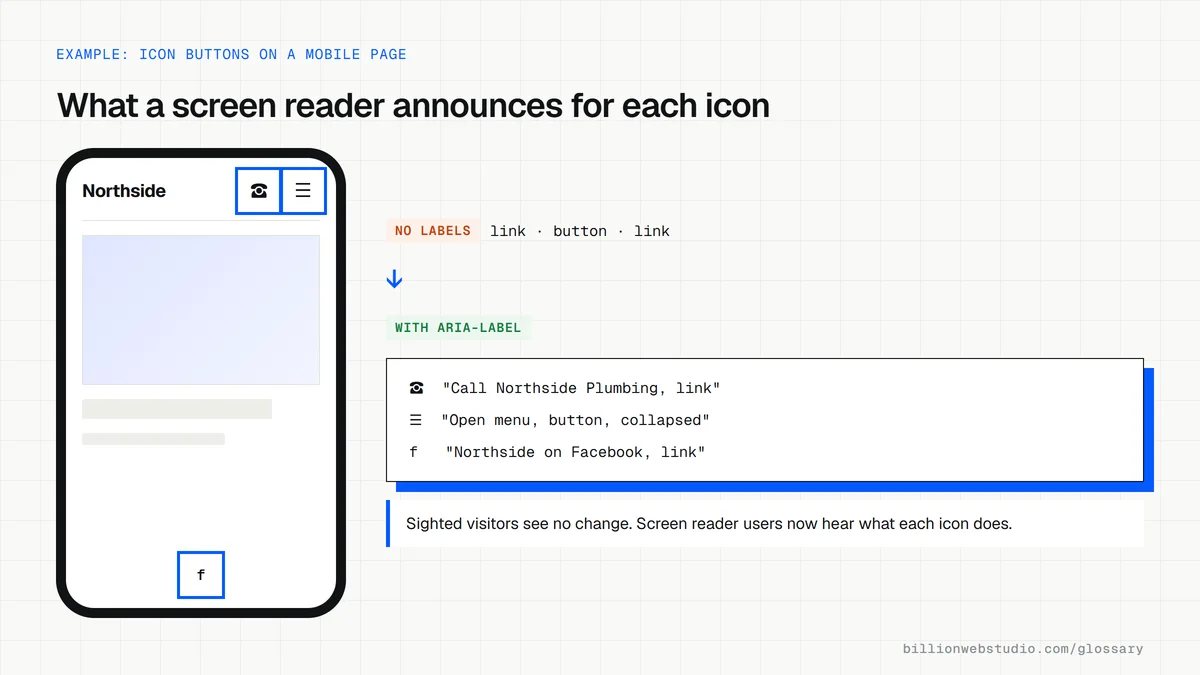
Why ARIA labels matter for a business website
Modern sites lean on icons: a magnifying glass for search, three lines for the menu, a cart symbol, social logos in the footer. Without a name, a screen reader may announce each one as just button or link, so a blind visitor cannot tell how to search, open the menu or check out. Every unnamed control on a booking form or checkout is an inquiry or sale that visitor cannot complete.
An ARIA label example
An online store's header has three icon buttons for search, account and cart. Each contains only an SVG drawing, so a screen reader hears button, button, button. Adding aria-label="Search", aria-label="Your account" and aria-label="Cart, 2 items" gives each a clear name while sighted shoppers see no change. Marking the SVG itself aria-hidden="true" stops it from being announced as well.
Common ARIA label mistakes
- Adding aria-label to a field that already has a visible label, which replaces that label for screen reader users.
- Writing a name that leaves out the words shown on screen, which fails WCAG 2.5.3 Label in Name for people who control the site by voice.
- Putting aria-label on plain text, such as a paragraph or a generic div, where MDN says the attribute is not supported.
- Rebuilding buttons and form controls with ARIA when native HTML elements already do the job, against the first rule of ARIA use.
- Labeling icons with vague words like icon or click here instead of the action the control performs.
Copy these ARIA label patterns
<!-- Icon-only menu button: aria-label is what a screen reader says -->
<button type="button" aria-label="Open menu" aria-expanded="false" aria-controls="site-menu">
  <svg aria-hidden="true" width="24" height="24"><use href="#icon-menu"></use></svg>
</button>

<!-- Icon-only phone link -->
<a href="tel:+15555550123" aria-label="Call Northside Plumbing">
  <svg aria-hidden="true" width="24" height="24"><use href="#icon-phone"></use></svg>
</a>

<!-- Two navigation menus, named so they can be told apart -->
<nav aria-label="Main">...</nav>
<nav aria-label="Footer">...</nav>

<!-- Visible heading reused as the section's name -->
<section aria-labelledby="hours-title">
  <h2 id="hours-title">Opening hours</h2>
</section>
How to check the accessible name of any button or link
- In Chrome, right-click an icon-only button, such as the menu, phone or cart icon, and choose Inspect.
- In the Elements panel, open the Accessibility tab in the side pane; it may sit behind the More tabs arrow.
- Under Computed Properties, read the Name value; an empty name means a screen reader has nothing to announce.
- Confirm the name describes the action, such as Open menu, and includes any words shown on the button.
- Repeat for every icon in your header and footer, including search, account, cart and social links.
What good looks like: Every button and link has a short, specific name, such as Search or Cart, 2 items, and any visible words also appear in the name, as WCAG 2.5.3 requires.
Free tool: Chrome DevTools: Accessibility features reference
Questions to ask your web developer
“How do the icon-only buttons in our theme get their accessible names?”
A good answer: Each one has an aria-label or visually hidden text, the SVG inside is marked aria-hidden, and the names were checked in the browser's accessibility tree.
“Where do you use ARIA, and where do you rely on native HTML instead?”
A good answer: Native button, a, label and nav elements come first; ARIA is added only to name or describe what HTML cannot, and every use is tested with a screen reader.
ARIA labels: common questions
What is the difference between aria-label and aria-labelledby?
Both give an element its accessible name. The aria-label attribute stores the name as text that only assistive technology reads. The aria-labelledby attribute points to the ID of visible text elsewhere on the page and uses that text as the name. If both are present, aria-labelledby wins, so use it whenever the right words are already on screen.
When should you use aria-label?
Use aria-label when an interactive element has no visible text that could serve as its name, such as an icon-only button, a search box without a visible label, or two navigation menus that need telling apart. If a visible label exists, connect it with a proper HTML label element or with aria-labelledby instead.
Do ARIA labels help SEO?
Add ARIA labels for people, not rankings. Google's guidance on links and images asks for descriptive visible anchor text and alt text, and does not present aria-label as a ranking factor. An accessible site still supports what SEO is for: visitors who can understand the page, use the navigation and complete the form.
Sources
Want a website that gets this right?
Every Billion Web Studio build includes technical SEO, schema and speed work as standard, with a fixed quote within 1 business day.