Accessibility and privacy
What Is GDPR?
GDPR stands for General Data Protection Regulation.
GDPR (General Data Protection Regulation) is the European Union law, applied since May 25, 2018, that sets rules for how organizations collect, use, store and share personal data about people in the EU. GDPR can apply to businesses outside the EU too.
What GDPR means in plain English
Personal data is anything that identifies a person, such as a name, email address, IP address or cookie ID. Under GDPR you need a lawful basis to use it, such as consent, a contract, a legal duty or a legitimate interest. You must tell people what you collect and why, keep it secure and keep it only as long as needed.
People also get rights over their data, including access, correction, deletion and objection. If a breach puts people at risk, a business must usually tell its data protection authority within 72 hours of finding out. The law reaches businesses outside the EU when they offer goods or services to people in the EU or monitor their behavior there.
Why GDPR matters for a business website
Your website is where much personal data enters the business: contact forms, newsletter sign-ups, analytics cookies, chat widgets and checkout. The most serious breaches of the rules can draw fines of up to 20 million euros or 4 percent of worldwide annual turnover, whichever is higher. This page explains the law in general terms and is not legal advice for your business.
A GDPR example
A US software company runs ads in Germany and collects demo requests through its website. Because it offers services to people in the EU, GDPR applies to that data. It adds a privacy notice explaining what the form collects and why, asks for consent before marketing emails and analytics cookies, signs data processing agreements with its CRM and email providers, and deletes stale leads on a schedule.
Common GDPR mistakes on websites
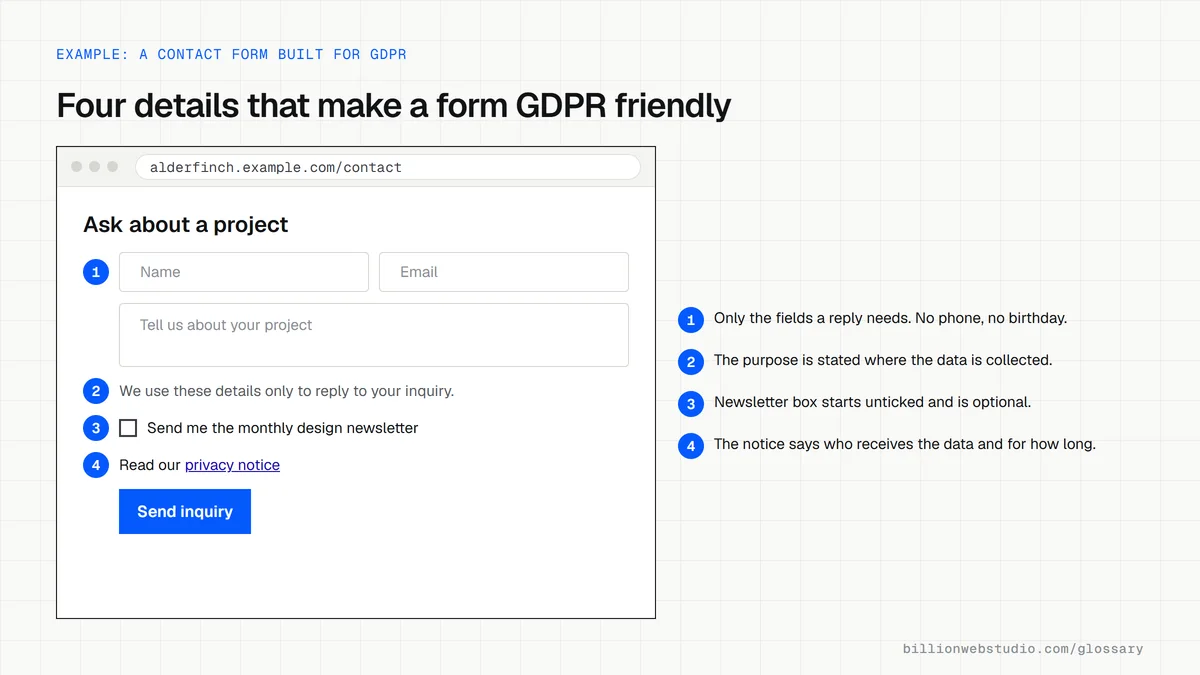
- Pre-ticking the newsletter box on a contact form instead of asking for a clear opt-in.
- Collecting more fields than the form needs, such as date of birth on a quote request.
- Copying a privacy policy template that does not match the tools the site really uses.
- Loading chat, analytics or ad scripts that send data to third parties before consent where consent is required.
- Keeping old form submissions forever in the inbox and CRM with no deletion schedule.
Which GDPR lawful basis fits common website data
| Website data | Usual lawful basis | Article 6(1) |
|---|---|---|
| Replying to a quote or contact request | Steps the person asked for before a contract | (b) |
| Processing an online order | Contract | (b) |
| Newsletter sign-up | Consent, with an unticked box | (a) |
| Analytics and ad cookies | Consent, which the ePrivacy rules also require before setting them | (a) |
| Keeping invoices for tax records | Legal obligation | (c) |
| Fraud checks at checkout | Legitimate interests, after a balancing test | (f) |
How to check your website forms against GDPR
- List every form on your site: contact, quote, newsletter, booking, checkout and chat.
- For each form, write down the fields it asks for and cross out any that the reply or order does not need.
- Check that every marketing opt-in box starts unticked and is separate from agreeing to the main request.
- Confirm each form links to a privacy notice that says what you collect, why, who receives it and how long you keep it.
- Send a test entry, follow where it lands, such as your inbox, CRM and email tool, and confirm you have a processing agreement with each provider.
What good looks like: Each form asks only for what it needs, states its purpose, links the privacy notice, and every service that stores the data is covered by an Article 28 processing contract and a deletion schedule.
Questions to ask your web developer
“Where does each form submission go, and which companies store it?”
A good answer: A written data map listing each form, its fields, every system the entry reaches, where it is stored and the processing agreement that covers it.
“Could we find, export or delete one person's data if they asked?”
A good answer: Yes, with steps for each system, so a request can be answered within the one month the GDPR allows.
“Do any scripts send visitor data to other companies before consent?”
A good answer: No. Every tag is listed with its purpose, and those that need consent load only after the visitor agrees.
GDPR: common questions
Does GDPR apply to US companies?
It can. GDPR applies to a business outside the EU when it offers goods or services to people in the EU, paid or free, or monitors their behavior in the EU, for example through tracking. A US company with no EU customers and no EU-targeted marketing or tracking is usually outside its scope.
What are the GDPR fines?
The most serious breaches, such as ignoring the core principles, consent rules or people's rights, can be fined up to 20 million euros or 4 percent of total worldwide annual turnover, whichever is higher. Other breaches carry a lower cap of 10 million euros or 2 percent. Regulators set each fine case by case.
Is GDPR changing?
In November 2025 the European Commission proposed a Digital Omnibus regulation that would amend parts of the GDPR and the ePrivacy cookie rules. As of October 2026 the proposal is still going through the EU legislative process, so the current GDPR text applies until any changes are formally adopted.
Sources
Want a website that gets this right?
Every Billion Web Studio build includes technical SEO, schema and speed work as standard, with a fixed quote within 1 business day.