Accessibility and privacy
What Is Cookie Consent?
Cookie consent is a website visitor's permission, usually given through a cookie banner, for the site to store or read non-essential cookies and similar trackers, such as analytics and advertising cookies, on their device. EU law requires this permission before those cookies are set.
What cookie consent means in plain English
Cookies are small files a website stores in the browser. Some are strictly necessary, such as the one that remembers a shopping cart or a login. Others measure visits for analytics or follow people for advertising. Cookie consent is the visitor's yes or no to that second group, collected before those cookies are placed.
The rule comes from Article 5(3) of the EU ePrivacy Directive, which allows storing or reading information on a device only with consent, unless it is strictly necessary for a service the user asked for. The GDPR defines valid consent as freely given, specific, informed and unambiguous, shown by a clear action. Pre-ticked boxes do not count.
Why cookie consent matters for your website
If your site has visitors in the EU, a banner that sets trackers first or hides the reject option can lead to complaints and fines. Consent also shapes your data, because analytics and ad platforms see less of the people who say no. Google's consent mode lets GA4 and Google Ads tags adjust to each choice. This is general information, not legal advice.
A cookie consent example
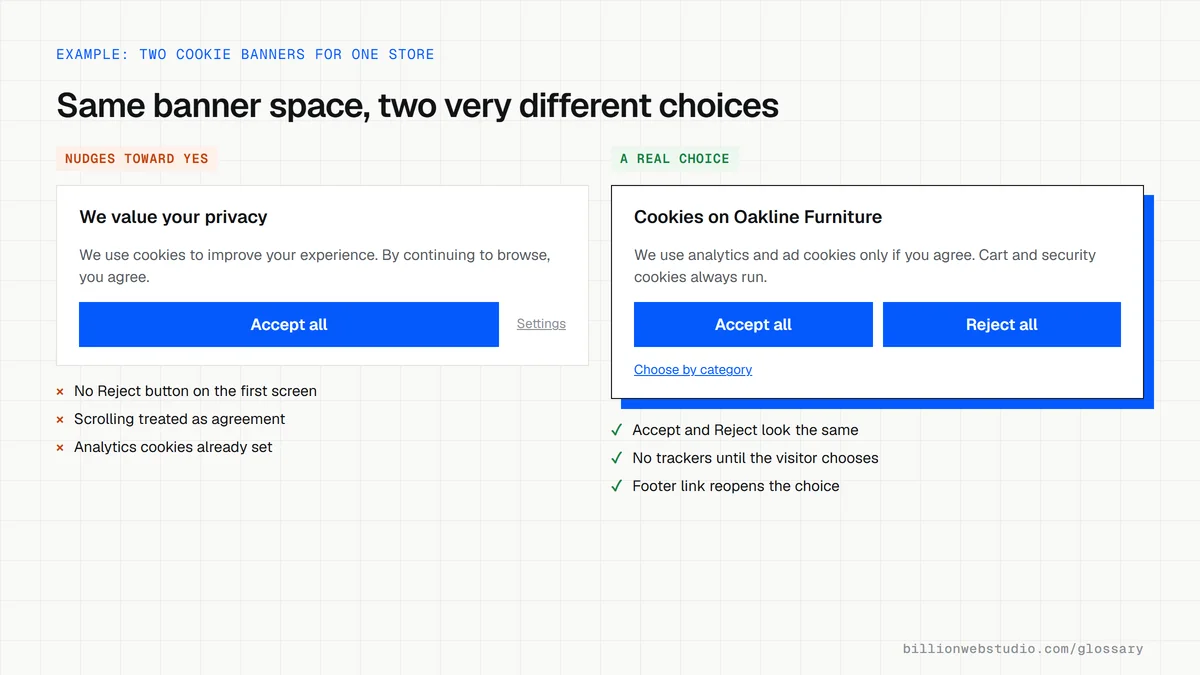
An online furniture store shows a banner on the first visit with two equal buttons, Accept all and Reject all, plus a link to choose by category. Until the visitor chooses, only cart and security cookies run. If they reject, analytics and advertising tags set no cookies. A link in the footer lets them change their choice at any time.
Common cookie consent mistakes
- Loading analytics or advertising tags before the visitor has made a choice.
- Showing an Accept button on the banner but hiding Reject behind a second screen.
- Using pre-ticked boxes or treating scrolling as agreement.
- Offering no easy way to withdraw consent later, although the GDPR says withdrawing must be as easy as giving it.
- Copying a banner from another site without listing the cookies your own site actually sets.
Copy this Google consent mode setup
<!-- Place before the Google tag so these defaults apply first -->
<script>
  window.dataLayer = window.dataLayer || [];
  function gtag(){dataLayer.push(arguments);}
  gtag('consent', 'default', {
    'ad_storage': 'denied',
    'ad_user_data': 'denied',
    'ad_personalization': 'denied',
    'analytics_storage': 'denied',
    'wait_for_update': 500
  });
</script>

<!-- Your banner runs this when the visitor clicks Accept all -->
<script>
  function acceptAllCookies() {
    gtag('consent', 'update', {
      'ad_storage': 'granted',
      'ad_user_data': 'granted',
      'ad_personalization': 'granted',
      'analytics_storage': 'granted'
    });
  }
</script>
How to check your cookie banner actually blocks trackers
- Open your site in a Chrome Incognito window and do not click anything on the banner.
- Press F12, open the Application panel, then Storage, Cookies, and select your site's address.
- Look for analytics and ad cookies such as _ga, _gcl_au or _fbp; before any choice, none should be listed.
- Click Reject all, reload the page and check the cookie list again.
- Find the link that reopens cookie settings, usually in the footer, and confirm you can change your answer.
What good looks like: Before a choice and after Reject all, only strictly necessary cookies appear, such as cart, session and the consent record itself, and Reject is as easy to find as Accept.
Free tool: Chrome DevTools: View and edit cookies
Questions to ask your web developer
“Which scripts load before a visitor makes a choice, and how is that enforced?”
A good answer: Only strictly necessary scripts. Analytics and ad tags wait for the banner's consent signal, and the developer shows this in DevTools on a fresh visit.
“Is Google consent mode set up, and in basic or advanced mode?”
A good answer: Defaults are set to denied before the Google tag loads, an update fires when the visitor chooses, and the developer explains which mode was chosen and why.
“How is each visitor's choice stored, and can we prove it later?”
A good answer: A first-party cookie records the choice and its date, the banner asks again when the cookie list changes, and the platform keeps a consent log.
Cookie consent: common questions
Do strictly necessary cookies need consent?
No. The ePrivacy Directive exempts storage that is strictly necessary to provide a service the visitor asked for, such as a shopping cart, login session or security cookie. Analytics, advertising and most social media cookies are not strictly necessary, so they need consent before they are set.
Do I need cookie consent if my business is outside the EU?
Possibly. EU privacy rules can reach businesses based elsewhere when they offer goods or services to people in the EU or track their behavior there. If your site targets or tracks EU visitors, plan for a compliant banner, and ask a privacy lawyer which rules apply in your markets.
Is a cookie banner enough for GDPR compliance?
No. A cookie banner covers consent for trackers on the device. GDPR compliance also covers how you collect, use, store and protect personal data across your forms, CRM, email tools and supplier contracts. The banner is only the most visible piece of a wider privacy program.
Sources
Want a website that gets this right?
Every Billion Web Studio build includes technical SEO, schema and speed work as standard, with a fixed quote within 1 business day.