SEO
What Is Alt Text?
Alt text stands for Alternative text.
Alt text (alternative text) is a short written description of an image, stored in the HTML alt attribute, that screen readers read aloud and search engines use to understand what the image shows.
What alt text means in plain English
In the code, alt text sits inside the image tag, for example alt="Dalmatian puppy playing fetch". Visitors normally never see it. A blind visitor using a screen reader hears it instead of seeing the picture, and anyone whose connection fails to load the image sees the words in its place. Most website editors, including WordPress and Shopify, have an alt text box for every image you upload.
Why alt text matters for a business website
Accessibility comes first. WCAG 2.2 success criterion 1.1.1, a Level A requirement, says images that carry meaning need a text alternative that serves the same purpose. Missing alt text is one of the easiest accessibility failures for a visitor or auditor to find. Google also reads alt text, alongside computer vision and the surrounding page, to understand images, and uses it as the anchor text when an image is a link.
An example of good and bad alt text
Picture a heating company's photo of a technician changing a furnace filter. Missing alt text tells nobody anything. Stuffed alt text such as furnace repair furnace service best furnace company reads as spam to Google and as noise to a screen reader user. Good alt text describes what is in the picture: Technician replacing the air filter on a gas furnace in a basement.
Common alt text mistakes
- Leaving the alt attribute out entirely, so screen readers may read the file name instead.
- Packing alt text with keywords, which Google's image guidance calls keyword stuffing.
- Starting every description with image of or picture of, which screen readers already announce.
- Writing descriptions for purely decorative images, which W3C says should use an empty alt="" so assistive technology skips them.
- Putting key text, such as a price or phone number, only inside an image with no text version.
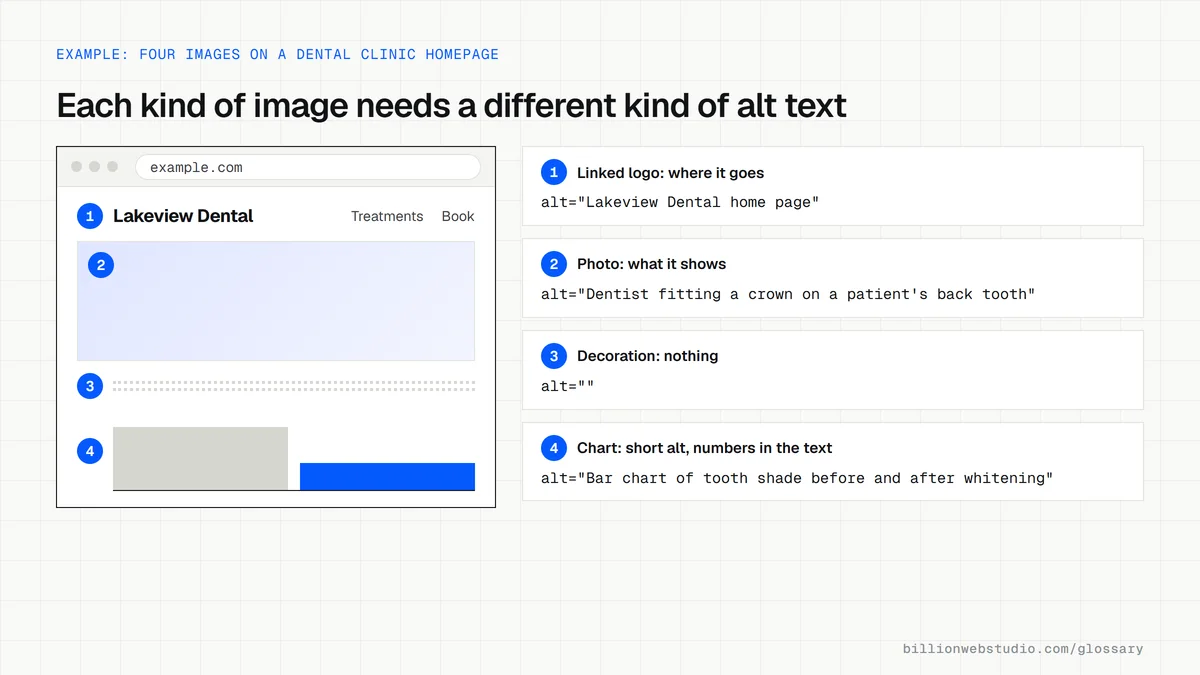
Copy these alt text patterns for each kind of image
<!-- Informative photo: say what it shows -->
<img src="/img/crown-fitting.webp" width="800" height="533"
     alt="Dentist fitting a porcelain crown on a patient's back tooth">

<!-- Linked logo: say where the link goes -->
<a href="/"><img src="/img/logo.svg" alt="Lakeview Dental home page" width="160" height="40"></a>

<!-- Icon button: say what it does -->
<button type="submit"><img src="/img/search.svg" alt="Search" width="20" height="20"></button>

<!-- Decoration: empty alt so screen readers skip it -->
<img src="/img/wave-divider.svg" alt="" width="1200" height="40">

<!-- Chart: short alt, with the key numbers in the caption -->
<figure>
  <img src="/img/whitening-results.png" width="800" height="450"
       alt="Bar chart of tooth shade before and after whitening">
  <figcaption>Average shade improved from A3 to A1 after two sessions.</figcaption>
</figure>
How to find missing or poor alt text on your site
- Paste a page address into the free WAVE checker from WebAIM and press Enter. Red Missing alternative text icons mark images with no alt attribute.
- Click the Details tab in WAVE to list every image with its alt text, and read each one: does it describe the picture, or just repeat a file name or keyword?
- In Chrome, run Lighthouse with the Accessibility category ticked. A failed Image elements do not have [alt] attributes check lists the exact images.
- On WordPress, open Media > Library, click an image and fill in the Alternative Text field. Editing it there does not update copies already placed in pages, so fix those in the page editor too.
What good looks like: No missing alt errors, every meaningful image described in a short phrase, linked images describing where the link goes, and decorative images using an empty alt.
Free tool: WAVE Web Accessibility Evaluation Tool
Questions to ask your web developer
“How will our team add alt text to new images after launch?”
A good answer: An alt text field in the CMS for every upload, a short written guide with examples from your own site, and a required check before a page goes live.
“How do you handle logos, icons and decorative images?”
A good answer: Linked logos and icon buttons get alt text that says where they go or what they do, and pure decoration gets alt="" or is added through CSS.
Alt text: common questions
Does alt text help SEO?
Yes. Google's image SEO guidance says it uses alt text, together with computer vision and the page's content, to work out what an image shows. Descriptive alt text helps images appear in Google Images, and when an image is used as a link, Google treats its alt text like anchor text for the linked page.
Do decorative images need alt text?
No. W3C guidance under WCAG 2.2 says purely decorative images should be implemented so assistive technology can ignore them, which in HTML means an empty alt attribute, written alt="". Adding a description to a divider line or background flourish only distracts people who rely on screen readers.
How long should alt text be?
Neither WCAG nor Google sets a character limit. Aim for the shortest phrase that tells someone who cannot see the image what it shows and why it is on the page, usually a short sentence. Longer explanations, such as the data in a chart, belong in the page text next to the image.
Sources
Want a website that gets this right?
Every Billion Web Studio build includes technical SEO, schema and speed work as standard, with a fixed quote within 1 business day.