Accessibility and privacy
What Is ADA Compliance for Websites?
ADA compliance stands for Americans with Disabilities Act.
ADA compliance for websites means making a site usable by people with disabilities, which the US Justice Department says the Americans with Disabilities Act requires of businesses open to the public and of state and local governments. Sites are usually measured against the WCAG guidelines.
What ADA compliance means for a website
The Americans with Disabilities Act is a US civil rights law that bans discrimination against people with disabilities. Title III covers businesses open to the public, and the Justice Department's position is that this includes their websites. There is no detailed federal web regulation for businesses, so WCAG, the W3C accessibility standard, serves as the practical yardstick.
State and local governments have a specific rule. In April 2024 the Justice Department required their websites and mobile apps to meet WCAG 2.1 Level AA under Title II. An interim final rule in April 2026 moved the deadlines to April 26, 2027 for entities serving 50,000 or more people and April 26, 2028 for smaller ones and special districts.
Why ADA compliance matters for a business website
An inaccessible website shuts out customers who use screen readers, keyboards or magnification, and it exposes the business to demand letters and lawsuits under the ADA. Fixing barriers early costs far less than rebuilding after a complaint. This is a plain-English summary, not legal advice, so check your own situation with a qualified lawyer.
An ADA compliance example
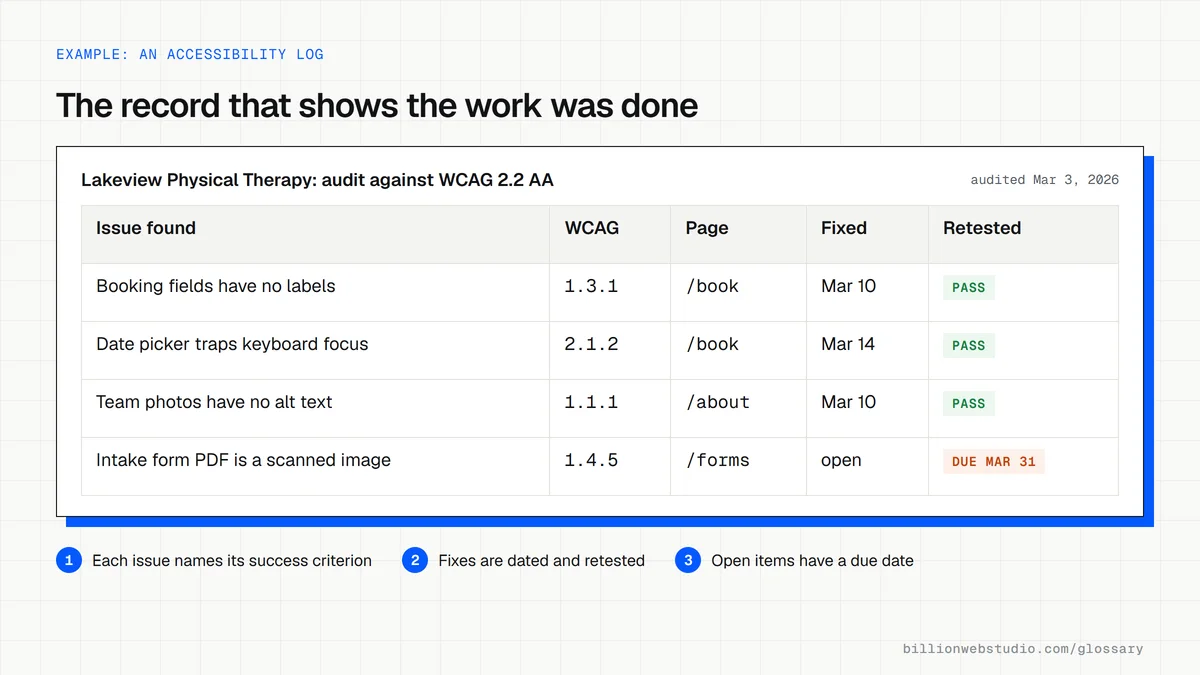
A physical therapy practice receives a letter claiming its site cannot be used with a screen reader. An audit against WCAG 2.2 Level AA finds unlabeled form fields, images without alt text and a booking widget that traps keyboard focus. The practice fixes the code, retests with a screen reader and keeps a dated record of the audit and the fixes.
Common ADA compliance mistakes
- Assuming a toolbar or widget added to the page makes the site accessible, when the underlying code still has barriers.
- Treating a badge or seal as proof, since a badge does not change how the site works for disabled visitors.
- Testing only the home page while checkout, booking forms and PDF documents stay inaccessible.
- Running one audit at launch and never retesting after new pages, plugins or campaigns go live.
Copy this accessibility clause for your website contract
ACCESSIBILITY REQUIREMENTS

1. Standard: all pages, templates, forms and documents delivered
   under this agreement will conform to WCAG 2.2 Level AA.
2. Testing: before launch the developer will test with an automated
   checker, keyboard only, and at least one screen reader (NVDA or
   VoiceOver), and share a written report.
3. Third-party tools: booking, chat and payment widgets the developer
   installs will be tested too, and any that cannot meet the standard
   will be reported in writing before launch.
4. Defects: failures found within 90 days of launch will be fixed at
   no extra cost.
5. No overlays: conformance will come from the site's own code, not
   from an accessibility overlay or toolbar.
6. Statement: the developer will publish an accessibility statement
   naming the standard and a contact for reporting problems.
How to spot-check your website for ADA accessibility issues
- Go to wave.webaim.org, paste your homepage address and press Enter.
- In the summary, note the Errors and Contrast Errors counts, then click the red icons on the page to see what each one flags.
- Repeat for your highest value pages: the contact or booking form, checkout and any page that links to PDFs.
- Open each linked PDF and try to highlight a sentence; if you cannot, it is a scanned image a screen reader cannot read.
- Look in your footer for an accessibility statement that names the standard you follow and gives a way to report problems.
What good looks like: No WAVE errors is a starting point, not proof, because automated tools find only some failures. A healthy site also passes keyboard and screen reader tests on its key forms and publishes a statement with a working contact.
Free tool: WAVE Web Accessibility Evaluation Tool
Questions to ask your web developer
“Which WCAG version and level will you build and test to, and will it be written into our contract?”
A good answer: WCAG 2.2 Level AA, named in the contract, with a written test report delivered before launch.
“Who checks new pages, plugins and PDFs for accessibility after launch?”
A good answer: A named person with a short checklist, plus a scheduled retest, such as every quarter or after each major release.
“What records will we have if we receive a demand letter?”
A good answer: Dated audit reports, the issues found, and when each was fixed and retested, kept in a folder the business owns.
ADA compliance: common questions
Does the ADA apply to websites?
The US Justice Department says yes. Its guidance states that the ADA applies to the goods and services of businesses open to the public, including those offered online, and a 2024 rule sets a specific web standard for state and local governments. How it applies to one business can depend on the facts, so ask a lawyer about your case.
What WCAG level do I need for ADA compliance?
State and local governments must meet WCAG 2.1 Level AA under the Title II rule. Private businesses have no technical standard set in the regulations, but the Justice Department's guidance points to WCAG as a helpful reference, and Level AA is the usual audit target. Building to WCAG 2.2 AA covers 2.1 AA as well.
When is the ADA Title II web accessibility deadline?
After the Justice Department's April 2026 interim final rule, state and local governments serving 50,000 or more people must meet WCAG 2.1 Level AA by April 26, 2027. Smaller governments and special district governments have until April 26, 2028. The Title II rule does not cover private businesses, which fall under Title III.
Sources
Want a website that gets this right?
Every Billion Web Studio build includes technical SEO, schema and speed work as standard, with a fixed quote within 1 business day.