Building and hosting
What Is UI Design?
UI design stands for User Interface design.
UI design (user interface design) is the craft of designing the visual and interactive parts of a website or app that people see and touch, such as buttons, menus, forms, typography, colors and spacing, so they are clear, consistent and easy to use.
What UI design means in plain English
If UX design is the floor plan of a house, UI design is the finishes, fixtures and light switches. UI designers decide how a button looks and responds when tapped, how headings and body text are sized, which colors signal an action or an error, and how much space sits between elements. The goal is an interface people understand without thinking.
Most UI work rests on a design system: a defined set of colors, type styles, icons and reusable components such as buttons, cards and form fields. Using the same parts on every page keeps the site consistent and makes new pages quicker to build. UI designers also plan states such as hover, focus, disabled and error.
Why UI design matters for your business
The interface is the first thing visitors judge. A clean, consistent look makes a business seem established and trustworthy, while cramped text or mismatched buttons suggest the opposite. Good UI also guides action, because a call-to-action button that clearly stands out gets noticed. Strong contrast and visible focus states make the site usable for people with disabilities as well.
A UI design example
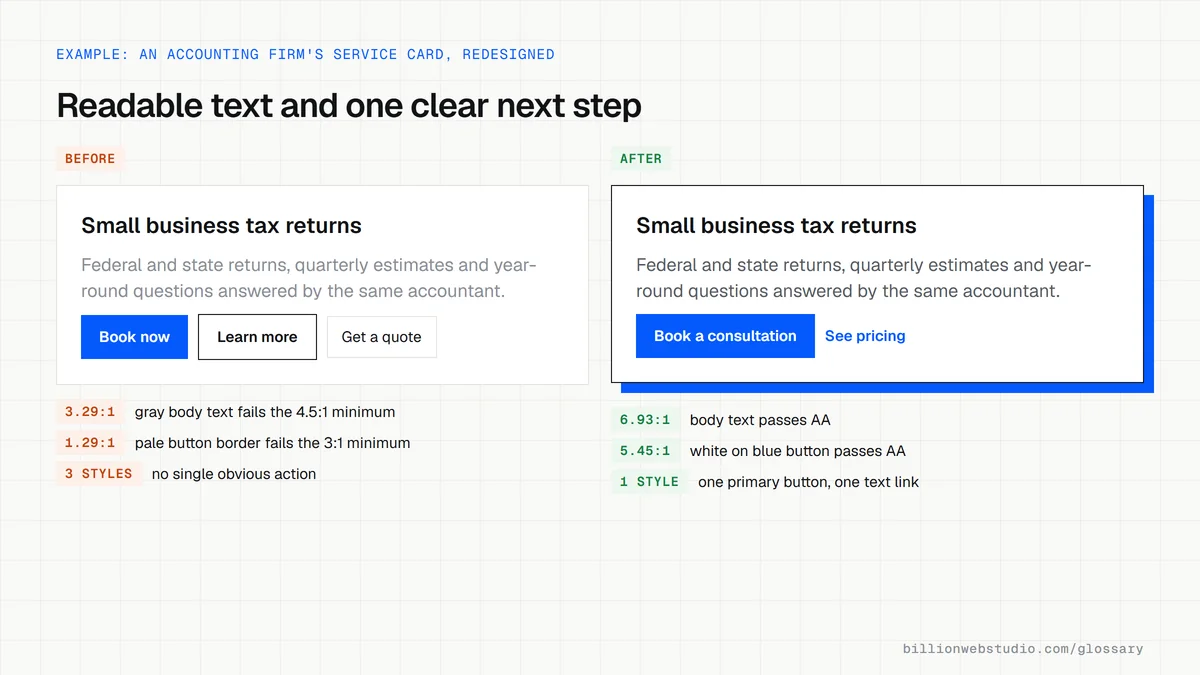
An accounting firm's old site uses five shades of green, three button styles and small gray body text. The UI designer cuts the palette to one brand green plus neutrals, sets one primary button style for every booking action, enlarges body text with strong contrast, and builds a consistent card layout for services. The next step is now always obvious.
Common UI design mistakes
- Low-contrast text, such as light gray on white, that is hard to read outdoors or with low vision.
- Several button styles on one page, so visitors cannot tell which action matters most.
- Tap targets on phones that are too small or packed too closely together.
- Decorative fonts used for body text.
- Animations that delay content or pull attention away from the main message.
UI accessibility minimums from WCAG 2.2 Level AA
| Element | Minimum | WCAG 2.2 success criterion |
|---|---|---|
| Body text | 4.5:1 contrast with its background | 1.4.3 Contrast (Minimum) |
| Large text (24px, or about 18.66px bold) | 3:1 contrast with its background | 1.4.3 Contrast (Minimum) |
| Button borders, form field outlines, icons | 3:1 against adjacent colors | 1.4.11 Non-text Contrast |
| Tap and click targets | 24 by 24 CSS pixels, or enough spacing around smaller ones | 2.5.8 Target Size (Minimum) |
| Text size | Readable and working when zoomed to 200% | 1.4.4 Resize Text |
How to check the UI basics on your site with free tools
- Open a page in Chrome, press F12, click the Inspect arrow and click a line of body text. In the Styles pane, click the small color swatch next to color and expand Contrast ratio to see whether it passes AA and AAA.
- Repeat on buttons, links, form field borders and placeholder text, where low contrast hides most often.
- Open the Lighthouse tab, tick Accessibility and run a mobile report. It lists text whose background and foreground colors lack sufficient contrast, and can also flag touch targets that are too small or too close together.
- Press Tab through the page and check that every link, button and field shows a clearly visible focus outline.
- Screenshot your main pages side by side and count the button styles; one primary and one secondary style keeps the next step obvious.
What good looks like: Body text reaches at least 4.5:1 contrast and large text 3:1, button borders and icons reach 3:1 against neighboring colors, touch targets are at least 24 by 24 CSS pixels, and focus is always visible, matching WCAG 2.2 Level AA.
Free tool: Chrome DevTools: Make your website more readable
Questions to ask your web developer
“Will you hand over a design system or component library with the site?”
A good answer: A documented set of colors, type sizes, spacing and components such as buttons, cards and form fields, each with its states, built once in code so every new page reuses it.
“Which states have you designed for each control?”
A good answer: Default, hover, focus, active, disabled, loading and error for buttons and fields, with error messages in plain words placed next to the field that caused them.
“How do you check contrast and target size before handoff?”
A good answer: Every color pair in the palette has a recorded contrast ratio checked against WCAG 2.2 AA, and touch targets meet the 24 by 24 CSS pixel minimum, with primary actions larger.
UI design: common questions
Is UI design the same as web design?
They overlap. Web design is a broad term for planning and creating websites, covering layout, content, UX, visual design and sometimes coding. UI design focuses specifically on the visual and interactive elements people use. On a website project, UI design is one stage within the wider web design work.
Do I need both a UX and a UI designer?
Not always as separate people. On many website projects one designer covers both, planning structure and journeys first, then designing the visual interface. Larger products and complex sites often split the roles. What matters is that both jobs get done well.
Sources
Want a website that gets this right?
Every Billion Web Studio build includes technical SEO, schema and speed work as standard, with a fixed quote within 1 business day.