Accessibility and privacy
What Is Color Contrast?
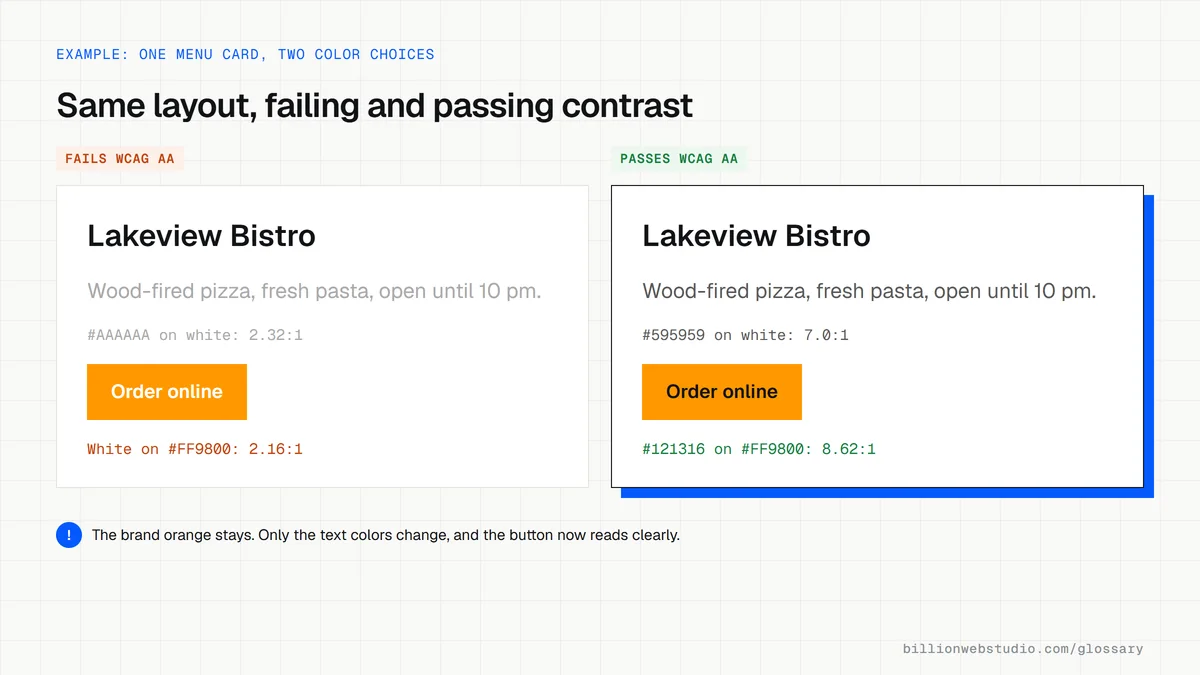
Color contrast is the difference in brightness between text or an interface element and the background behind it, measured as a ratio from 1:1 to 21:1. WCAG Level AA asks for at least 4.5:1 for normal body text.
What color contrast means in plain English
Contrast compares how light one color is against another. Black text on white scores the maximum, 21:1, while white on white scores 1:1 and is invisible. WCAG calculates the ratio from each color's relative luminance, so two colors that look very different, such as red and green, can still score low when they are similarly bright.
WCAG 2.2 sets three main rules. Normal text needs 4.5:1 at Level AA. Large text, meaning 18 point, or 14 point bold (about 24px, or 18.5px bold), needs 3:1. Icons, input borders and other parts of the interface people must see also need 3:1 under success criterion 1.4.11. Level AAA raises the bar to 7:1 for normal text.
Why color contrast matters for a business website
Low contrast hides the words that sell. Pale gray body copy, white text over a busy hero photo or a light button on a light background are hard to read for people with low vision or color blindness, for older visitors and for anyone on a phone in sunlight. If they cannot read the price, the phone number or the button label, they leave without calling.
A color contrast example
A landscaping company puts white text on its bright brand green, #8BC34A. That pairing scores about 2.1:1, which fails even the 3:1 rule for large text. Keeping the hue but darkening it to a deep green such as #33691E lifts the ratio to about 6.6:1. The brand still reads as green, and the Get a quote button becomes readable for every visitor.
How to check color contrast on your own site
- Inspect any text in Chrome DevTools and read the contrast ratio in the color picker, which can also suggest a passing color.
- Open the CSS Overview panel in Chrome DevTools to list the low-contrast text on a whole page.
- Check text placed over photos and gradients at the lightest spot behind it, since automated checkers often miss image backgrounds.
- Test buttons, form field borders and focus outlines against the 3:1 rule, not only body text.
- Look closely at placeholder text, footer links and hover states, which designers often make too faint.
How common color pairs score against WCAG AA
| Color pair | Ratio | Normal text (4.5:1) | Large text and icons (3:1) |
|---|---|---|---|
| Light gray #999999 on white | 2.85:1 | Fail | Fail |
| Mid gray #767676 on white | 4.54:1 | Pass | Pass |
| White on orange #FF9800 | 2.16:1 | Fail | Fail |
| Black on orange #FF9800 | 9.74:1 | Pass | Pass |
| White on sky blue #2196F3 | 3.12:1 | Fail | Pass |
| White on red #E53935 | 4.23:1 | Fail | Pass |
| White on dark red #C62828 | 5.62:1 | Pass | Pass |
How to check contrast across a whole page and brand palette
- In Chrome, press F12, open the Lighthouse panel, tick only Accessibility and click Analyze page load.
- In the report, open the contrast audit, which lists every text element whose colors fall below the WCAG AA ratio.
- Collect your brand colors as hex codes from your style guide or your site's CSS.
- Enter each text and background pair into the WebAIM Contrast Checker and note pass or fail for normal text, large text and graphics.
- Adjust failing pairs until they pass, then update the brand guide so new pages use the passing versions.
What good looks like: Lighthouse reports no contrast failures, and every pair used for text reaches at least 4.5:1, or 3:1 for large text, icons and form field borders.
Free tool: WebAIM Contrast Checker
Questions to ask your web developer
“Which of our brand color pairs pass for body text, and which only for large text?”
A good answer: A palette sheet listing every text and background pair with its ratio and allowed use, checked against WCAG 2.2 Level AA.
“How do you check text over photos, and hover, focus and disabled states?”
A good answer: Each state is tested, and text on images gets a solid panel or dark overlay so the lightest area behind it still meets the ratio.
Color contrast: common questions
What is a good color contrast ratio?
For WCAG Level AA, the usual audit target, normal text needs at least 4.5:1 and large text at least 3:1. Level AAA asks for 7:1 and 4.5:1. W3C treats these as hard thresholds with no rounding, so a ratio of 4.499:1 fails the 4.5:1 rule. Higher ratios are generally easier to read.
Do logos need to meet color contrast rules?
No. WCAG success criterion 1.4.3 exempts text that is part of a logo or brand name, along with purely decorative text and text in disabled controls. The exemption covers the logo itself, not the rest of your brand palette, so buttons, links and body text set in brand colors still need to pass.
Does good color contrast help people with color blindness?
Largely, yes. Contrast is measured on brightness, so a strong ratio keeps text readable for most people with color vision deficiencies. WCAG adds a separate rule, 1.4.1 Use of Color, which says color must not be the only way information is shown, such as marking an error field with red alone.
Sources
- W3C: Understanding WCAG 2.2 Success Criterion 1.4.3 Contrast (Minimum)
- W3C: Understanding WCAG 2.2 Success Criterion 1.4.6 Contrast (Enhanced)
- W3C: Understanding WCAG 2.2 Success Criterion 1.4.11 Non-text Contrast
- Chrome for Developers: Make your website more readable (contrast tools in DevTools)
- WebAIM Contrast Checker
Want a website that gets this right?
Every Billion Web Studio build includes technical SEO, schema and speed work as standard, with a fixed quote within 1 business day.