Accessibility and privacy
What Is WCAG?
WCAG stands for Web Content Accessibility Guidelines.
WCAG (Web Content Accessibility Guidelines) is the international W3C standard for making websites usable by people with disabilities, including people who are blind, deaf or unable to use a mouse. WCAG 2.2, first published in October 2023, is the current version.
What WCAG means in plain English
WCAG is a set of testable rules, called success criteria, written by the World Wide Web Consortium (W3C). They sit under four principles: content must be perceivable, operable, understandable and robust. In practice that means alt text on images, captions on videos, enough color contrast and a site that works with a keyboard alone.
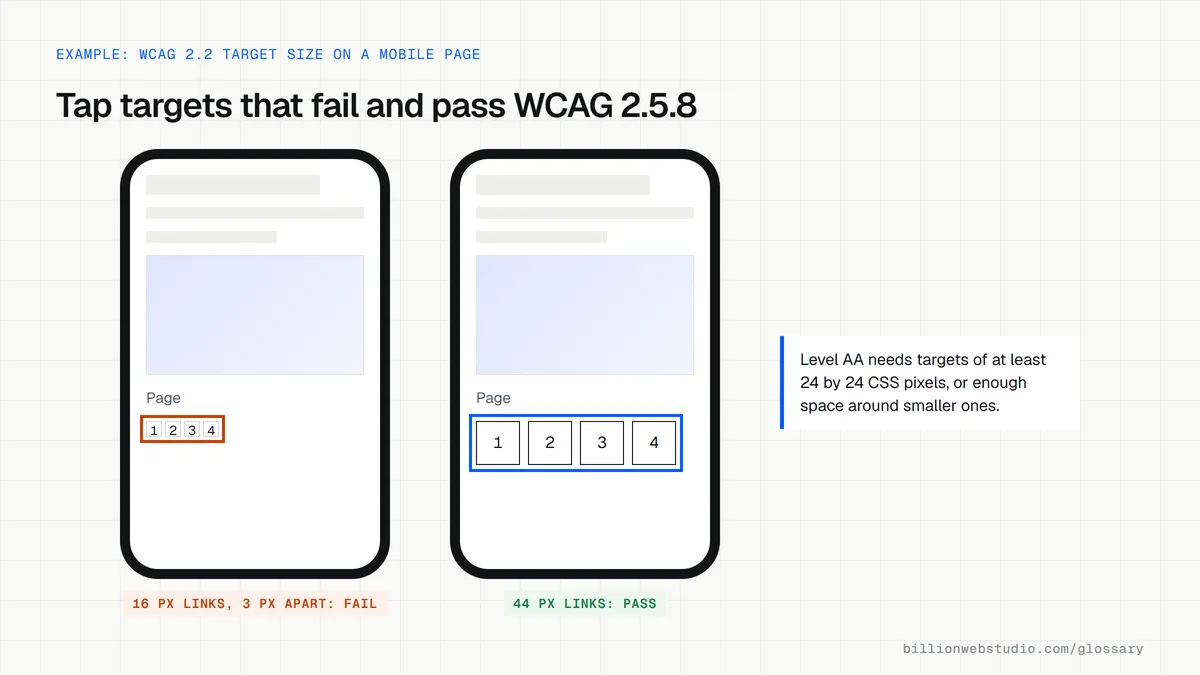
Each rule has a level. Level A is the minimum, Level AA is the usual target, and Level AAA is the strictest. WCAG 2.2 added nine success criteria, such as a minimum size for tap targets, and removed the old 4.1.1 Parsing rule. Content that meets WCAG 2.2 also meets 2.1 and 2.0.
Why WCAG matters for a business website
An accessible site reaches more customers, including older visitors and anyone using a phone one-handed or in bright sun. It also lowers legal risk, since accessibility rules and public-sector contracts often point to WCAG Level AA as the yardstick. Many fixes, such as clear headings, descriptive links and readable contrast, also help search engines and AI assistants understand your pages.
A WCAG example
A clinic's booking form uses gray placeholder text instead of labels, and its date picker only works with a mouse. A screen reader user cannot tell which box is which, and a keyboard user cannot pick a date. Adding visible labels, stronger contrast and keyboard support fixes several WCAG failures at once and makes the form easier for every patient.
How to check WCAG on your own site
- Run a free automated checker such as Lighthouse in Chrome, knowing it catches only some of the issues.
- Put the mouse aside and try to reach and use every link, menu and form with the Tab and Enter keys.
- Zoom the page to 200 percent and confirm nothing overlaps, gets cut off or disappears.
- Turn on a screen reader, such as VoiceOver or NVDA, and listen to a key page from top to bottom.
- Ask for a written WCAG 2.2 Level AA audit before launch, not after a complaint.
Copy this accessible form field pattern
<form action="/book" method="post">
  <!-- 1.3.1 and 3.3.2: a visible label tied to the field -->
  <label for="email">Email address</label>
  <!-- 1.3.5: autocomplete names the field's purpose -->
  <input id="email" name="email" type="email" autocomplete="email"
         required aria-describedby="email-hint">
  <p id="email-hint">We only use this to confirm your booking.</p>

  <label for="phone">Phone (optional)</label>
  <input id="phone" name="phone" type="tel" autocomplete="tel">

  <!-- 3.3.1: when a field fails, show the error as text and
       add the error's id to that field's aria-describedby -->
  <p id="email-error" class="error"></p>

  <button type="submit">Book appointment</button>
</form>
How to check the WCAG 2.2 additions on your site
- Press Tab through a page that has a sticky header, cookie bar or chat button, and confirm the focused item is never completely hidden behind them (2.4.11).
- On a phone-sized view, right-click a small icon or link, choose Inspect and hover the highlighted line to read its size; targets under 24 by 24 pixels need clear space around them (2.5.8).
- Try your login: pasting a password or using a password manager should work, with no puzzle or memory test (3.3.8).
- Go through a multi-step form and note any detail it asks for twice, such as an address you already entered (3.3.7).
- Check that your help or contact link sits in the same place on every page (3.2.6).
What good looks like: Focus is never hidden, small targets have room around them, logins accept pasting, forms reuse earlier answers and help stays in one place. Together with 2.5.7 Dragging Movements, these are all the WCAG 2.2 additions at Levels A and AA.
Free tool: W3C: How to Meet WCAG (Quick Reference)
Questions to ask your web developer
“How do you test the parts automated tools miss?”
A good answer: Keyboard-only and screen reader passes on every key template, plus a 200 percent zoom check, with results recorded against each success criterion.
“Do sliders, maps or drag-to-reorder features have a single-pointer alternative?”
A good answer: Yes. Every drag action also works with buttons or inputs, as WCAG 2.5.7 requires.
“How will accessibility hold up after launch when editors add content?”
A good answer: Editor guidance for alt text, headings and link text, required alt fields in the CMS, and a retest after major releases.
WCAG: common questions
What is the difference between WCAG 2.1 and 2.2?
WCAG 2.2 keeps almost everything in 2.1 and adds nine success criteria, mostly helping people with low vision, motor and cognitive disabilities, such as visible keyboard focus, larger tap targets and logins without memory tests. It also removed criterion 4.1.1 Parsing. A site that meets 2.2 also meets 2.1.
Is WCAG a law?
No. WCAG is a technical standard published by the W3C, not a law. Laws and regulations in many places refer to it, such as the US Justice Department's 2024 rule for state and local government websites, which uses WCAG 2.1 Level AA. Whether a law applies to your site depends on where and how you operate.
Which WCAG level should my website meet?
Level AA is the usual target for business and public websites. It covers the barriers that block most disabled visitors without the strictest Level AAA rules, which W3C notes cannot be met for some content. Ask your developer to name the version and level, ideally WCAG 2.2 AA, in the contract.
Sources
Want a website that gets this right?
Every Billion Web Studio build includes technical SEO, schema and speed work as standard, with a fixed quote within 1 business day.