Building and hosting
What Is a Design System?
A design system is a shared set of reusable components, visual styles and usage rules, such as buttons, forms, colors, typography and spacing, that a team uses to design and build every page of a website or product consistently.
What a design system means in plain English
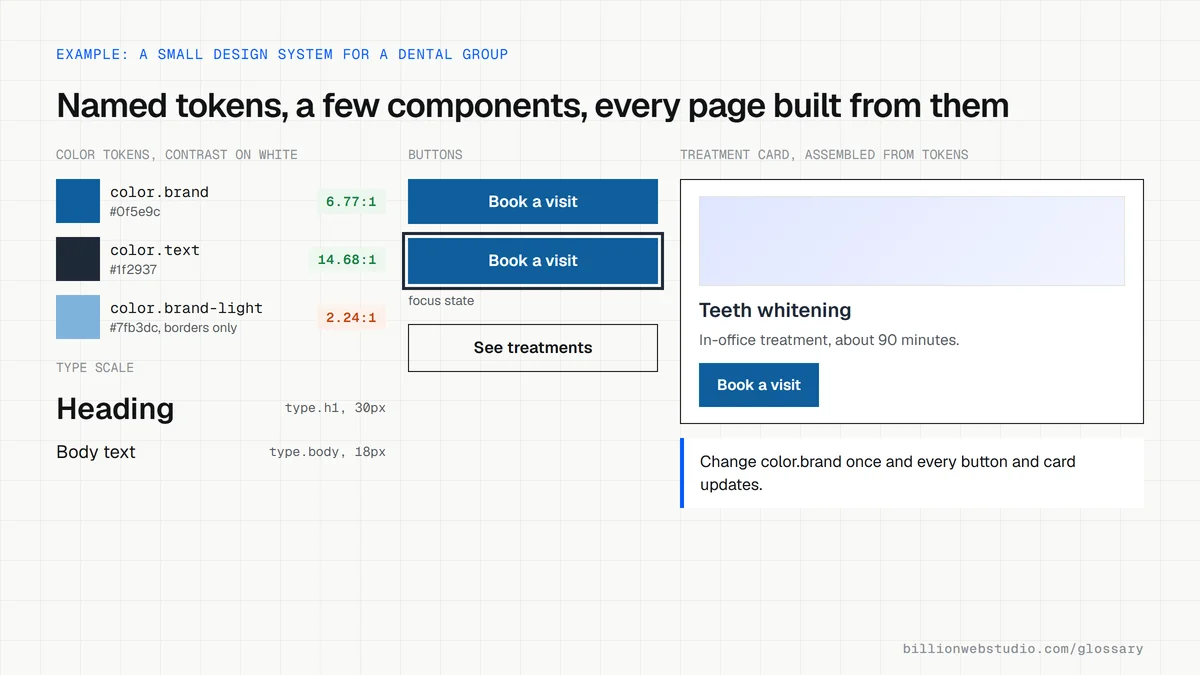
A design system is a kit of parts plus the instructions for using them. The parts are components such as headers, cards, forms and buttons. The styles are the brand decisions behind them: colors, fonts, sizes and spacing, often stored as named values called design tokens. The rules explain when to use each part, and the same kit exists both in the design tool and in the website's code.
The GOV.UK Design System is a public example. It groups its content into styles for layout, typography, color and images, reusable accessible components for forms, navigation and tables, and patterns for common tasks such as entering an address or creating an account.
Why a design system matters for a business website
Without one, every new page is designed from scratch, and small differences pile up: three button styles, two shades of the brand color, forms that behave differently. A design system makes new pages faster and cheaper, because they are assembled from approved parts. It also fixes problems once: when the contact form component meets accessibility and contrast rules, every page that uses it does too.
A design system example
A dental group with eight locations builds its website from one set of components: a hero block, a treatment card, a dentist profile, a location block with map and hours, and a booking call to action. When the group opens a ninth practice, its page is assembled from those parts in a day. When the brand color changes, the team updates one token, and every page picks up the new color.
Common design system mistakes
- Building a large design system for a ten-page site that only needs a simple style guide.
- Keeping components in the design file only, so developers rebuild them slightly differently on every page.
- Skipping usage rules, so editors put any component anywhere and the site drifts again.
- Leaving accessibility checks for later instead of building them into each component.
- Letting nobody own the system, so updates stop after launch.
Copy these design tokens in the W3C format
{
  "color": {
    "brand": {
      "$type": "color",
      "$value": { "colorSpace": "srgb", "components": [0.059, 0.369, 0.612], "hex": "#0f5e9c" }
    },
    "text": {
      "$type": "color",
      "$value": { "colorSpace": "srgb", "components": [0.122, 0.161, 0.216], "hex": "#1f2937" }
    }
  },
  "space": {
    "md": { "$type": "dimension", "$value": { "value": 16, "unit": "px" } }
  },
  "button": {
    "primary-background": { "$type": "color", "$value": "{color.brand}" },
    "padding": { "$type": "dimension", "$value": "{space.md}" }
  }
}
How to check whether your website follows a design system
- Open five different page types in Chrome tabs: the homepage, a service page, a blog post, the contact page and a landing page.
- Compare the main buttons, headings and forms across the tabs and count how many different button styles you can see.
- Right-click a primary button, choose Inspect, open the Computed tab and note its background color, font size and border radius.
- In the Styles tab, check whether those values come from named variables such as var(--color-brand) rather than raw values typed into each rule.
- Repeat on the other tabs, then run each page through WAVE and open its Contrast panel to find text below the 4.5:1 ratio.
What good looks like: One primary button style used everywhere, colors and sizes drawn from named variables, and normal text meeting the WCAG AA minimum contrast of 4.5:1 (3:1 for large text).
Free tool: WAVE accessibility checker
Questions to ask your web developer
“Will components be built once in code and reused, or styled page by page?”
A good answer: They are built once as components in the CMS or codebase, named the same as in the design file, so a change to one component updates every page that uses it.
“Where are the design tokens stored, and how do design and code stay in sync?”
A good answer: Tokens live in one file or variable collection that is exported to CSS variables in the build, and every change follows a named process with a short changelog.
“How is accessibility built into each component?”
A good answer: Each component is checked for contrast, keyboard use, visible focus and labels before it joins the library, so pages built from it inherit those fixes.
Design system: common questions
What is the difference between a design system and a style guide?
A style guide documents visual rules such as logo use, colors and fonts. A design system includes those rules plus working, reusable components in both the design tool and the code, with guidance on when to use each one. A style guide describes the brand, and a design system lets a team build with it.
Does a small business website need a design system?
A full design system is rarely worth it for a small site. A lighter version helps: a defined set of colors, fonts and spacing, plus a handful of reusable page sections built into the CMS, so new pages stay consistent without designer time for each one.
What are design tokens?
Design tokens are named values for design decisions, such as a brand color, a font size or a spacing step, stored in a format both design tools and code can read. The W3C Design Tokens Community Group published the first stable version of its token format specification on October 28, 2025.
Sources
Want a website that gets this right?
Every Billion Web Studio build includes technical SEO, schema and speed work as standard, with a fixed quote within 1 business day.