Conversion and analytics
What Is Microcopy?
Microcopy is the small, functional text in a website or app, such as button labels, form field hints, error messages and confirmation notes, that tells visitors what to do next and reassures them at the moment they need it.
What microcopy means in plain English
Microcopy is every short line a visitor reads while doing something rather than while browsing. It includes the words on buttons, the labels and hints in forms, the line under an email field saying how you will use it, error messages, empty states, tooltips and the message after a form is sent. Each piece is only a few words, but together they decide whether a task feels easy.
Microcopy differs from marketing copy. Headlines and service descriptions persuade; microcopy removes doubt and friction at the point of action. It belongs to the wider practice of UX writing, which plans the words in an interface as part of its design instead of filling them in at the end.
Why microcopy matters for a business website
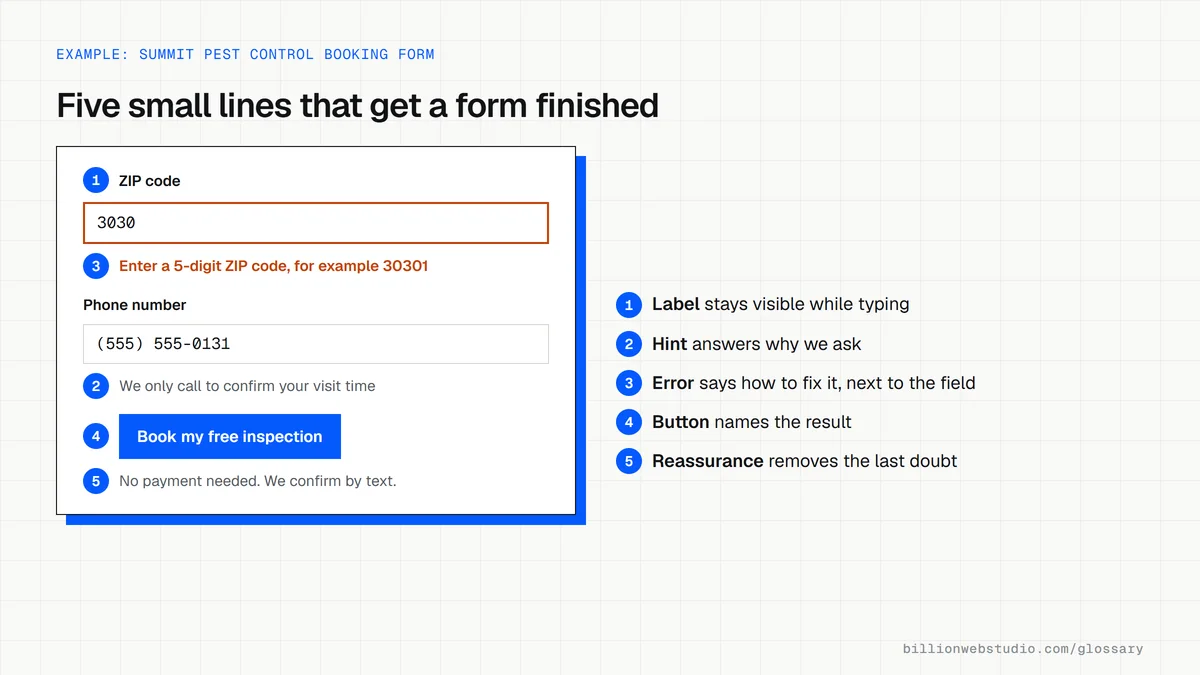
Forms and checkouts are where leads and sales are won or lost, and microcopy does most of its work there. A visitor unsure what happens after pressing a button, or puzzled by an error, often leaves. Clear labels also matter for accessibility: WCAG 2.2 success criterion 3.3.2, at Level A, requires labels or instructions whenever content asks for user input.
A microcopy example
A home care agency's inquiry form ends with a gray button labeled Submit and shows Invalid input when a field is wrong. The rewrite labels the button Request a care consultation, adds a note beneath it saying a coordinator calls back within one business day, and replaces the error with Enter a phone number with area code so we can call you back. The agency then compares completed inquiries with the previous month.
Common microcopy mistakes
- Using vague button labels such as Submit or Click here instead of naming the result.
- Writing error messages in technical terms, or showing them far from the field that needs fixing.
- Clearing everything a visitor typed when only one field is wrong.
- Relying on placeholder text as the only label, which disappears as soon as someone starts typing.
- Ending a form with a thank you message that says nothing about what happens next or when.
Microcopy rewrites for the moments that lose leads
| Moment | Vague | Clear |
|---|---|---|
| Form button | Submit | Get my free estimate |
| Phone field hint | (no hint) | We only call to confirm your appointment time |
| Error message | Invalid input | Enter a 5-digit ZIP code, for example 30301 |
| Password rule | Password does not meet requirements | Use at least 8 characters, including one number |
| After the form is sent | Thank you | Got it. We will email your estimate by 5 pm on the next business day. |
| Empty search results | No results | No matches for gutter guard. Try gutters, or call (555) 555-0123. |
| Shipping note near the cart | Shipping calculated later | Free shipping over $50. You see the exact cost before you pay. |
How to audit the microcopy on your own forms
- Open your main inquiry form and read only the button, labels and small print aloud. Each line should tell a stranger what to enter and what happens next.
- Submit the form empty, then with a wrong email address and a short phone number. Each error should name the field and say how to fix it, right next to that field.
- Check that everything you typed is still in place after an error appears.
- Run the page through the free WAVE checker from WebAIM and look for missing form label errors.
- Send a valid test and read the confirmation message: it should say what happens next and when.
What good looks like: Every field has a visible label that stays while typing, errors are identified and described in text as WCAG 2.2 success criterion 3.3.1 (Level A) requires, and the button names the result the visitor gets.
Free tool: WAVE web accessibility evaluation tool
Questions to ask your web developer
“Who writes the button labels, error messages and confirmation text?”
A good answer: They are written with the page copy and reviewed with you, rather than left as the form plugin's defaults such as Submit and This field is required.
“Can we see every error and success message before launch?”
A good answer: Yes. They provide a list of every form state, including each error, the sending state and the success message, so you can approve the wording in one place.
“How will you tell whether a microcopy change helped?”
A good answer: They track form starts and completed submissions before and after the change, so a new label is judged by completion rate rather than by opinion.
Microcopy: common questions
What are examples of microcopy?
Common examples include button labels such as Get my free quote, form hints such as We only use your number to arrange the visit, password rules shown before someone types, error messages, shipping notes near an Add to cart button, and the confirmation message after an order or inquiry is sent.
What is the difference between microcopy and UX writing?
UX writing is the discipline of writing all the text in a product's interface to suit users' needs and context. Microcopy is part of its output: the individual short pieces of interface text. A UX writer produces microcopy along with naming conventions, voice guidelines and longer help content.
Sources
Want a website that gets this right?
Every Billion Web Studio build includes technical SEO, schema and speed work as standard, with a fixed quote within 1 business day.