Building and hosting
What Is a CMS?
CMS stands for Content Management System.
A CMS (content management system) is software that lets you add and edit the pages, posts and images on your website without writing code. WordPress, Webflow and Shopify are common examples.
What a CMS means in plain English
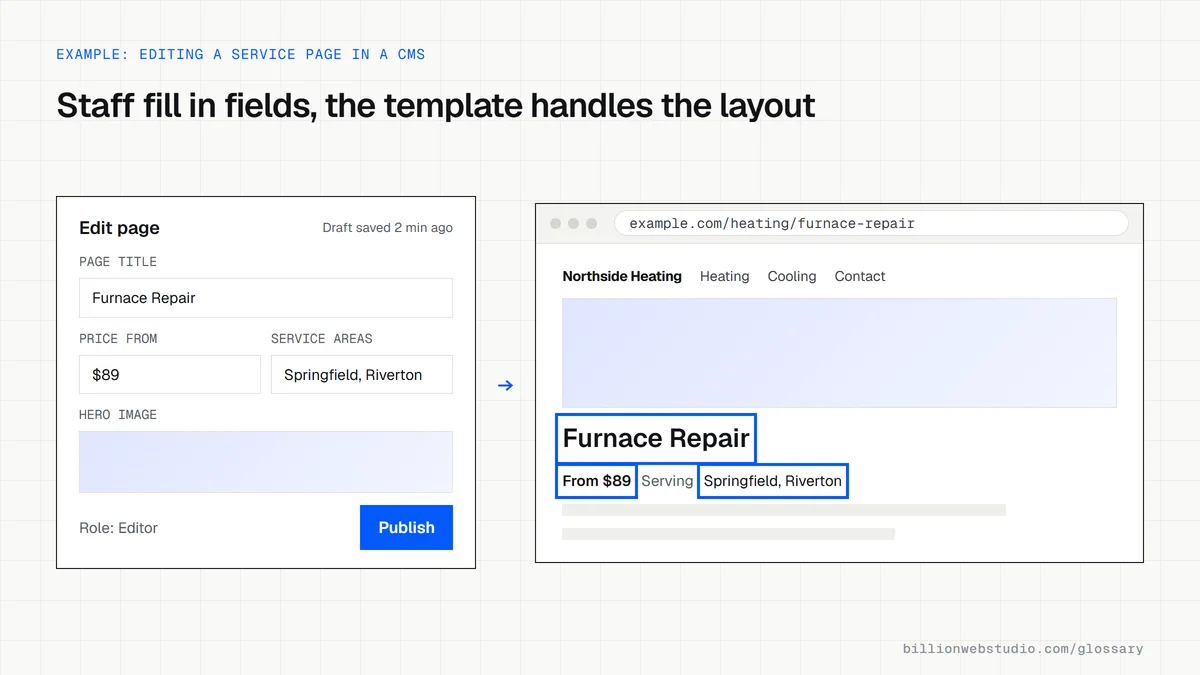
Without a CMS, every text change means editing code files and uploading them to the server. A CMS separates content from design. Your team logs in to a dashboard, types into fields that work like a word processor, adds images and clicks publish. The CMS stores that content in a database and places it into the site's templates automatically.
CMS platforms come in a few kinds. Traditional systems such as WordPress manage both the content and the website front end. Hosted builders such as Webflow and Shopify bundle the CMS with hosting. A headless CMS stores content only and sends it through an API to any front end, which suits custom builds and apps.
Why a CMS matters for your business website
A CMS decides who can change your site and how fast. If updating a price or adding a blog post needs a developer ticket, content goes stale and small jobs become invoices. A well set up CMS lets your marketing team publish landing pages, edit SEO titles and add case studies the same day. Billion Web Studio delivers every build with a CMS your team can use, with training.
A CMS example
An HVAC company runs its site on WordPress. Each week the office manager logs in, adds a seasonal offer to the homepage, posts a short article on furnace maintenance, and updates the service area page when the company starts covering a new town. None of this touches code, and the design stays consistent because the templates control the layout.
Common CMS mistakes
- Choosing a platform because it is popular rather than because it fits what your team will actually edit.
- Installing dozens of plugins, each one a possible security hole and a cost to page speed.
- Skipping updates to the CMS core, theme and plugins for months at a time.
- Giving every user full administrator rights instead of editor or author roles.
- Picking a closed platform that makes it hard to export your content if you leave.
Which kind of CMS fits which business
| CMS type | Examples | Best for | Watch out for |
|---|---|---|---|
| Traditional, self-hosted | WordPress.org, Drupal | Service businesses that publish often and want a wide plugin choice | You own updates, security and hosting |
| Hosted site builder | Webflow, Squarespace, Wix | Small marketing sites where design control and low upkeep matter most | Monthly fees and limits on custom code |
| Ecommerce platform | Shopify, BigCommerce | Stores where products, checkout and stock drive the site | Content pages are simpler, and apps add monthly costs |
| Headless CMS | Sanity, Contentful, Strapi | Custom builds, apps or several channels sharing one content source | Layout changes and previews need a developer |
How to check which CMS your site uses and who can edit it
- Open your homepage in Chrome, right-click and choose View page source.
- Press Ctrl+F (Cmd+F on a Mac) and search for generator, then for wp-content, webflow and cdn.shopify.com. A match usually names the platform.
- Log in to the CMS and open the user list. In WordPress it is Users > All Users, with each person's role in the Role column.
- Remove people who have left, and change anyone who only writes content from Administrator to Editor or Author.
- Find the export option (in WordPress, Tools > Export) and confirm you can download your own content.
What good looks like: You know the platform and its version, only one or two trusted people hold administrator rights, and you can export every page and post without asking a developer.
Questions to ask your web developer
“Which roles will our team have, and what can each role change?”
A good answer: A written role list: one or two administrators, editors who can publish, authors who draft, with templates locked so content edits cannot break the layout.
“How do we export all our content if we leave?”
A good answer: They show the export route on the chosen platform, such as Tools > Export in WordPress or a CSV export of CMS collections, and explain how images come out with it.
“Who applies CMS, theme and plugin updates, and how often?”
A good answer: A named person updates on a fixed schedule, tests on a staging copy first and keeps a backup from just before each update.
CMS: common questions
Is WordPress a CMS?
Yes. WordPress is one of the best-known content management systems. The free, open-source software from WordPress.org runs on hosting you choose, while WordPress.com is a hosted service built on the same software. Both let you manage pages, posts and media from a dashboard.
What is a headless CMS?
A headless CMS stores and manages content but has no built-in website front end. Developers pull the content through an API into a site built with a framework such as Next.js, or into an app. It allows more control over design and speed, but layout changes usually need a developer.
Do I need a CMS for my website?
If anyone other than a developer will update the site, yes. A CMS saves time and money on routine edits. A small static site that almost never changes can manage without one, but most business sites add pages, posts and offers often enough to need it.
Sources
Want a website that gets this right?
Every Billion Web Studio build includes technical SEO, schema and speed work as standard, with a fixed quote within 1 business day.