SEO
What Is Schema Markup?
Schema markup is code added to a web page, usually in JSON-LD format, that uses the schema.org vocabulary to tell search engines exactly what the page describes, such as a business, product, article, event or review.
What schema markup means in plain English
A person reading your contact page knows that 555 0142 is a phone number and 8 to 5 are opening hours. Schema markup spells those facts out for machines using shared labels from schema.org, a vocabulary created by Google, Microsoft, Yahoo and Yandex. Google accepts three formats, JSON-LD, Microdata and RDFa, and recommends JSON-LD, a separate block of code that does not change how the page looks.
Why schema markup matters for a business website
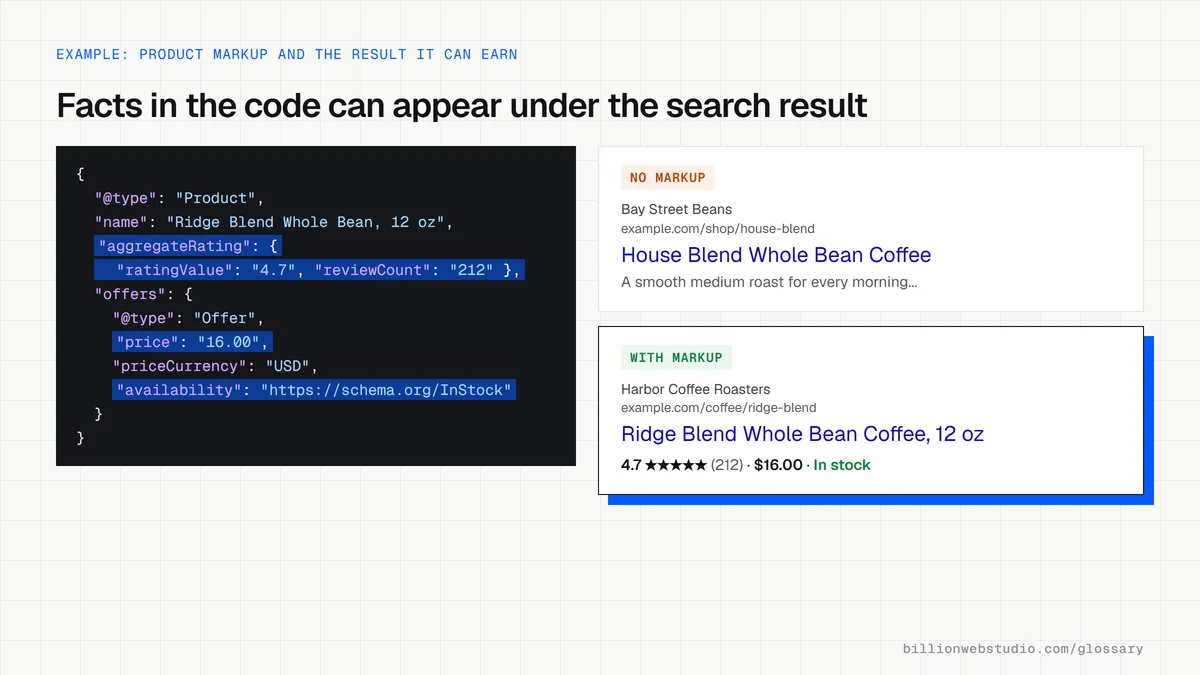
Correct markup makes pages eligible for rich results: listings that show product prices and stock, review stars, event dates, recipes or breadcrumb trails. Those richer listings stand out on a crowded results page. Google is clear that eligibility is not a guarantee, and that the markup must match what visitors can see. Markup also gives search systems clean facts about your business name, address and offers.
An example of schema markup
A dental clinic adds a JSON-LD block to its homepage using the Dentist type, a kind of LocalBusiness. The block lists the clinic's name, street address, phone number, opening hours, logo and website. An online store does the same on each product page with the Product type, adding the price, currency, availability and review rating that already appear on the page.
Common schema markup mistakes
- Marking up details that visitors cannot see on the page, which Google's guidelines forbid.
- Adding review stars written by the business itself rather than real customers, which can lead to a manual action.
- Still relying on FAQ markup for extra space in results, although Google stopped showing FAQ rich results on May 7, 2026.
- Running two plugins that each output conflicting Organization or LocalBusiness data.
- Never testing the code, when Google's Rich Results Test shows errors and eligible features in seconds.
Which schema type for which page, and what Google can show
| Page | Schema type | What Google can show |
|---|---|---|
| Product page | Product with Offer | Price, availability and review stars in results |
| Location or contact page | LocalBusiness, or a subtype such as Dentist | Business details such as hours in a knowledge panel |
| Homepage | Organization | Logo and company details Google may use in knowledge panels |
| Blog post or news story | Article | Clearer title, image and date information |
| Any page inside a hierarchy | BreadcrumbList | A breadcrumb trail, on desktop results only since January 2025 |
| Reviews of your own business | AggregateRating on LocalBusiness | No stars: Google does not show self-serving reviews |
| FAQ section | FAQPage | No rich result since May 7, 2026 |
Copy this Product JSON-LD for a product page
<script type="application/ld+json">
{
  "@context": "https://schema.org",
  "@type": "Product",
  "name": "Ridge Blend Whole Bean Coffee, 12 oz",
  "image": "https://www.example.com/images/ridge-blend.jpg",
  "description": "Medium roast whole bean coffee with notes of cocoa and cherry.",
  "sku": "RB-12",
  "brand": { "@type": "Brand", "name": "Harbor Coffee Roasters" },
  "aggregateRating": {
    "@type": "AggregateRating",
    "ratingValue": "4.7",
    "reviewCount": "212"
  },
  "offers": {
    "@type": "Offer",
    "url": "https://www.example.com/coffee/ridge-blend",
    "price": "16.00",
    "priceCurrency": "USD",
    "availability": "https://schema.org/InStock"
  }
}
</script>
How to test the schema markup on your pages
- Open Google's Rich Results Test, paste the URL of a product, location or article page and click Test URL.
- Under Detected structured data, click each item, such as Product snippets, Merchant listings or Local business. Red errors must be fixed for that feature; warnings are optional fields.
- Compare every value in the markup with what the page shows: price, stock status, hours, address and ratings must match what a visitor sees.
- For types Google does not turn into rich results, paste the URL into the Schema Markup Validator to check the code against the schema.org vocabulary.
- In Google Search Console, open the reports under Shopping or Enhancements in the left menu to see valid and invalid items across the whole site.
What good looks like: No errors on the features you want, values that match the visible page, and Search Console item counts that grow as you add pages.
Free tool: Rich Results Test
Questions to ask your web developer
“Which schema types will each page template output, and where does the data come from?”
A good answer: A list per template, such as Product on product pages and LocalBusiness on location pages, filled from the same fields that show on the page, so price or hours can never disagree.
“How do you test the markup after each release?”
A good answer: Key templates are run through the Rich Results Test after every release, and the Search Console structured data reports are checked monthly for new errors.
Schema markup: common questions
Does schema markup improve Google rankings?
Google presents structured data as a way to understand a page and to qualify it for rich results, not as a ranking boost. The practical gain comes from more informative listings, such as prices or review stars, which can attract more clicks. Pages still need useful content and sound technical SEO to rank in the first place.
What is the difference between schema markup and structured data?
Structured data is the general idea of describing page content in a standard, machine-readable format. Schema markup is the most common way of doing it on websites, using the schema.org vocabulary. In everyday SEO conversation the two terms are used almost interchangeably, and Google's documentation mostly says structured data.
Is FAQ schema still worth adding in 2026?
Not for Google rich results. Google announced that FAQ rich results would stop appearing from May 7, 2026, and removed the documentation in June 2026. Visible questions and answers on the page can still help readers and AI tools, but the markup alone no longer earns extra space on Google's results page.
Sources
- Google Search Central: Introduction to structured data markup
- Google Search Central: General structured data guidelines
- Google Search Central: Structured data markup that Google Search supports
- Google Search Central: Latest documentation updates (FAQ rich result removal)
- Schema.org: About
- Google Rich Results Test
- Schema Markup Validator
- Google Search Central: Review snippet structured data (self-serving reviews)
- Google Search Central Blog: Simplifying breadcrumbs on mobile search results
- Google Search Central: Product structured data
Want a website that gets this right?
Every Billion Web Studio build includes technical SEO, schema and speed work as standard, with a fixed quote within 1 business day.