Building and hosting
What Is Responsive Web Design?
Responsive web design is an approach to building websites so the same pages automatically adjust their layout, images and text to fit any screen, from a small phone to a wide desktop monitor, using one set of code and one URL.
What responsive web design means in plain English
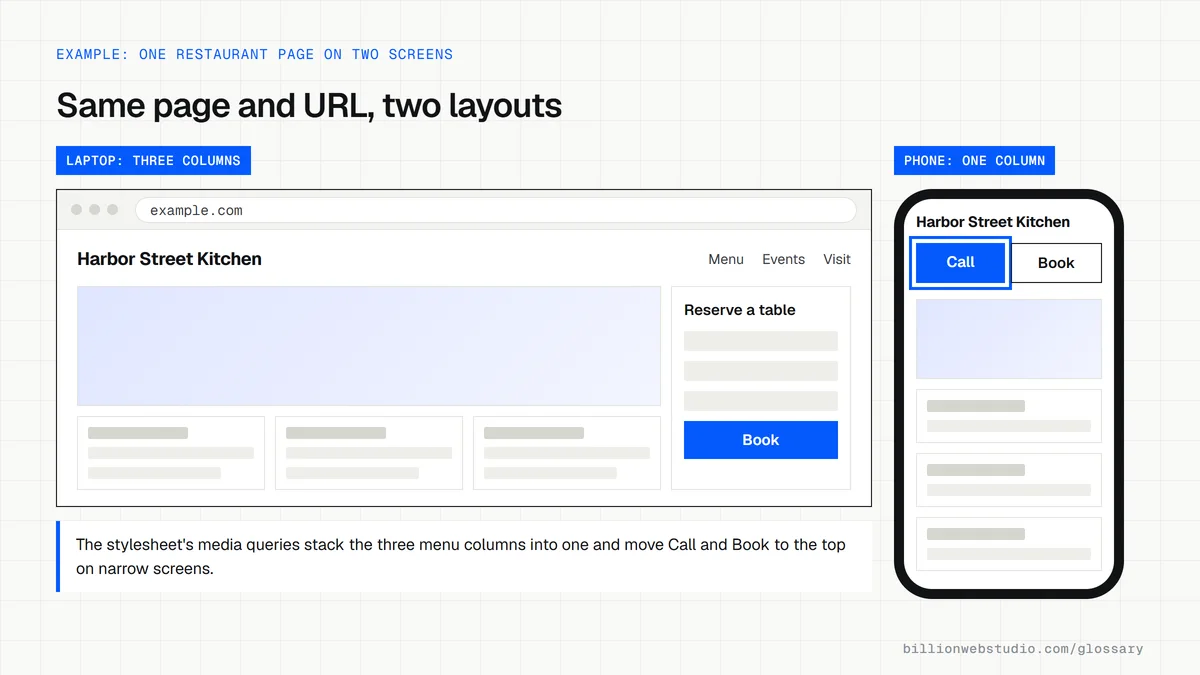
Instead of building a separate mobile site, a responsive site uses flexible layouts that rearrange themselves. Three columns on a laptop become one stacked column on a phone, the menu folds into a button, and images shrink to fit. Designer Ethan Marcotte coined the term in 2010 to describe fluid grids, flexible images and CSS media queries working together.
Media queries are rules in the stylesheet that apply different styles at different screen widths, known as breakpoints. A viewport meta tag in the page head tells phones to use their real screen width. Without it, mobile browsers lay the page out as if on a wide desktop screen, and visitors see a tiny zoomed-out page.
Why responsive web design matters for your business
Google uses the mobile version of a site's content for indexing and ranking, and it recommends responsive design as the easiest pattern to build and maintain. A page that is awkward on a phone loses calls, form fills and sales from people browsing on the move. Responsive design also means one site to update instead of two.
A responsive web design example
On a desktop, a restaurant's homepage shows a wide photo, a menu preview in three columns and a reservation form on the right. On a phone, the same page shows a cropped photo, the menu as a single list, and large call and booking buttons near the top. The content and the URL stay identical; only the layout changes.
How to check if your site is responsive
- Open your site on a real phone and try every main task, including sending the contact form.
- Drag your desktop browser window narrow and watch whether content reflows or spills off the side.
- Check that text is readable without zooming and buttons are large enough to tap.
- Run a Lighthouse audit in Chrome to flag mobile usability and speed problems.
- Confirm the page head includes a viewport meta tag.
Copy this responsive starter
<!-- In <head>: lay the page out at the device's real width -->
<meta name="viewport" content="width=device-width, initial-scale=1">

<style>
  /* Phones first: one column */
  .menu-grid { display: grid; gap: 16px; grid-template-columns: 1fr; }
  img { max-width: 100%; height: auto; }

  /* 640px and wider: two columns */
  @media (min-width: 640px) {
    .menu-grid { grid-template-columns: repeat(2, 1fr); }
  }
  /* 1024px and wider: three columns */
  @media (min-width: 1024px) {
    .menu-grid { grid-template-columns: repeat(3, 1fr); }
  }
</style>

<!-- A photo that downloads a smaller file on phones -->
<img src="/img/dining-800.jpg"
     srcset="/img/dining-480.jpg 480w, /img/dining-800.jpg 800w, /img/dining-1600.jpg 1600w"
     sizes="(min-width: 1024px) 33vw, 100vw"
     width="800" height="533" alt="Window tables in the Harbor Street dining room">
How to test your site's responsive design in Chrome
- Open the page in Chrome, press F12, then press Ctrl+Shift+M (Cmd+Shift+M on a Mac) to turn on the device toolbar.
- Set the Dimensions menu at the top to Responsive and type 320 in the width box. Scroll the whole page and look for a sideways scrollbar, or text and images cut off at the right edge.
- Open the toolbar's three-dot menu and choose Show media queries. Colored bars appear above the page; click each one to jump to that breakpoint and recheck the layout.
- Turn the device toolbar off, set the window to full width and zoom the page to 400% with Ctrl and the plus key. The content should reflow into one column you can read by scrolling down only.
What good looks like: At 320 CSS pixels wide, the width used by WCAG 2.2 success criterion 1.4.10 Reflow (Level AA), every page reads with vertical scrolling only, and no text, button or image is cut off or overlapped.
Free tool: Chrome DevTools device mode
Questions to ask your web developer
“Which screen widths will you design for and test, and on which real devices?”
A good answer: They name the breakpoints in the design files, test down to 320 pixels wide, and check on at least one real iPhone and one real Android phone before launch, not only in a desktop emulator.
“How will images be sized for phones?”
A good answer: Images use srcset and sizes so phones download smaller files, carry width and height attributes to prevent layout shift, and use the picture element when a wide photo needs a different crop on narrow screens.
“Are buttons and links sized for fingers?”
A good answer: Every target meets at least the WCAG 2.2 Target Size (Minimum) of 24 by 24 CSS pixels or has enough spacing, primary actions are larger than that, and body text is readable without zooming.
Responsive web design: common questions
What is the difference between responsive and adaptive design?
Responsive design uses fluid layouts that resize continuously to any screen width. Adaptive design detects the device and serves one of several fixed layouts built for set sizes. Responsive is far more common today because one flexible layout handles new screen sizes without extra work.
Is responsive design the same as mobile-friendly?
Not quite. Mobile-friendly simply means a page works well on a phone, which can be achieved in several ways. Responsive design is one specific method: serving the same HTML on the same URL to every device and adjusting the layout with CSS. It is the approach Google recommends.
Does responsive design affect SEO?
Yes. Google indexes and ranks the mobile version of your content, so what phone users see is what Google evaluates. Responsive design keeps the same content and URLs on every device, which avoids missing mobile content and the extra work of separate mobile URLs.
Sources
Want a website that gets this right?
Every Billion Web Studio build includes technical SEO, schema and speed work as standard, with a fixed quote within 1 business day.