Building and hosting
What Is UX Design?
UX design stands for User Experience design.
UX design (user experience design) is the practice of shaping how easy, useful and satisfying a website or product is for the people using it, covering everything from page structure and navigation to forms, content and speed.
What UX design means in plain English
UX design asks how a visitor gets what they came for. Can they find the right service in two clicks? Does the quote form ask only what is needed? Is the phone number easy to tap? The Nielsen Norman Group defines user experience as all aspects of a person's interaction with a company, its services and its products, so UX goes well beyond looks.
A typical UX process starts with research: talking to customers, reviewing analytics and watching how people use the current site. Designers then map user journeys, organize the site structure, sketch wireframes and test prototypes with real users. Each round of testing shows where people get stuck, and the design is adjusted before anything is built.
Why UX design matters for your business
Good UX turns visits into leads and sales. If people cannot find pricing, give up on a long form or tap the wrong button on a phone, they leave, however polished the branding. Clear structure also helps search engines understand the site, and smoother journeys mean fewer confused calls. Poor UX is costly because it hides in inquiries you never receive.
A UX design example
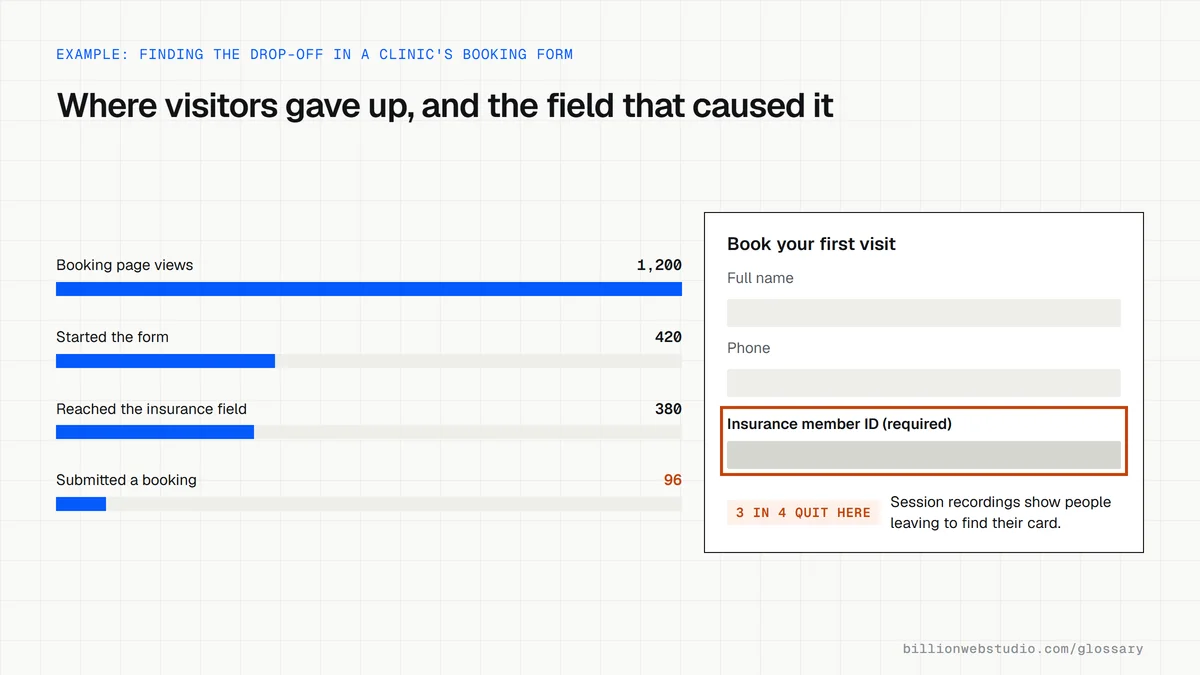
A physical therapy clinic sees that many visitors open its booking page but few finish. Watching session recordings, the designer notices people abandoning the form at a required insurance number field. The clinic makes that field optional, splits the form into two short steps and adds a line explaining what happens next, removing the point where visitors gave up.
Common UX design mistakes
- Designing around what the business wants to say rather than what visitors came to do.
- Burying the contact details and pricing that buyers look for first.
- Using clever menu labels instead of the words customers actually search for.
- Testing only on a large desktop screen.
- Making design decisions on opinion without looking at analytics or watching real users.
Copy this five-task usability test script
USABILITY TEST: Lakeview Physical Therapy website (about 20 minutes)

Intro (read aloud)
"We are testing the website, not you. Please think out loud as you go.
There are no wrong answers, and you can stop at any time."

Warm-up
1. What would you expect a physical therapy clinic's website to help you do?

Tasks (use a phone and start on the homepage each time)
2. Find out whether the clinic treats sports injuries.
3. Find what a first visit costs, or how to check your insurance.
4. Book a first appointment for next Tuesday afternoon.
5. Find where to park.
6. Send the clinic a question about your knee.

Wrap-up
7. What was the hardest part? Did anything almost make you give up?

Observer notes
- Do not help or hint. If asked, reply: "What would you do if I were not here?"
- Record for each task: completed (yes or no), time taken, where they hesitated.
How to find the UX problems on your site this week
- In GA4, open Reports > Engagement > Pages and screens, sort by Views and note busy pages with low average engagement time.
- Click Explore, choose the Funnel exploration template and add steps such as the service page, the contact page and your form submission key event to see where people drop out.
- Install a free session recording tool such as Microsoft Clarity and watch ten recordings of visitors who reached the step with the biggest drop.
- Run a small test: give five people one task each, such as booking a first visit on a phone, ask them to think aloud and write down every point where they hesitate.
- Fix the most common sticking point, then compare the same funnel a few weeks later.
What good looks like: You can name the step where most visitors leave and why, backed by both the funnel numbers and what you saw in recordings or tests, and the funnel's completion rate rises after the fix.
Free tool: GA4 Help: Funnel exploration
Questions to ask your web developer
“What research will you do before designing anything?”
A good answer: A named plan: reviewing analytics and search queries, talking to or surveying a few real customers, and watching sessions on the current site, with findings shared before wireframes start.
“How will you test the design with real users before it is built?”
A good answer: Clickable prototypes tested with about five representative users per round, as Nielsen Norman Group recommends, with tasks written in advance and a short note of what changed after each round.
“How will we know the new design worked?”
A good answer: Baseline numbers recorded before launch, such as form completion rate and calls from phones, and the same report compared after launch.
UX design: common questions
What is the difference between UX and UI design?
UX design covers the whole experience: structure, flow, content and whether the site solves the visitor's problem. UI design covers the visual and interactive surface, such as buttons, typography, colors and spacing. UX decides what belongs on a page and why; UI decides how it looks and feels.
Does UX design affect SEO?
Yes. Google's page experience guidance covers areas UX designers control, such as how content displays on mobile, avoiding intrusive pop-ups, and fast, stable pages. Clear navigation and internal links also help Google crawl and understand your site, and pages that answer visitors' questions well tend to earn more clicks.
What does a UX designer do on a website project?
A UX designer researches who the visitors are and what they need, plans the site structure and user journeys, creates wireframes and prototypes, and tests them with real people. Their work guides the UI designer and developers, so the site is built around how customers actually behave.
Sources
Want a website that gets this right?
Every Billion Web Studio build includes technical SEO, schema and speed work as standard, with a fixed quote within 1 business day.