Building and hosting
What Is Website Maintenance?
Website maintenance is the ongoing work that keeps a live website secure, fast, accurate and working: updating software and plugins, taking backups, renewing the domain and SSL certificate, fixing broken pages and forms, and checking speed and search performance.
What website maintenance means in plain English
A website is not finished at launch. The platform, theme and plugins release updates, browsers change, staff leave, prices change and pages break when linked sites move. Maintenance is the routine of keeping all of that current so the site keeps doing its job.
It splits into technical upkeep, such as updates, backups, security checks and uptime monitoring, and content upkeep, such as correcting opening hours, adding new services, refreshing photos and removing offers that have ended.
Why website maintenance matters for a business
An unmaintained site fails quietly. A plugin update breaks the contact form and nobody notices for weeks, an expired domain takes the site offline, or an old page shows a price you no longer honor. Each problem costs leads and trust before anyone realizes.
Regular care is also cheaper than emergency repair. Fixing a hacked site or rebuilding after years of skipped updates usually costs far more than steady upkeep, and search engines favor sites that load quickly, use HTTPS and keep links working.
A website maintenance example
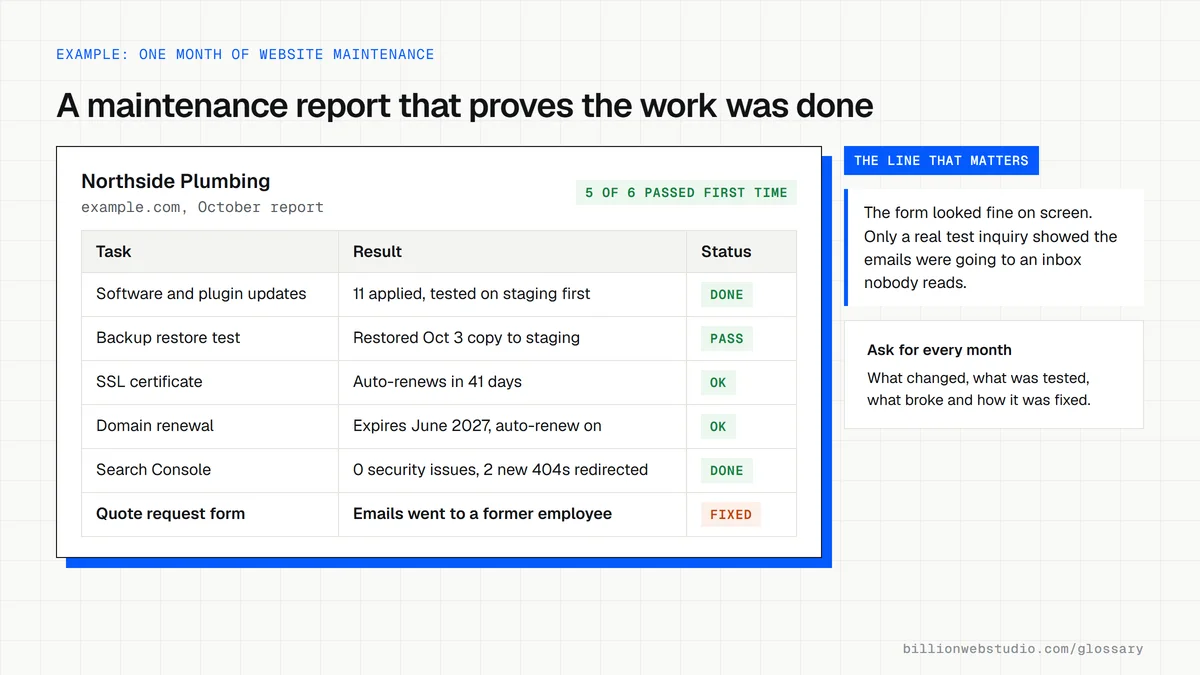
A plumbing company's monthly routine takes about an hour. Someone applies updates on a staging copy first, confirms the latest backup restores, submits a test inquiry through every form, checks Search Console for new errors and updates the seasonal offer. Once a quarter they also review page speed and fix any broken links.
Website maintenance checklist
- Apply platform, theme and plugin updates, testing them on a staging site first.
- Keep automatic backups stored off the server and test a restore regularly.
- Submit a test entry through every form and confirm it arrives where it should.
- Watch domain and SSL certificate renewal dates so neither one expires unnoticed.
- Check Google Search Console for crawl errors, broken pages and security alerts.
- Review content for outdated prices, staff, hours, offers and dates.
A website maintenance schedule for a small business site
| Task | How often | What goes wrong if it is skipped |
|---|---|---|
| Security and plugin updates | Weekly, and the same day for urgent security fixes | Known holes stay open and the site can be hacked through an old plugin |
| Backups and a restore test | Daily backups, restore test every quarter | A backup that has never been restored may not work on the day you need it |
| Form and checkout tests | Monthly and after every update | Inquiries or orders silently stop arriving |
| SSL certificate renewal | Check monthly; auto-renew should handle it | Browsers show a security warning. Maximum certificate life fell to 200 days in March 2026 and drops to 47 days by 2029, so renewals come often |
| Domain renewal | Yearly, with auto-renew on | The whole site and email go offline when the domain lapses |
| Search Console review | Monthly | Hacked pages, new 404 errors and indexing drops go unnoticed |
| Content review | Quarterly | Old prices, staff and offers mislead customers |
How to check that your website maintenance is really happening
- On WordPress, open Dashboard > Updates and see whether the core software, plugins or themes are waiting for an update, then open Tools > Site Health and read any critical issues.
- In Chrome, click the site information icon to the left of the address bar, choose Connection is secure, then Certificate is valid, and note the Valid to date.
- Type your domain into ICANN Lookup and read the registry expiration date, then confirm auto-renew is switched on at your registrar.
- In Google Search Console, open Security & Manual Actions > Security issues, then Indexing > Pages, and look for new Not found (404) pages.
- Ask whoever maintains the site for the date of the last successful backup restore test and where the backup files are stored.
What good looks like: No pending security updates, a certificate and domain with auto-renew on and weeks of runway, no security issues in Search Console, and a restore test dated within the last three months.
Free tool: ICANN Lookup (domain registration data)
Questions to ask your web developer
“How do you apply updates, and what happens if one breaks the site?”
A good answer: Updates go to a staging copy first, a fresh backup is taken before anything touches the live site, and a broken update is rolled back the same day. The monthly report lists what was updated.
“Where are the backups kept, how many copies do you keep, and when did you last test a restore?”
A good answer: Backups are stored off the hosting server, a set number of daily copies is kept (for example 30), and the developer can give the date and result of the last restore test.
“Who owns the domain, hosting account and admin logins?”
A good answer: Everything is registered to your business and your email address. The maintainer works from their own user account, which you can remove at any time without losing the site.
Website maintenance: common questions
What does website maintenance include?
Website maintenance usually includes software and plugin updates, security monitoring, backups, uptime checks, domain and SSL certificate renewals, fixing broken links and forms, speed checks and content updates. Some plans also cover small design changes, SEO reporting and hosting management.
How often should a website be maintained?
Check security updates and backups at least weekly or monthly, depending on how often your platform releases fixes. Test forms monthly, review content quarterly, and do a fuller speed and SEO review once or twice a year. Busy online stores need closer, more frequent attention.
Do I need a maintenance plan after launch?
You need someone responsible, whether that is your own staff, a freelancer or an agency. Billion Web Studio includes 30 days of support after launch, and after that the owner decides how ongoing upkeep is handled. What matters is that updates, backups and form checks actually happen.
Sources
Want a website that gets this right?
Every Billion Web Studio build includes technical SEO, schema and speed work as standard, with a fixed quote within 1 business day.