AI search
What Is Google AI Mode?
Google AI Mode is a conversational search experience inside Google Search that answers longer, more complex questions with an AI-written response and supporting links, and lets the searcher keep asking follow-up questions.
What Google AI Mode means in plain English
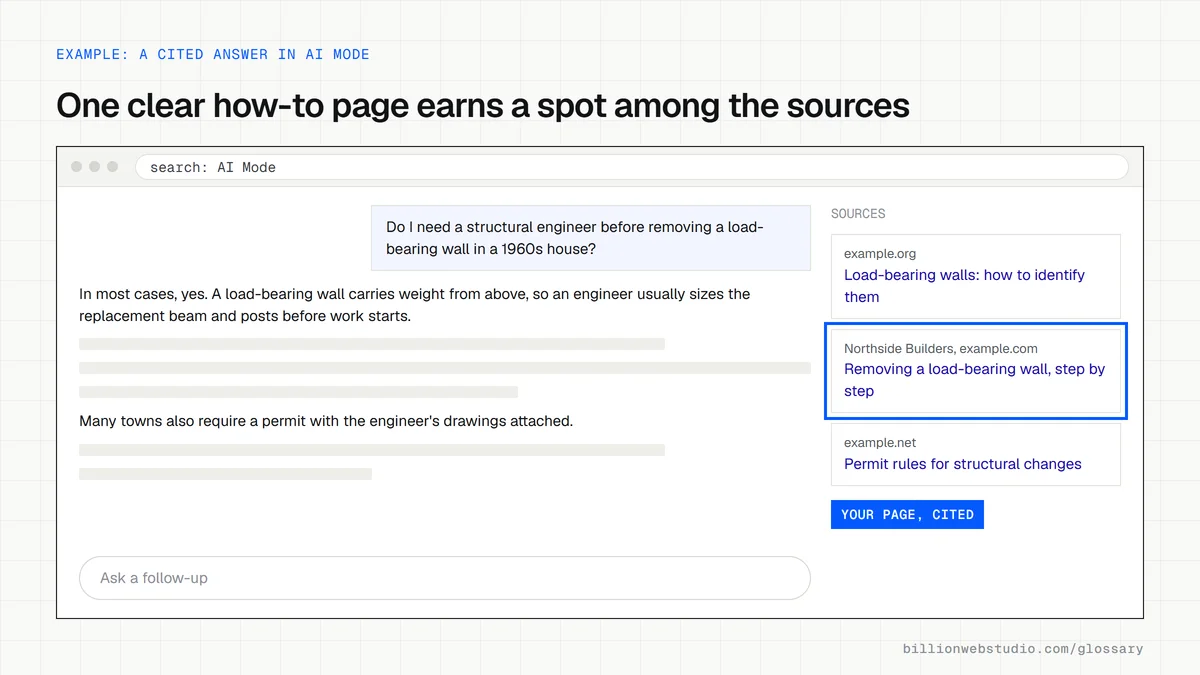
AI Mode is a separate tab in Google Search that works more like a chat than a results page. You type or speak a detailed question, Google writes an answer with links to the pages it drew on, and you can ask a follow-up without starting again. Google's documentation says AI Mode suits questions that need further exploration, reasoning or complex comparisons.
Google announced AI Mode on March 5, 2025 as a Search Labs experiment, opened it to everyone in the United States on May 20, 2025, and expanded it to more than 200 countries and territories on October 7, 2025. In May 2026 Google said AI Mode had passed one billion monthly users. Those figures are Google's own and are correct as of October 2026.
How Google AI Mode differs from AI Overviews
An AI Overview is a short summary that sits above the normal results for some searches, and the classic list of links stays underneath. AI Mode replaces that list with a conversation built for longer questions and comparisons. Both features may use query fan-out, which runs several related searches at once and then combines what they find into a single answer.
AI Mode has also become a place where Google tests agentic features. Google has described AI Mode searching for event tickets, showing booking availability for local services and, for eligible US retailers, offering checkout inside the conversation. Availability of those features varies by country and category, so check Google's latest announcements before planning around them.
Why Google AI Mode matters for a business website
Buyers use AI Mode for the questions they used to split across five searches: which supplier suits a specific need, how two options compare, what a job typically involves. The answer cites a handful of pages. If yours is one of them, you reach the buyer at the shortlist stage. Google states there are no extra technical requirements: a page must be indexed and eligible to show a snippet, and normal SEO practice applies.
How to check Google AI Mode on your own site
- Ask AI Mode the comparison and how-to questions your buyers ask, and note which sites it links to.
- Open the Performance report in Google Search Console, where AI Mode clicks and impressions are counted inside the Web search type.
- Confirm your key service and product pages are indexed and not blocked by nosnippet or noindex rules.
- Keep prices, service areas and specifications in plain text on the page so Google can quote them accurately.
- Track leads and sales from organic search, not only clicks, since a smaller number of visits can still bring better inquiries.
Which preview controls change what AI Mode can use from your page
| Control | Where you set it | Effect in AI Mode and AI Overviews |
|---|---|---|
| noindex | Robots meta tag or X-Robots-Tag header | The page leaves Google Search, so it cannot be shown or linked in AI features at all. |
| nosnippet | Robots meta tag | No text snippet is shown, and Google says the content is not used as a direct input for AI Overviews or AI Mode. |
| max-snippet:[number] | Robots meta tag | Caps how many characters Google may show and use as direct input. max-snippet:0 works like nosnippet. |
| data-nosnippet | Attribute on a span, div or section element | Keeps only that part of the page out of snippets, while the rest of the page stays usable. |
| Google-Extended | robots.txt | Controls use for Gemini training and grounding in other Google products. Google says it does not affect inclusion or ranking in Google Search. |
How to check whether Google AI Mode cites your website
- Go to www.google.com, type a full question a buyer would ask, such as which flooring suits a busy dental clinic, and select AI Mode.
- Read the answer and open the linked sources beside it. Note every site cited and whether any of your pages appear.
- Ask two natural follow-up questions and record the cited sites again, since each turn can draw on different pages.
- Keep the same 10 to 20 questions in a spreadsheet and rerun them every month, because the cited sources vary over time.
- In Search Console, open Performance, then Search results, keep Search type on Web, and check that the pages you want cited earn impressions for long, question-style queries.
- Run each key page through URL Inspection to confirm it is indexed, then view its source to make sure no nosnippet or max-snippet:0 rule was added by mistake.
What good looks like: Every key page is indexed and eligible for a snippet, which Google names as the only technical requirement, and the share of your tracked questions that cite one of your pages holds steady or rises month to month.
Free tool: Google Search Console
Questions to ask your web developer
“How will you show us whether AI Mode cites our pages?”
A good answer: A fixed list of buyer questions is checked on a set schedule with the cited URLs logged, and the report pairs that with Search Console impressions and organic leads counted as GA4 key events.
“Do any of our pages use nosnippet, max-snippet or data-nosnippet, and why?”
A good answer: They can list every page and section that carries a preview control, give the reason for each, and confirm none sits on a page you want quoted.
“Which of our key facts exist only in images, PDFs or scripts?”
A good answer: Prices, service areas and specifications are in HTML text on the page, and anything shown in an image or PDF is repeated in plain text nearby.
Google AI Mode: common questions
Is AI Mode the same as AI Overviews?
No. AI Overviews are summaries shown at the top of a regular results page for some queries. AI Mode is a separate, conversational search experience for complex questions, with follow-ups and more links. Google uses related technology for both, but they appear in different places and behave differently.
Can I see AI Mode traffic in Google Search Console?
Partly. Google includes AI Mode clicks and impressions in the Performance report under the Web search type, together with regular search and AI Overviews. As of October 2026, Google's documentation does not describe a separate AI Mode filter, so you cannot isolate that traffic there.
How do I get my website to appear in Google AI Mode?
There is no form to submit and no special markup. Google says a page needs to be indexed and eligible to show a snippet in Search. Clear answers to real buyer questions, content in text rather than images, and structured data that matches the page all help, though inclusion is never guaranteed.
Sources
- Google Search Central: AI features and your website
- Google blog: Expanding AI Overviews and introducing AI Mode, March 5, 2025
- Google blog: AI Mode in Google Search, updates from Google I/O 2025, May 20, 2025
- Google blog: AI Mode is now available in more languages and locations, October 7, 2025
- Google blog: Google Search's I/O 2026 updates, May 19, 2026
- Google Search Central: Robots meta tag, data-nosnippet and X-Robots-Tag specifications
- Google Search Central: Google's common crawlers (Google-Extended)
- Google Search Help: Get AI-powered responses with AI Mode
Want a website that gets this right?
Every Billion Web Studio build includes technical SEO, schema and speed work as standard, with a fixed quote within 1 business day.