SEO
What Is Google Search Console?
Google Search Console is a free service from Google that shows how a website performs in Google Search, including which searches bring clicks, which pages are indexed and what problems Google finds. Site owners use it to monitor, fix and improve their search presence.
What Google Search Console means in plain English
Search Console is the direct line between your website and Google. Once you prove you own the site, Google shares data you cannot get anywhere else: the searches that showed your pages, how often people clicked, which pages are in its index and why others are not. It also alerts you to indexing, spam and security problems.
You do not need Search Console to appear in Google, but without it you are guessing. To add a site, you verify ownership with a DNS record at your domain provider, an HTML file, a meta tag, Google Analytics or Google Tag Manager. A Domain property, which covers every subdomain and protocol, can only be verified with a DNS record.
Why Google Search Console matters for a business website
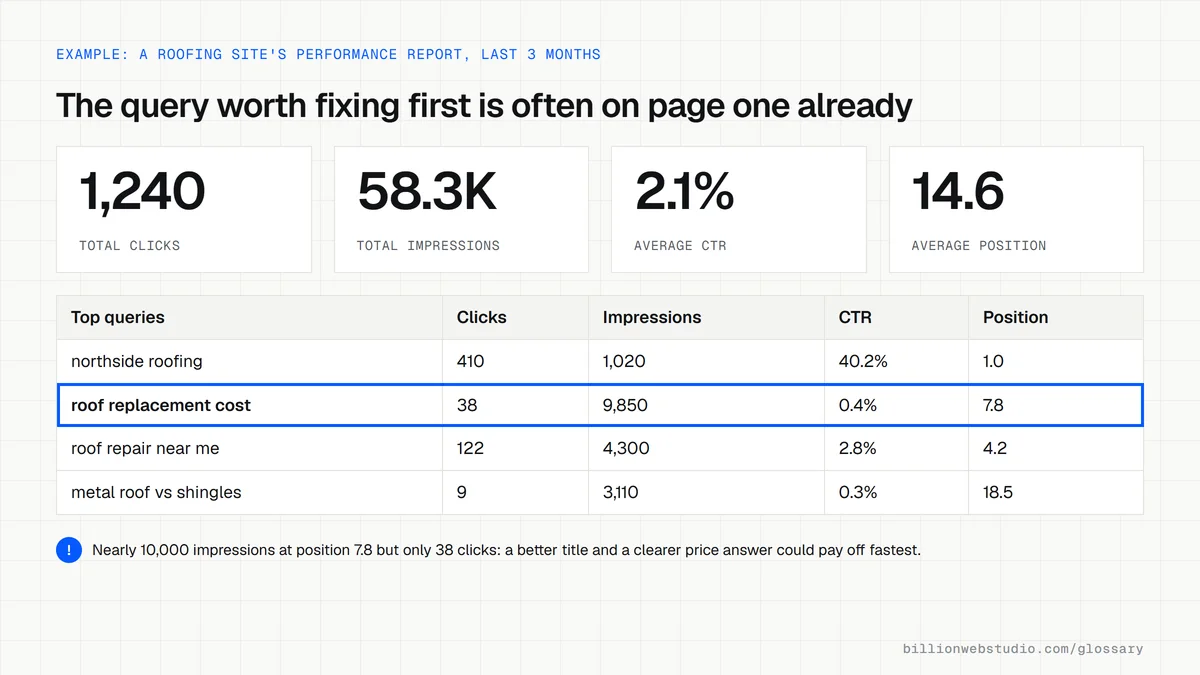
It is the only place to see which Google searches actually bring people to your site. The Performance report shows clicks, impressions, click-through rate and average position for each query and page, with up to 16 months of history. That shows which pages win leads, which nearly rank and when a drop starts, so you can act early.
Key Google Search Console reports
- Performance shows the searches, pages, countries and devices that bring clicks and impressions.
- Page indexing shows which pages Google has indexed and the reason each excluded page is left out.
- URL Inspection shows the indexed status of a single URL, with a live test and a Request indexing button.
- Sitemaps is where you submit your XML sitemap and see whether Google could read it.
- Links shows the sites linking to you and your most internally linked pages.
A Google Search Console example
A roofing company's leads drop in March. In Search Console, the Performance report shows impressions for "roof replacement cost" fell sharply from one date. The Page indexing report shows the cost guide is now excluded as a page with a redirect, because a plugin changed its URL. Restoring the URL and requesting indexing through URL Inspection brings the page back.
Copy this DNS record for Search Console verification
; TXT record that verifies example.com in Google Search Console
; Most DNS panels ask for these fields:
Type:   TXT
Host:   @   (some providers want this left blank)
Value:  google-site-verification=REPLACE_WITH_YOUR_CODE
TTL:    3600, or your provider's default

; The same record in zone file format:
example.com.  3600  IN  TXT  "google-site-verification=REPLACE_WITH_YOUR_CODE"

; Keep it after verifying. Removing it ends verification.
How to set up and check Google Search Console for your site
- Go to Google Search Console, sign in with a Google Account the business controls, and choose Add property from the property menu.
- Choose Domain, type your domain without https or www, and copy the TXT record Search Console shows.
- Add the TXT record at your domain provider, with the host set to @ or left blank, then click Verify. Google says the record can take up to two or three days to start working.
- Open Sitemaps, enter your sitemap address, such as sitemap.xml, and click Submit.
- Under Settings, open Users and permissions and confirm the business account is the owner. Give an agency Full or Restricted access instead of ownership.
- A few days later, open Performance and check that clicks and impressions are appearing.
What good looks like: A verified Domain property owned by a business account, a sitemap with the status Success, and Performance data coming in. The TXT record stays in place, because removing it ends verification.
Free tool: Google Search Console
Questions to ask your web developer
“Whose Google Account will own our Search Console property?”
A good answer: The business's own account is the verified owner. The agency is added as a full user and can be removed at any time without the business losing any data.
“Which Search Console reports will you review each month, and what will you act on?”
A good answer: Performance by query and page, Page indexing, and any manual action or security notice, with a short note on what changed and which pages they will fix next.
“Will you set up a Domain property or a URL-prefix property?”
A good answer: A Domain property verified by DNS, so every subdomain and both http and https are covered, with a URL-prefix property added only where a specific report needs one.
Google Search Console: common questions
Is Google Search Console free?
Yes. Google Search Console is free for any website owner. You need a Google account and a way to verify that you own the site, such as adding a DNS record at your domain registrar or uploading an HTML file. There is no paid version.
What is the difference between Google Search Console and Google Analytics?
Search Console shows what happens before the click: the Google searches your pages appeared for, impressions, clicks and indexing problems. Google Analytics shows what visitors do after they arrive from any source, such as which pages they view and whether they submit a form. Most business sites use both, and the two can be linked.
How long does Google Search Console keep data?
The Performance report keeps up to 16 months of search data. Anything older is no longer available in the report, so if you want longer comparisons you need to export the data regularly or pull it through the Search Console API into your own storage.
Sources
- Search Console Help: About Search Console
- Search Console Help: Verify your site ownership
- Search Console Help: Performance report (Search results)
- Google Search Central Blog: Introducing the new Search Console
- Search Console Help: URL Inspection tool
- Search Console Help: Links report
- Search Console Help: Advanced filtering and comparison
Want a website that gets this right?
Every Billion Web Studio build includes technical SEO, schema and speed work as standard, with a fixed quote within 1 business day.