AI search
What Is a Knowledge Panel?
A knowledge panel is an information box that Google shows in search results for people, places, organizations and things in its Knowledge Graph, giving a quick overview such as a description, logo, website, social profiles and key facts.
What a knowledge panel means in plain English
Search for a well-known company or person and Google often shows a box of facts beside the results on desktop, or among them on mobile. That box is a knowledge panel. Google generates panels automatically from its Knowledge Graph and updates them as information on the web changes, using sources across the web, licensed data and feedback from the people and organizations featured.
A knowledge panel is different from the local business listing with hours, reviews and a map pin. That listing comes from a Google Business Profile, which local businesses manage separately. Brands, people and organizations without a storefront can still have a knowledge panel.
Why a knowledge panel matters for a business
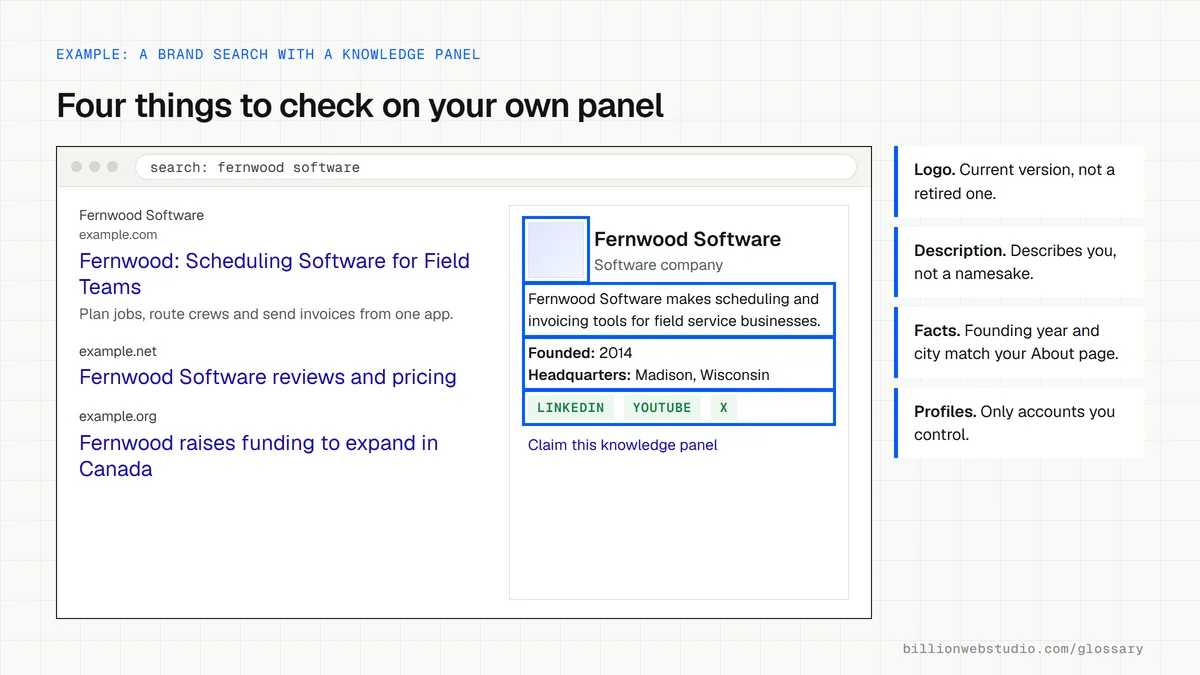
For anyone searching your brand name, the panel is often the first thing they read. A correct panel with your logo, a clear description and links to official profiles builds trust before the click. A wrong one, such as an old logo, a former CEO or a mixed-up company with the same name, quietly undermines it. Panels are generated automatically, and Google's help pages describe no way to switch one on for your brand.
How to claim and edit a knowledge panel
If a panel already exists, search for your business, select Claim this knowledge panel, and verify by signing in to one of the official sites or profiles Google lists, such as your Search Console property or YouTube channel. Not every panel can be claimed yet.
Once verified, use the Feedback option on the panel to suggest a change and include links that support it. Google gives priority review to verified users, but it still decides what appears. Owners can add managers and contributors, which helps when an agency or new marketing lead takes over.
Common knowledge panel mistakes
- Trying to manage a local storefront's hours and phone number through the knowledge panel instead of the Google Business Profile.
- Suggesting edits without links to official pages that prove the correction.
- Claiming the panel with a personal account that leaves when the employee does.
- Letting the website's About page, logo and social profiles contradict each other.
- Assuming structured data will force a panel to appear, when it only helps Google understand the entity.
Copy this knowledge panel correction note
Suggested change for: [Brand name] knowledge panel
Field: Logo
Currently shows: Old blue square logo (retired March 2025)
Should show: Current logo, as used on https://www.example.com/about

Supporting links:
  https://www.example.com/about
  https://www.example.com/press/new-brand-identity
  https://www.linkedin.com/company/example-brand

Why: The company rebranded in March 2025. Our website and all
official profiles now use the new logo, and the old one is retired.

Submitted by: [Name], [Job title], verified representative
How to check and claim your brand's knowledge panel
- Sign in to a Google Account the business controls, not a personal one, and search Google for your brand name.
- If a panel appears, compare its name, logo, description, website link and social profiles with your current details.
- Select Claim this knowledge panel at the bottom of the panel or in its About section. On mobile, the same option sits in the panel's menu.
- Verify by signing in to one of the official sites or profiles Google lists, such as your Search Console property or YouTube channel.
- Once verified, use Feedback on the panel to suggest each correction, adding a link to an official page that shows the right fact.
What good looks like: The panel shows your current logo, an accurate description and only your official profiles, and it is claimed by a business-owned account with a second manager added. If the claim option is missing, search again every few months.
Free tool: Google Help: Get verified on Google (knowledge panels)
Questions to ask your web developer
“Which account will claim our knowledge panel, and who else can manage it?”
A good answer: A Google Account owned by the business and linked to the company's Search Console property or YouTube channel, with a second manager added so access survives staff changes.
“Which official pages will back up each correction we request?”
A good answer: Each change is matched to a live page on your own site or an official profile that states the correct fact in plain text, and that page is updated before the feedback is sent.
Knowledge panel: common questions
How do I get a knowledge panel for my business?
Google's help pages offer no way to request or pay for one. Google creates knowledge panels automatically when it has enough reliable information about an entity. Consistent business details across your site and official profiles, Organization structured data and mentions on reputable sites make it easier for Google to recognize your business.
Is a knowledge panel the same as a Google Business Profile?
No. A Google Business Profile is a listing a local business creates and manages for Search and Maps, with hours, reviews and directions. A knowledge panel is generated by Google from its Knowledge Graph for people, brands and things, and its subject can claim it and suggest changes.
Can I change the information in my knowledge panel?
You can suggest changes. Anyone can use the Feedback link on a panel, and verified representatives get priority review. Include links to official sources that support each correction. Google reviews the suggestion and decides whether to update the panel, so changes are not instant or guaranteed.
Sources
Want a website that gets this right?
Every Billion Web Studio build includes technical SEO, schema and speed work as standard, with a fixed quote within 1 business day.