AI search
What Is Vibe Coding?
Vibe coding is a way of building software in which a person describes what they want to an AI tool in plain language and accepts the code it produces, usually without reading, reviewing or fully understanding that code.
What vibe coding means in plain English
Andrej Karpathy, a co-founder of OpenAI, coined the term in a post on X on February 2, 2025. He described a new kind of coding where you give in to the vibes and forget that the code even exists, and he noted it was fine for throwaway weekend projects. Collins Dictionary named vibe coding its Word of the Year on November 6, 2025.
The defining feature is the missing review step. A developer who asks an AI assistant for code, then reads it, tests it and could explain every line, is doing ordinary software development with AI help. Vibe coding is when nobody checks: you prompt, run the result, paste in any error message and prompt again until the thing appears to work.
Why vibe coding matters for a business website
Vibe coding makes it cheap to try ideas. A founder can mock up a calculator, a booking flow or a landing page in an afternoon and show it to customers before paying for a full build. That is useful, as long as everyone treats the result as a prototype.
The risk starts when unreviewed code goes live. A business website handles contact details, payments and logins, and it has to rank, load quickly on phones and work with screen readers. Code that nobody understands is hard to secure, hard to fix when it breaks, and often missing basics such as page titles, redirects and form spam protection.
A vibe coding example
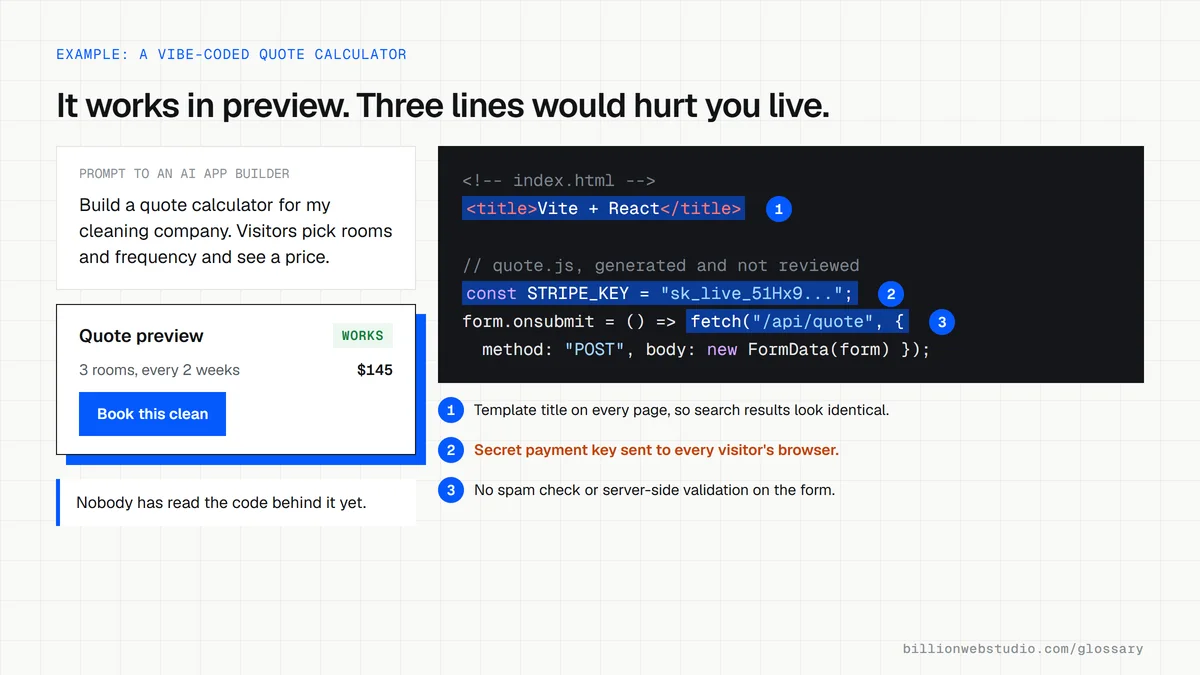
The owner of a cleaning company asks an AI app builder for a quote calculator where visitors pick room count and frequency and see a price. Within an hour there is a working page, and the office team tries it with real customer scenarios. Before adding the calculator to the live site, a developer reviews where submitted details are stored, adds spam protection, checks speed on a mid-range phone and connects the form to analytics so every quote request is counted.
Common vibe coding mistakes
- Publishing AI-generated code to the live site without anyone reading it first.
- Pasting API keys or passwords into prompts or into front-end code that every visitor can download.
- Letting a form collect names, emails or health details without checking where that data ends up.
- Skipping a staging copy, so every experiment happens on the site customers are using.
- Forgetting search basics such as unique page titles, crawlable links and redirects for changed URLs.
- Having no one on the team who can explain or maintain the code once the original prompts are gone.
Copy this pre-launch checklist for AI-generated code
PRE-LAUNCH REVIEW: AI-GENERATED PAGE OR FEATURE
Page or feature: ____________  Reviewer: ____________  Date: ______

[ ] A developer has read every file and can explain what it does
[ ] No API keys, passwords or tokens in browser code or in the repo
[ ] Secrets stored as server environment variables
[ ] Forms validate input on the server, not only in the browser
[ ] Spam protection on every public form
[ ] Form data goes to a named system with limited access
[ ] Dependencies checked for known vulnerabilities (npm audit or similar)
[ ] Unique title, meta description and one H1 per page
[ ] Changed URLs have 301 redirects
[ ] Core Web Vitals pass on a mobile test
[ ] Zero errors in an accessibility checker
[ ] Key events (form submit, call click) tracked in analytics
[ ] Tested on a staging copy, with a rollback plan
[ ] Code committed to a repository the business owns
How to check a vibe-coded page before it goes live
- Open the page in Chrome, right-click and choose View page source, press Ctrl+F (Cmd+F on a Mac) and search for key, secret, token and sk_live. Any long random string you find is readable by every visitor and has to move to the server.
- Paste the URL into PageSpeed Insights, keep the Mobile tab selected and read the Core Web Vitals assessment at the top of the report.
- Run the same URL through the WAVE accessibility checker and open its Errors list, where missing form labels, empty buttons and missing alt text appear.
- Submit every form twice: once with a test entry to see exactly where it lands, and once with the fields empty to confirm it is refused.
- Back in View page source, search for <title> and confirm the page has its own title and meta description, not a template default such as React App or Vite + React.
What good looks like: No secrets in the page source, a passed Core Web Vitals assessment (LCP 2.5 seconds or less, INP 200 milliseconds or less, CLS 0.1 or less), zero WAVE errors, and every test submission arriving in the inbox or CRM you expected.
Free tool: PageSpeed Insights
Questions to ask your web developer
“Who reads AI-generated code before it reaches the live site?”
A good answer: A named developer reviews every change in a pull request, can explain what each part does, and it runs on a staging copy with automated checks before it is merged and deployed.
“Where do API keys and form submissions end up?”
A good answer: Secret keys sit in server-side environment variables, never in browser code, and the developer can name the system that stores each form's data, who can access it and how long it is kept.
“Could another developer take over this code next month?”
A good answer: Yes. The code lives in a repository the business owns, with a short README on how to run, deploy and roll back, and every dependency is listed with its version.
Vibe coding: common questions
Who coined the term vibe coding?
The AI researcher Andrej Karpathy introduced the phrase in a post on X on February 2, 2025, describing coding by voice and prompt while barely touching the keyboard. The term spread quickly, and Collins Dictionary chose vibe coding as its Word of the Year for 2025.
Is vibe coding safe for a business website?
Vibe coding is fine for prototypes, internal experiments and testing an idea with customers. For a live site that handles leads, payments or personal data, the code needs a review by someone who understands it, plus testing for security, speed, accessibility and search basics before launch.
What is the difference between vibe coding and AI-assisted coding?
The difference is review. In AI-assisted coding, a developer uses AI to write code faster but reads, tests and takes responsibility for every change. In vibe coding, the person accepts whatever the AI produces and judges it only by whether it seems to work.
Sources
Want a website that gets this right?
Every Billion Web Studio build includes technical SEO, schema and speed work as standard, with a fixed quote within 1 business day.