AI search
What Are AI Overviews?
AI Overviews are AI-generated summaries that Google shows at the top of some search results, answering the query in a few sentences and linking to the web pages that support the answer.
What AI Overviews mean in plain English
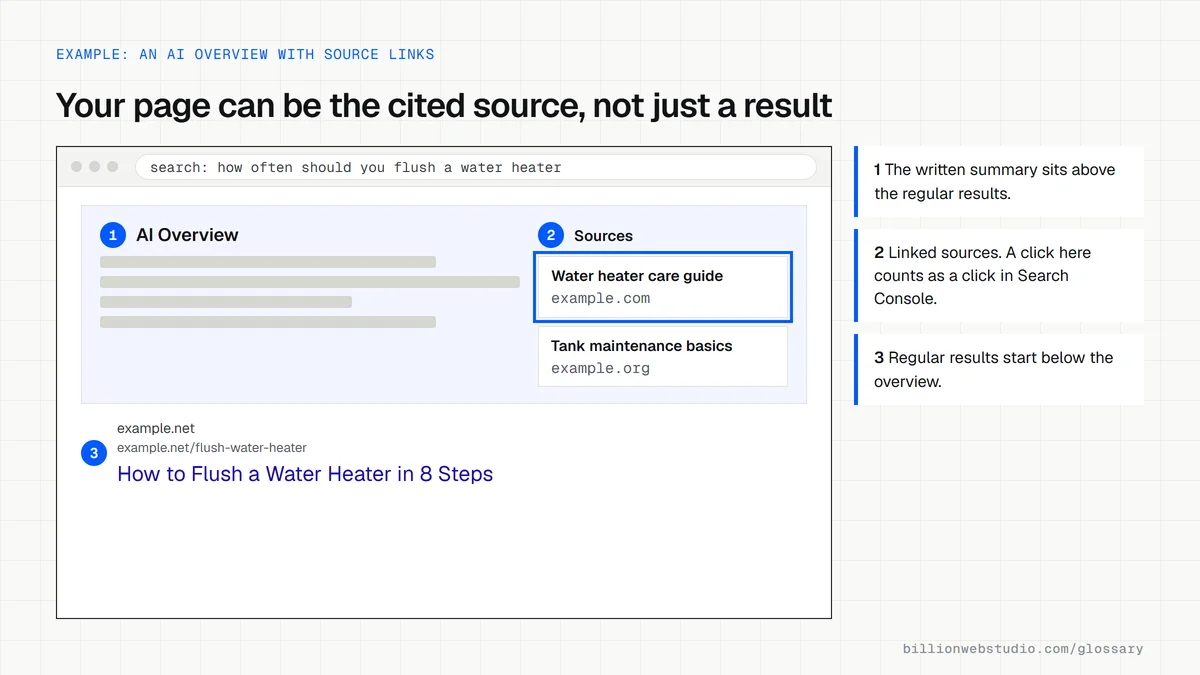
Google began rolling out AI Overviews to everyone in the United States on May 14, 2024, after testing them in Search Labs, with more countries added after that. An AI Overview appears above the usual results for some searches and gives a written answer with links to the sources it drew on.
Google says AI Overviews appear only when its systems judge them to be additive to classic search results, so many queries still show none. Google also offers AI Mode, a separate conversational search experience suited to more complex questions and follow-ups.
Why AI Overviews matter for a business website
An AI Overview can answer a simple question without a click, which can reduce traffic to basic informational pages. The links inside it are also a new place to be seen. Google states that clicks from results pages with AI Overviews tend to be higher quality, with visitors more likely to spend more time on the site.
How to appear in AI Overviews
There is no application form, special markup or extra file. Google's documentation says a page must be indexed and eligible to show in Google Search with a snippet, and that the usual SEO fundamentals apply: allow crawling, use internal links, keep important content in text, and make structured data match the visible page. Inclusion is never guaranteed.
How to check AI Overviews traffic on your site
- Open the Performance report in Google Search Console and use the Web search type, which includes traffic from AI Overviews and AI Mode.
- Expect AI Overview clicks to sit inside your overall search totals, so watch trends on pages that answer common questions.
- Search your main buyer questions in Google yourself and note which sites the overview links to.
- If you need to keep text out of AI Overviews, use nosnippet, data-nosnippet or max-snippet, knowing these also limit regular snippets.
Which control does what to AI Overviews
| Control | Effect on AI Overviews | Effect on regular results |
|---|---|---|
| noindex | The page cannot be used | The page is removed from Search |
| nosnippet | No text from the page can be shown | No text snippet under the listing |
| max-snippet:[number] | Limits how many characters can be quoted | The same limit applies to the text snippet |
| data-nosnippet on a section | That section cannot be shown | That section is left out of snippets |
| robots.txt Disallow for Googlebot | The page cannot be crawled, so its text cannot be used | The URL may still appear, but without a description |
| Google-Extended in robots.txt | No change: Google says it does not affect inclusion in Search | No change |
Copy this markup to keep part of a page out of AI Overviews
<!-- This paragraph can be quoted in snippets and AI Overviews -->
<p>A standard service call covers diagnosis and the first 30 minutes of labor.</p>

<!-- Visitors still see this block, but Google will not quote it -->
<div data-nosnippet>
  <p>Member pricing: $89 per visit for active plan holders.</p>
</div>

<!-- Or, inside <head>, cap every text snippet from this page -->
<meta name="robots" content="max-snippet:160">
How to check if a page can be linked from AI Overviews
- In Search Console, inspect the page with URL Inspection and confirm the result says URL is on Google.
- Open the page in Chrome, right-click, choose View page source and press Ctrl+F to search for nosnippet and max-snippet: either one limits what Google can show.
- Visit yourdomain.com/robots.txt and make sure no rule blocks Googlebot from the page or its folder.
- Search the question the page answers; if an AI Overview appears, open its source links and note which sites are cited.
- Repeat each month for your five most important buyer questions and keep a short log of who is cited.
What good looks like: The page is indexed, carries no nosnippet or very low max-snippet rule, and is open to Googlebot. Google says such a page is eligible to appear as a supporting link, with no extra technical requirements, but inclusion is not guaranteed.
Free tool: Google Search Console URL Inspection
Questions to ask your web developer
“Have you added any rule to our pages that limits snippets, such as nosnippet or max-snippet?”
A good answer: They can list every page where a preview control is used and why, and confirm none sits on pages we want quoted in AI Overviews.
“If we block Google-Extended in robots.txt, does that keep us out of AI Overviews?”
A good answer: No. Google says Google-Extended does not affect inclusion in Google Search; it covers Gemini Apps and Vertex AI. To limit what AI Overviews show, they would use the snippet controls instead.
AI Overviews: common questions
Can I stop my content from appearing in AI Overviews?
Yes, with Google's preview controls. The nosnippet rule, the data-nosnippet attribute and max-snippet limit what Google can show from a page, including in AI Overviews. A noindex rule removes the page from Search entirely. These controls affect normal snippets too, so use them with care.
Do AI Overview clicks show in Search Console?
Yes. Google counts a click on an external link inside an AI Overview as a click in Search Console, and the usual impression rules apply. That traffic is reported in the Performance report under the Web search type, together with regular results.
Do I need schema markup to appear in AI Overviews?
No. Google says there is no special schema.org structured data you need to add for its AI features. Structured data still helps search engines understand a page, and Google recommends keeping it consistent with the text visitors can see.
Sources
- Google Search Central: AI features and your website
- Google: Generative AI in Search, May 2024
- Search Console Help: What are impressions, position, and clicks?
- Google Search Central: Control your snippets in search results
- Google Search Central: Robots meta tag, data-nosnippet and max-snippet
- Google Search Central: Google's common crawlers (Google-Extended)
- Google Search Central: Introduction to robots.txt
Want a website that gets this right?
Every Billion Web Studio build includes technical SEO, schema and speed work as standard, with a fixed quote within 1 business day.