Conversion and analytics
What Is GA4?
GA4 stands for Google Analytics 4.
GA4 (Google Analytics 4) is Google's free analytics tool that records what visitors do on a website or app as events, such as page views, clicks, form submissions and purchases. GA4 replaced Universal Analytics, which stopped processing data on July 1, 2023.
What GA4 means in plain English
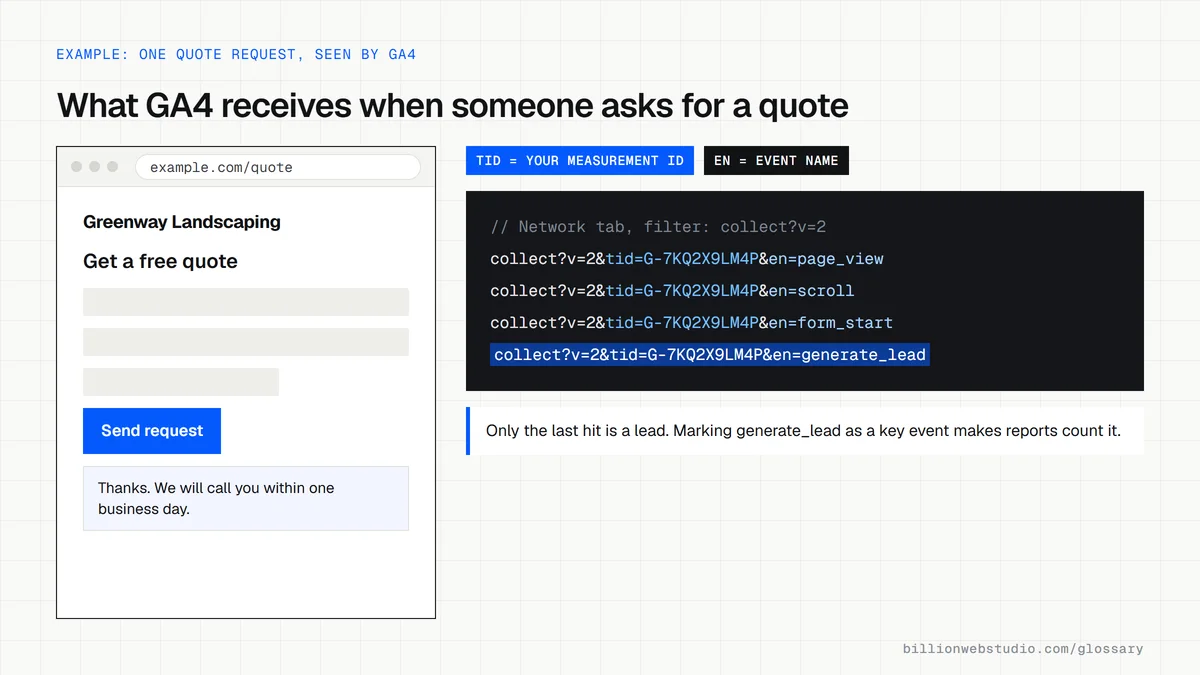
GA4 is the current version of Google Analytics. A small piece of code, called the Google tag, runs on every page and sends Google a record each time something happens. GA4 calls each record an event. Page views are collected automatically, and with enhanced measurement switched on GA4 also records actions like scrolls and outbound clicks.
Any event that matters to your business, such as a quote request or a purchase, can be marked as a key event, the name GA4 now uses for what it used to call conversions. Reports then show how many people completed each key event and which channels, campaigns and pages led them there.
Why GA4 matters for a business website
GA4 answers the questions an owner actually asks: where visitors come from, which pages they read and which channel brings the leads or sales. Without it, decisions about ads, content and redesigns rest on guesses. Because it is free, few business websites have a good reason to run without it. At Billion Web Studio, every lead is tracked in analytics as standard.
A GA4 example
A law firm installs GA4 and marks two events as key events: the contact form submission and a tap on the phone number. After a month, its reports show that form leads come mostly from organic search to practice area pages, while calls come mainly from its Google Business Profile. The firm shifts content budget toward the pages that produce cases.
How to check GA4 on your own site
- Open the Realtime report while you browse your site on your phone and confirm your visit appears.
- Check that form submissions, phone taps or purchases are marked as key events, not just collected.
- Set data retention to 14 months, the longest option for a standard property, so explorations can compare a full year.
- Make sure you, not only your developer or agency, hold administrator access to the GA4 property.
Which GA4 report answers which business question
| Question | Where to look in GA4 | What to read |
|---|---|---|
| Where do my visitors come from? | Reports > Acquisition > Traffic acquisition | Sessions and key events by session default channel group |
| Which pages get read? | Reports > Engagement > Pages and screens | Views and average engagement time for each page |
| Which pages do visits start on? | Reports > Engagement > Landing page | Sessions and key events for each landing page |
| How many leads or sales did we get? | Reports > Engagement > Key events | The count of each key event and how it changes over time |
| Where do people drop out before contacting us? | Explore > Funnel exploration | The step with the highest abandonment rate |
| Is the tag collecting data right now? | Reports > Realtime overview | Active users and events arriving in the last 30 minutes |
How to confirm the GA4 tag is installed on any page
- Find your Measurement ID: in GA4 open Admin, then Data streams, and click your web stream. The ID starts with G-.
- Go to tagassistant.google.com, click Add domain, enter the page address and click Connect.
- Browse the page in the window that opens, then return to Tag Assistant. Your G- ID should be listed with a page_view event under it.
- Check that the same G- ID is listed only once. Two copies, for example one in the theme and one in Tag Manager, count every visit twice.
- Without Tag Assistant: open Chrome DevTools, choose the Network tab, reload the page and type collect?v=2 in the filter box. Each line is a hit sent to GA4.
What good looks like: One Google tag with your own G- ID on every page, one page_view per page load, and each key event firing once per action.
Free tool: Google Tag Assistant
Questions to ask your web developer
“Which events will you track beyond page views, and what will each one be called?”
A good answer: A short tracking plan listing each event, such as generate_lead for the quote form and a phone_click event for call taps, the trigger for each, and which ones are marked as key events.
“How will you keep our own staff and developers out of the data?”
A good answer: They define your office IP addresses as internal traffic in the web stream's tag settings, activate the internal traffic data filter, and exclude developer test visits the same way.
“Will GA4 follow our cookie banner?”
A good answer: Where consent is required, the tag runs with Google consent mode, so analytics storage waits for the visitor's choice, and they show you the consent state in Tag Assistant before launch.
GA4: common questions
Is GA4 free?
Yes. Google Analytics, including GA4, is free to use. Google also sells Analytics 360, a paid version for large organizations that need higher limits and longer data retention. A typical small or mid-sized business website gets everything it needs from the free version.
What happened to Universal Analytics?
Universal Analytics, the previous version of Google Analytics, stopped processing new data for standard properties on July 1, 2023, and the last paid 360 properties stopped on July 1, 2024. GA4 replaced it. Old Universal Analytics data does not carry over into GA4, so GA4 reports start from the day its tag was installed.
Is GA4 hard to set up?
Basic setup is quick: create a property, add a web data stream and place the Google tag on your site, either in the page code, through your CMS settings or through Google Tag Manager. The harder part is choosing which events count as key events and testing that each one fires correctly.
Sources
- Google Analytics Help: Universal Analytics has been replaced by Google Analytics 4
- Google Analytics Help: About events
- Google Analytics Help: About key events
- Google Analytics Help: Data retention
- Google Analytics Help: Set up Analytics for a website
- Google Marketing Platform: Google Analytics
- Google Analytics Help: Pages and screens report
- Google Analytics Help: Funnel exploration
- Google Analytics Help: Find your Google tag ID
- Tag Assistant Help: Troubleshoot with Tag Assistant
Want a website that gets this right?
Every Billion Web Studio build includes technical SEO, schema and speed work as standard, with a fixed quote within 1 business day.