Conversion and analytics
What Is Conversion Rate?
Conversion rate is the percentage of website visitors or sessions that complete a goal you care about, such as a purchase, a quote request or a phone call, calculated as conversions divided by visitors, multiplied by 100.
What conversion rate means
A conversion is any action that moves a visitor closer to becoming a customer. For a shop it is usually a purchase; for a service business it may be a form submission, a call or a booking. Conversion rate tells you what share of your traffic does that, which says more about a website's performance than visitor numbers alone.
In Google Analytics 4, the actions you mark as important are called key events, a name that replaced conversions for these actions inside Analytics. GA4 reports session key event rate, the percentage of sessions in which a key event happened, and user key event rate, the percentage of users who completed one.
Why conversion rate matters for revenue
Conversion rate connects traffic to revenue. Doubling traffic costs money in ads or content, while lifting the share of visitors who inquire often costs only design and copy changes. The metric also exposes hidden problems: a page with strong traffic and almost no inquiries usually has an offer, trust or usability issue rather than a traffic issue.
A conversion rate example
A landscaping company's website gets 4,000 sessions in a month, and 60 of those sessions include a submitted quote form. Its session conversion rate is 60 divided by 4,000, or 1.5%. After moving the quote button higher and cutting the form from nine fields to four, the team compares the next month's rate against that baseline.
Common conversion rate mistakes
- Counting every button click as a conversion, which inflates the rate and hides real lead volume.
- Comparing your rate with generic industry averages instead of with your own past performance.
- Ignoring phone calls and chat inquiries, which leaves part of your leads out of the calculation.
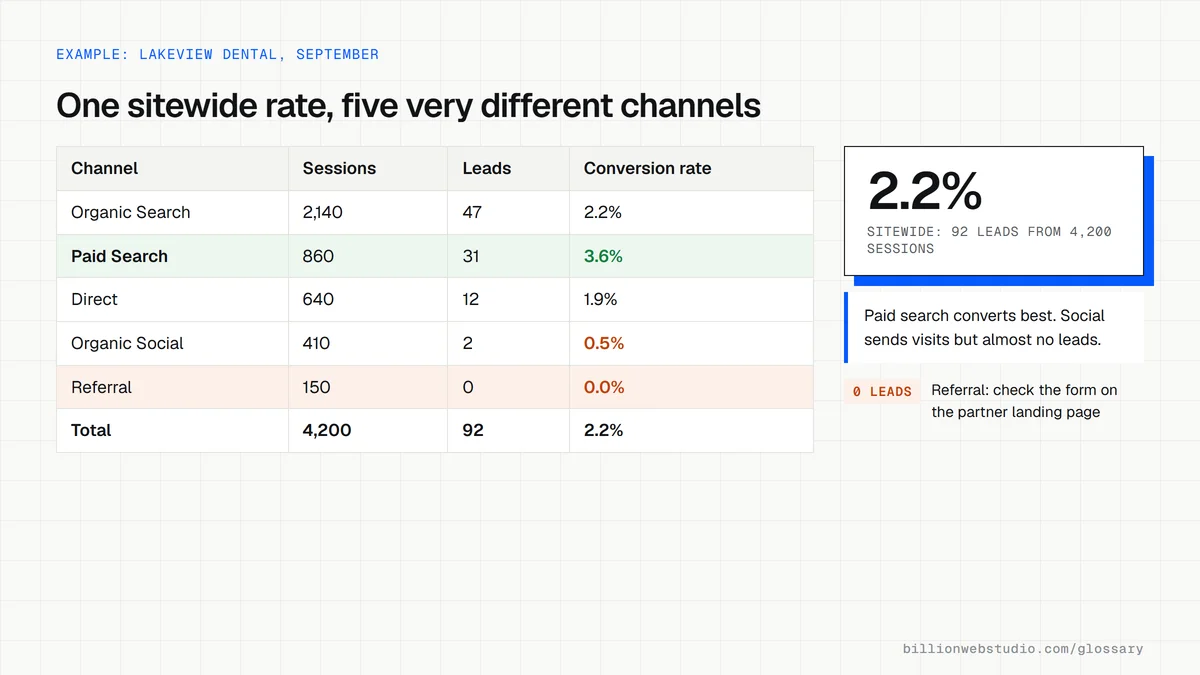
- Reading only the sitewide figure, when individual pages and traffic sources tell very different stories.
Work out your Conversion rate
Conversion rate calculator
How to find your conversion rate by channel in GA4
- In GA4, open Reports, then Acquisition, then Traffic acquisition. If your property uses the Business objectives collection, the same report is under Generate leads.
- Set the date range to the last 28 days, or to a full month you can compare with the one before.
- Scroll the table to the right to the Key events and Session key event rate columns. If they are missing, click the pencil icon to customize the report and add them under Metrics.
- Use the drop-down above the Key events column to choose one key event, such as your quote form, instead of all key events.
- Read the rate for each channel, then change the date range to the previous period and compare.
What good looks like: Each lead is counted once, the rate holds steady or rises against your own earlier periods, and no channel with real traffic shows zero key events, which usually means broken tracking rather than bad traffic.
Free tool: Google Analytics
Questions to ask your web developer
“Which actions will you count as conversions, and which will you leave out?”
A good answer: A short written list: form submissions, phone taps, booking confirmations and purchases count; menu clicks, scrolls and page views do not. Each counted action fires once per lead.
“Will a form lead be counted on the thank you page or on a successful submission?”
A good answer: On a confirmed successful submission, so a page reload, a bookmarked thank you page or a form that failed to send does not count as a lead.
“How will you report conversion rate after launch?”
A good answer: Monthly, by channel and by landing page, compared with the same period before launch and using the same key event definitions, so the numbers can be compared fairly.
Conversion rate: common questions
What is a good conversion rate?
There is no single good number, because rates vary widely by industry, price, traffic source and what you count as a conversion. The most useful benchmark is your own site over time. Track the same action from the same traffic sources and aim to improve it month by month.
How do you calculate conversion rate?
Divide the number of conversions by the number of visitors or sessions, then multiply by 100. For example, 30 inquiries from 1,500 sessions gives a 2% conversion rate. Make sure both numbers cover the same date range and the same traffic you are measuring.
Sources
Want a website that gets this right?
Every Billion Web Studio build includes technical SEO, schema and speed work as standard, with a fixed quote within 1 business day.