Conversion and analytics
What Is Google Tag Manager?
Google Tag Manager is a free Google tool that lets you add and manage tracking codes, called tags, on a website or app from one dashboard instead of editing the site's code each time. Typical tags include GA4, Google Ads conversion tracking and social media ad pixels.
What Google Tag Manager means in plain English
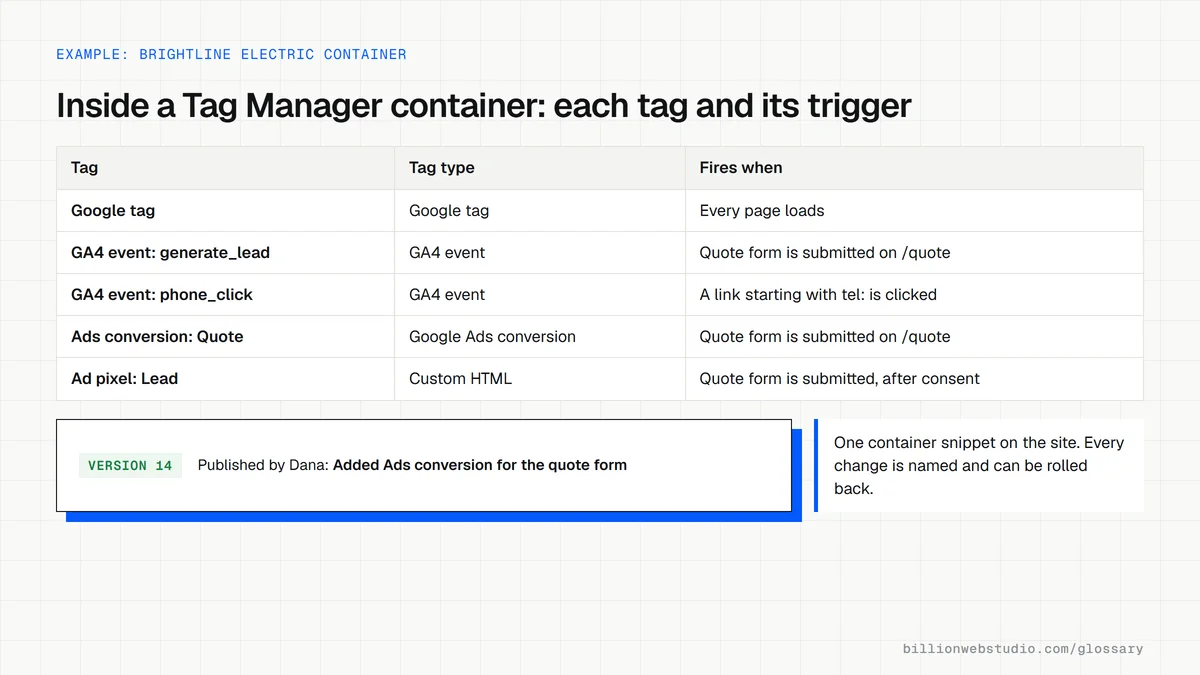
Marketing tools each ask you to paste a snippet of code into your site. Google Tag Manager replaces all of those with one container snippet, installed once. After that, marketers add, edit or pause tags in the Tag Manager web interface and publish the change, without waiting for a developer to update the site.
Three building blocks do the work. A tag is the code that runs, such as a GA4 event. A trigger is the rule for when it runs, such as a form submission or a click on a phone number. A variable is a reusable value, such as a page address or button text, that tags and triggers can read.
Why Google Tag Manager matters for your website
Tracking needs change often: a new ad campaign, a new form, a new chat tool. With Tag Manager those changes become quick, logged and reversible, because each published version is saved and can be restored. That keeps lead tracking accurate and stops loose scripts piling up in the theme, where they slow pages and break during redesigns.
A Google Tag Manager example
A home services company wants to know how many visitors tap its click-to-call button. In Tag Manager, a marketer creates a trigger for clicks on links that start with tel:, attaches a GA4 event tag named phone_click, checks it in Preview mode on the live site, then publishes. No website code changes, and phone taps start appearing in GA4 reports.
Common Google Tag Manager mistakes
- Installing GA4 both in the site code and in Tag Manager, which counts visits twice.
- Publishing changes without using Preview mode to test that each tag fires once and at the right moment.
- Giving publish rights to everyone, so nobody knows who changed what or why.
- Loading every marketing tag on every page, when some only need to run on checkout or thank-you pages.
- Firing analytics and advertising tags before the visitor answers the cookie banner where consent is required.
Copy this Tag Manager install code
<!-- Paste as high in the <head> of every page as possible -->
<!-- Google Tag Manager -->
<script>(function(w,d,s,l,i){w[l]=w[l]||[];w[l].push({'gtm.start':
new Date().getTime(),event:'gtm.js'});var f=d.getElementsByTagName(s)[0],
j=d.createElement(s),dl=l!='dataLayer'?'&l='+l:'';j.async=true;j.src=
'https://www.googletagmanager.com/gtm.js?id='+i+dl;f.parentNode.insertBefore(j,f);
})(window,document,'script','dataLayer','GTM-ABCDEFGH');</script>
<!-- End Google Tag Manager -->

<!-- Paste immediately after the opening <body> tag -->
<!-- Google Tag Manager (noscript) -->
<noscript><iframe src="https://www.googletagmanager.com/ns.html?id=GTM-ABCDEFGH"
height="0" width="0" style="display:none;visibility:hidden"></iframe></noscript>
<!-- End Google Tag Manager (noscript) -->

<!-- Replace both GTM-ABCDEFGH with your own container ID -->
How to see which tags Tag Manager fires on your site
- Sign in at tagmanager.google.com, open your container and click Preview at the top right.
- Enter your site's address in Tag Assistant and click Connect. Your site opens in a new window marked Connected; go back to the Tag Assistant tab and click Continue.
- On your site, do the action you track, such as submitting the contact form or tapping the phone number.
- In Tag Assistant, click that action in the left-hand event list and read which tags fired and which did not.
- Back in Tag Manager, open Versions to see who published each change and when, and confirm the site loads only one GTM- container ID.
What good looks like: Each tag fires exactly once on the action it is meant for, nothing fires before consent where consent is required, and every published version has a name and a note explaining the change.
Free tool: Tag Manager Help: Preview and debug containers
Questions to ask your web developer
“Who owns the Tag Manager account, and who can publish?”
A good answer: Your business owns the account. The agency gets a user with Publish permission, others get Edit or Read, and you can remove any user without losing the container.
“How do you name and document each published version?”
A good answer: Every version gets a clear name and description, such as Added generate_lead event to the quote form, so any change can be traced and rolled back to the previous version.
“Are any tracking codes hard-coded in the theme as well as in Tag Manager?”
A good answer: They list every script the site loads, move marketing tags into the container where possible and remove duplicates, so each tag is managed in one place.
Google Tag Manager: common questions
Is Google Tag Manager the same as Google Analytics?
No. Google Analytics collects and reports on visitor data. Google Tag Manager is a delivery tool that places the GA4 tag and other tracking codes on your site and controls when they fire. Many sites use both: Tag Manager sends the data, and GA4 stores and reports it.
Is Google Tag Manager free?
Yes, the standard version of Google Tag Manager is free. Google also offers Tag Manager 360 as part of its enterprise marketing suite for large organizations. Most business websites never need the enterprise version to manage their analytics, advertising and conversion tags.
Does Google Tag Manager slow down a website?
The container is one script, but every tag inside it can load its own code. A container stuffed with old pixels and duplicate tags can hurt page speed and Core Web Vitals. Remove tags you no longer use and limit heavy ones to the pages that need them.
Sources
Want a website that gets this right?
Every Billion Web Studio build includes technical SEO, schema and speed work as standard, with a fixed quote within 1 business day.