Building and hosting
What Is HTTPS?
HTTPS stands for Hypertext Transfer Protocol Secure.
HTTPS (Hypertext Transfer Protocol Secure) is the encrypted version of HTTP, the protocol browsers use to load web pages. It uses TLS to scramble data passing between a visitor's browser and a website's server, so nobody in between can read or change it.
What HTTPS means in plain English
Every time someone loads a page, their browser and your server exchange messages using HTTP. Over plain HTTP those messages travel as readable text, so anyone on the same public Wi-Fi or along the route could see or tamper with them. HTTPS wraps the same messages in TLS encryption, backed by the certificate installed on your server.
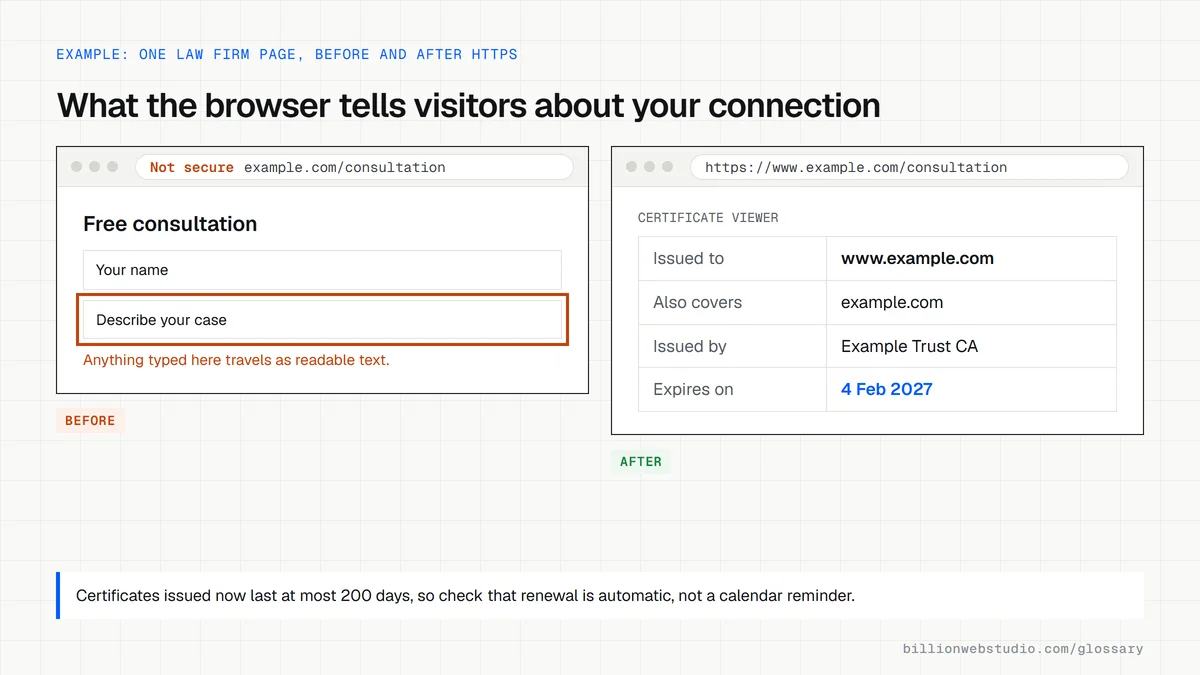
You can spot HTTPS in the address bar, where URLs begin with https:// rather than http://. Browsers now treat HTTPS as normal and flag the exception. Chrome, for example, warns visitors when a site does not use a private connection, and its help pages say only the site owner can fix that by moving the site to HTTPS.
Why HTTPS matters for leads and rankings
Google announced HTTPS as a ranking signal in 2014, and secure delivery is still part of its page experience guidance. The bigger effect is on people: a warning beside your contact form tells visitors their details are exposed. Several browser features, including geolocation and service workers, also only work in secure contexts, so plain HTTP limits what your site can do.
An HTTPS example
A law firm's old site loads at http://smithlaw.com, and Chrome warns visitors on its consultation form. The firm installs a certificate, sets every HTTP address to 301 redirect to its HTTPS version, updates internal links and the XML sitemap, and adds the secure site to Google Search Console. Google then recrawls the pages and the browser warning disappears.
How to check HTTPS on your own site
- Type http:// in front of your domain and confirm the browser lands on the https:// version.
- Try the www and non-www versions too, because each one needs its own redirect.
- Open the HTTPS report in Google Search Console to see any pages Google cannot serve securely.
- Look for mixed content warnings in the browser console, which mean some files still load over HTTP.
Copy this HTTPS redirect for nginx
# Send every HTTP request to the single HTTPS address
server {
    listen 80;
    server_name example.com www.example.com;
    return 301 https://www.example.com$request_uri;
}

# Send the non-www HTTPS address to www too
server {
    listen 443 ssl;
    server_name example.com;
    ssl_certificate     /etc/ssl/example.com/fullchain.pem;
    ssl_certificate_key /etc/ssl/example.com/privkey.pem;
    return 301 https://www.example.com$request_uri;
}

# Main site: tell browsers to use HTTPS for the next year
server {
    listen 443 ssl;
    server_name www.example.com;
    ssl_certificate     /etc/ssl/example.com/fullchain.pem;
    ssl_certificate_key /etc/ssl/example.com/privkey.pem;
    add_header Strict-Transport-Security "max-age=31536000" always;
    root /var/www/example.com;
}
How to check your SSL certificate and HTTPS setup
- Open your site in Chrome on a computer and click the View site information icon to the left of the address.
- Choose Connection is secure, then Certificate is valid, to open the certificate viewer.
- Check that the Issued To name matches your domain, including www if you use it, and note the Expires On date.
- Press F12, open the Network tab, reload, click the first row and look for strict-transport-security under Response Headers.
- Ask your host whether the certificate renews automatically and who is alerted if a renewal fails.
What good looks like: The certificate covers every address you use, renews automatically well before it expires, and the site sends a Strict-Transport-Security header so browsers always use HTTPS.
Questions to ask your web developer
“How does our certificate renew, and who hears about it if renewal fails?”
A good answer: Renewal is automatic, for example through Let's Encrypt or the host's managed certificates, with expiry alerts going to a company address. Public certificates issued since 15 March 2026 last at most 200 days, so manual renewal is no longer practical.
“Do all four versions of our address end on one HTTPS URL in a single redirect?”
A good answer: Yes. http and https, with and without www, all reach one address in a single 301 hop, and they can show it to you in a redirect checker.
“Will you add an HSTS header, and when?”
A good answer: Once every subdomain works over HTTPS, they add Strict-Transport-Security with a short max-age first, then raise it to a year.
HTTPS: common questions
Is HTTPS the same as SSL?
No. HTTPS is the secure protocol your pages are delivered over, while the SSL certificate, today technically a TLS certificate, is what makes it possible. The certificate proves your site's identity and supplies the keys, and HTTPS is the encrypted connection built using them.
Does HTTPS mean a website is safe?
Not entirely. HTTPS only means the connection is encrypted, so data cannot be read or altered while it travels. A scam site can use HTTPS too. It protects the journey of the data, not the honesty of the people running the website, so judge the business separately.
Will switching to HTTPS hurt my SEO?
Not when it is done properly. Redirect every HTTP URL to its HTTPS match with a 301 redirect, update internal links and canonical tags, and submit the updated sitemap. Rankings can move a little while Google recrawls the site, then they normally settle.
Sources
- MDN Web Docs: HTTPS
- Google Search Central Blog: HTTPS as a ranking signal (August 2014)
- Google Search Central: Understanding page experience in Google Search results
- Google Chrome Help: Check if a site's connection is secure
- MDN Web Docs: Features restricted to secure contexts
- DigiCert: Public TLS certificate validity reductions
- MDN Web Docs: Strict-Transport-Security header
Want a website that gets this right?
Every Billion Web Studio build includes technical SEO, schema and speed work as standard, with a fixed quote within 1 business day.