Conversion and analytics
What Is Lead Generation?
Lead generation is the process of attracting potential customers and capturing their contact details, such as a name, email address or phone number, so a business can follow up and turn their interest into a sale.
What lead generation means
A lead is a person or company that has shown interest and shared a way to reach them. Lead generation covers both halves: getting the right people to notice you, through search, ads, referrals or social media, and giving them a reason and an easy way to get in touch, such as a quote form, a booking tool or a phone number.
Leads are often split by readiness. A marketing qualified lead has engaged with your content, for example by downloading a guide. A sales qualified lead has asked for a price, a call or a meeting. Most service businesses care most about the second kind, because those people are close to a buying decision.
Why a website matters for lead generation
Buyers who hear about you elsewhere often check your website before they call. A site that loads fast, answers common questions, shows proof such as reviews and makes contact effortless turns that research visit into an inquiry. Billion Web Studio tracks every lead in analytics as standard, so owners can see which pages and channels produce them.
A lead generation example
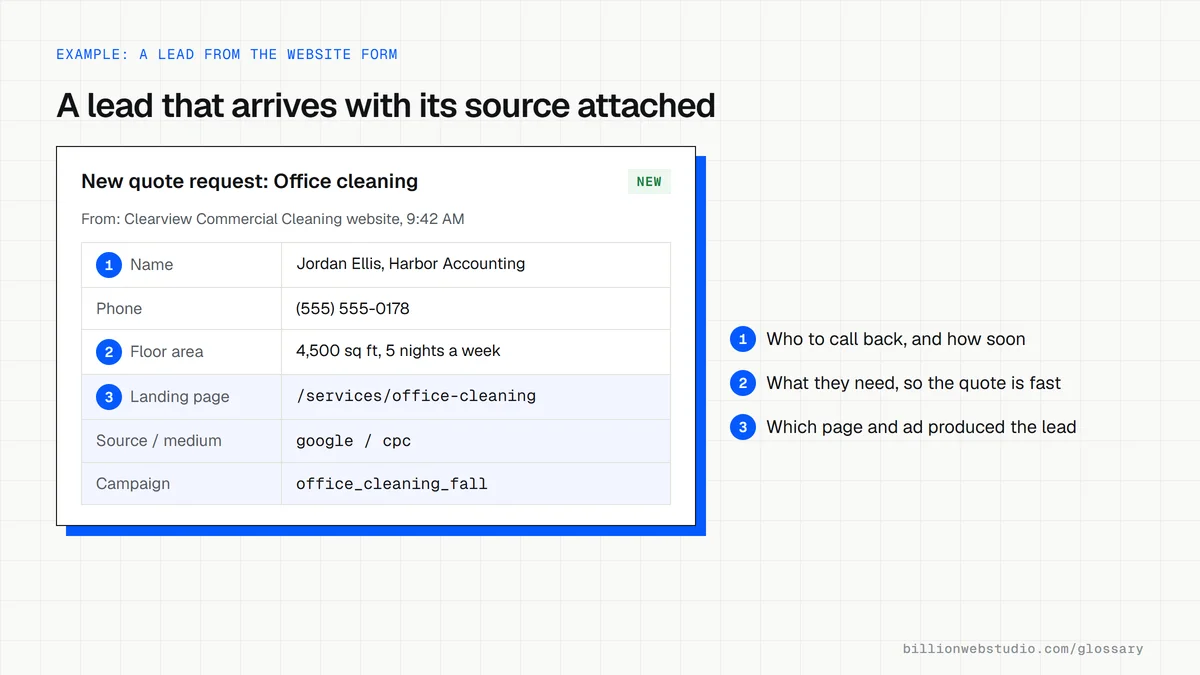
A commercial cleaning company adds a short quote form to each service page, asking for business type, floor area and ZIP code. It also publishes an office cleaning checklist. Search traffic finds the checklist, the checklist links to the service pages, and every form submission lands in the team's inbox and in analytics, tagged with the page it came from.
Common lead generation mistakes
- Hiding the phone number and form on a single Contact page instead of every key page.
- Asking for too much information before giving anything in return.
- Not tracking where leads come from, so budget keeps going to channels that do not deliver.
- Sending form submissions to an unmonitored inbox, where they wait days for a reply.
- Driving ad traffic to the homepage instead of a page that matches the offer.
Lead capture options compared
| Capture method | Suits buyers who | Track it in GA4 as | Watch out for |
|---|---|---|---|
| Quote or contact form | Want a written price and can wait for a reply | A generate_lead event on a successful submit | Too many required fields |
| Click to call | Have an urgent problem and want a person now | An event on taps of tel: links | Unanswered calls outside business hours |
| Online booking | Already know which service they need | An event on the booking confirmation | A booking tool on another domain that breaks source tracking |
| Live chat | Have one quick question before deciding | An event when a chat starts | Chats left waiting during busy hours |
| Lead magnet download | Are still researching and not ready to talk | generate_lead with a lead_source parameter | Sign-ups that get no follow-up emails |
How to test your own lead path in 15 minutes
- On your phone, reach your site from a Google search as a customer would, and see how quickly you can find the quote form or phone number.
- Submit the form with a clear test name, such as Test Lead, and your own email address, and note the exact time.
- Check where the submission landed: the shared inbox, the CRM or someone's phone. Confirm a named person reads that place every business day.
- Check the confirmation email: it should arrive, stay out of spam and tell the person what happens next and when.
- In GA4, open Reports, then Realtime overview, and confirm your test shows up as a key event with the right source.
What good looks like: The form is a tap or two away from any service page, the test lead reaches a monitored inbox straight away, the visitor gets a clear confirmation, and GA4 records the lead with its source.
Questions to ask your web developer
“Where will each lead go after someone submits a form?”
A good answer: To a named inbox or CRM that someone checks daily, with a second copy stored elsewhere, so no lead depends on one email address nobody monitors.
“Will we see which page and channel produced each lead?”
A good answer: Yes. The form passes the landing page and source, including any UTM values, along with the lead, and GA4 records every submission as a key event.
“How will you stop spam without blocking real customers?”
A good answer: They use a hidden honeypot field or a low-friction check instead of puzzles, and review blocked submissions in the first weeks to catch genuine leads caught by mistake.
Lead generation: common questions
What is the difference between lead generation and sales?
Lead generation creates interest and captures contact details. Sales takes those leads and turns them into paying customers through calls, proposals and follow-up. A business website mostly supports lead generation, though for online stores the site handles the sale as well.
What are examples of lead generation on a website?
Common examples include quote or contact forms, booking calendars, click-to-call buttons, live chat, newsletter sign-ups and downloadable guides offered in exchange for an email address. The best choice depends on how ready your visitors are to buy when they arrive.
Sources
Want a website that gets this right?
Every Billion Web Studio build includes technical SEO, schema and speed work as standard, with a fixed quote within 1 business day.