Conversion and analytics
What Is ROAS?
ROAS stands for Return on Ad Spend.
ROAS (return on ad spend) is an advertising metric that divides the revenue or conversion value from ads by the money spent on those ads. A ROAS of 4, often written as 400% or 4:1, means $4 came back for every $1 spent.
What ROAS means in plain English
The formula is revenue from ads divided by ad spend. Spend $1,000 on a campaign that produces $5,000 in tracked sales and the ROAS is 5, or 500%. Google Ads uses the percentage form when you set a Target ROAS bid strategy, and its help center gives the example of $5 in sales for each $1 of ad spend equaling a 500% target. Platforms report the figure per campaign, ad group or keyword.
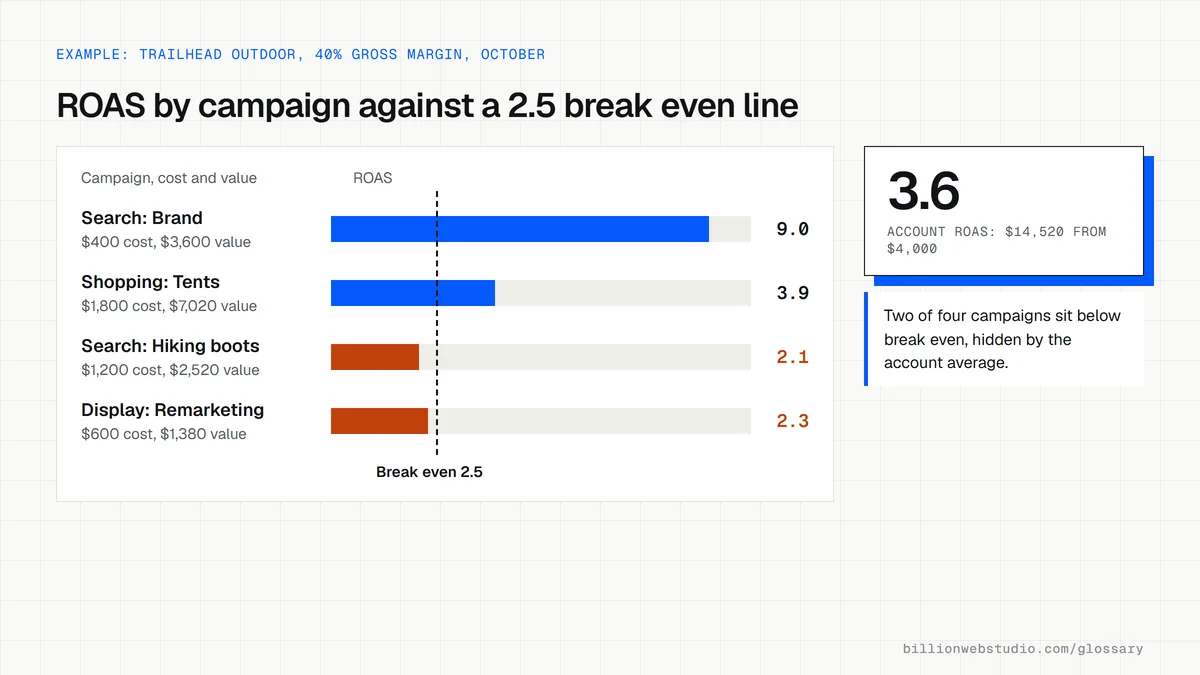
ROAS only counts what the ad platform can see. It uses the conversion values you send back, such as order totals from a store or values you assign to leads. It ignores product cost, delivery, staff time and overheads, so a campaign with a high ROAS can still lose money when margins are thin.
Why ROAS matters for a business
ROAS shows which campaigns pay their way and where the next dollar of budget should go. Google Ads and other platforms can bid automatically toward a target ROAS, but only when accurate values flow back from your website. That makes the site part of the calculation: broken checkout tracking, or leads sent without values, leave the bidding system optimizing for the wrong thing.
A ROAS example
An online store selling coffee equipment spends $2,000 a month on Shopping ads that produce $9,000 in revenue, a ROAS of 4.5. Its products carry an average gross margin of 30%, so it needs a ROAS of about 3.3 just to cover the product cost of each sale, because 1 divided by 0.3 is 3.33. The store is profitable on those ads and sets its target above that break even line.
Common ROAS mistakes
- Treating ROAS as profit when it ignores product, delivery and staff costs.
- Judging lead generation campaigns by ROAS without giving each lead a realistic value.
- Counting the same sale twice because a platform tag and an imported conversion both record it.
- Cutting campaigns that drive phone orders because those calls are never tracked.
- Comparing ROAS across ad platforms that credit sales with different attribution rules.
Work out your ROAS
ROAS calculator
How to find ROAS for each campaign in Google Ads
- In Google Ads, open Campaigns and set the date range to the last 30 days or a full month.
- Click the Columns icon above the table, then Modify columns. Find Conv. value and Conv. value / cost, tick both, then click Apply.
- Read Conv. value / cost as each campaign's ROAS. Multiply it by 100 for the percentage form that Target ROAS bidding uses.
- Write your break even ROAS at the top of your notes and flag every campaign that sits below it.
- Check the Conversions column for the same rows: a ROAS built on only a few conversions can swing widely from month to month.
What good looks like: Every campaign reports a conversion value, the campaigns you keep sit above your break even ROAS, and the values come from real order totals or agreed lead values rather than placeholders.
Free tool: Google Ads Help: conversion tracking data
Questions to ask your web developer
“Where do the conversion values behind our ROAS come from?”
A good answer: For a store, the real order total passed from the checkout; for leads, a value based on your close rate and average job size, written down so everyone knows the assumption.
“How do you stop the same sale from being counted twice?”
A good answer: They use one primary conversion action per sale, send a transaction ID with each purchase so duplicates are dropped, and compare Google Ads totals with store orders every month.
“What ROAS do we need to break even, and is our target above it?”
A good answer: They calculate it from your real margins, including delivery and payment fees if you want true profit, and set targets per campaign instead of one number for the whole account.
ROAS: common questions
What is a good ROAS?
It depends on your margins. Work out your break even ROAS by dividing 1 by your gross margin: with a 25% margin you need a ROAS of 4 to cover product costs, and with a 50% margin you need 2. A good ROAS sits comfortably above your own break even figure, not above an industry average.
What is the difference between ROAS and ROI?
ROAS compares revenue with ad spend only. ROI, return on investment, compares profit with the total cost, including product costs, fees, salaries and tools. A campaign can show a ROAS of 3 and still produce a negative ROI if margins are thin. Use ROAS to steer ad budgets and ROI to judge the business result.
How do you calculate ROAS?
Divide the revenue attributed to your ads by what you spent on them. For example, $12,000 in sales from $3,000 of ad spend gives a ROAS of 4. Multiply by 100 to express it as a percentage, 400%, which is the form Google Ads uses for its Target ROAS setting.
Sources
Want a website that gets this right?
Every Billion Web Studio build includes technical SEO, schema and speed work as standard, with a fixed quote within 1 business day.