SEO
What Is a Google Business Profile?
A Google Business Profile is a free listing that controls how a business appears on Google Search and Google Maps, showing details such as opening hours, phone number, location, photos and customer reviews.
What a Google Business Profile means in plain English
A Google Business Profile, formerly called Google My Business, is the panel people see when they search a company's name or browse Google Maps. The owner claims and verifies the listing, then manages it at no charge. It shows the address or service area, phone number, website link, hours, photos, booking links and reviews, and customers can call or request directions straight from it.
Why a Google Business Profile matters for your business
For local searches, the map results draw directly from Business Profiles, so a business without one is close to invisible there. Reviews on the profile act as public proof for new customers and feed what Google calls prominence, one of its three local ranking factors. A complete, accurate profile also stops customers calling an old number or arriving after closing time.
Who can have a Google Business Profile
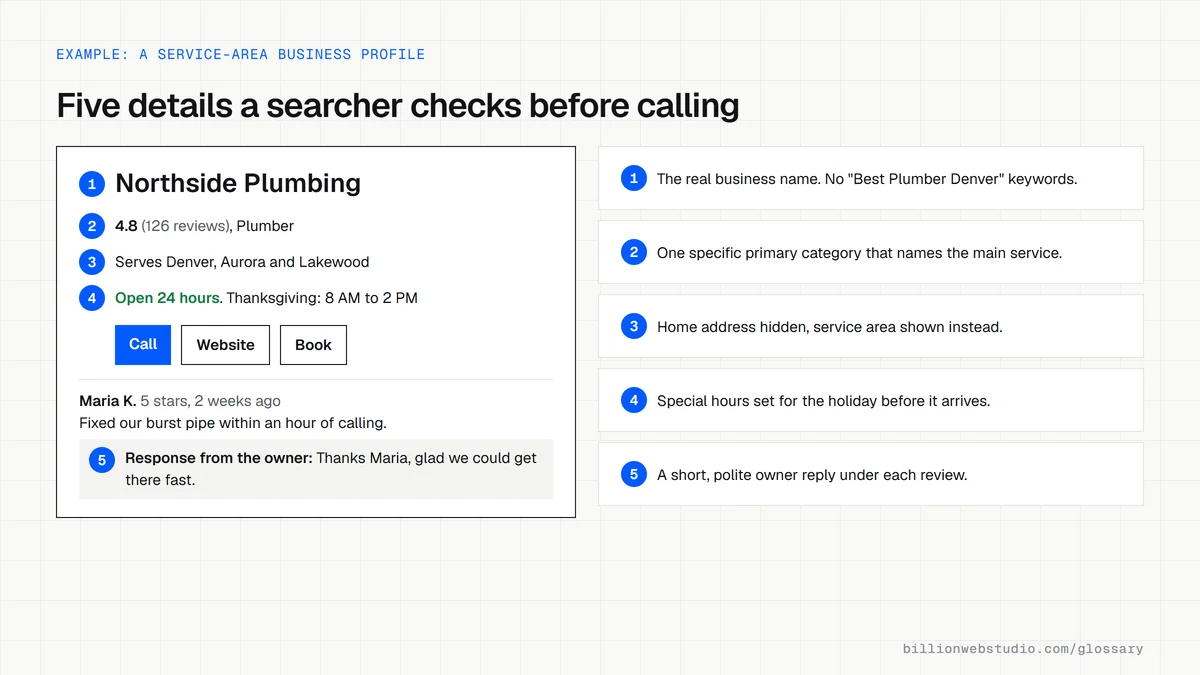
Google limits profiles to businesses that have in-person contact with customers during stated hours. That includes storefronts such as shops and clinics, and service-area businesses such as plumbers and cleaners who travel to customers. Service-area businesses should hide a home address and list the areas they serve instead. Businesses that operate only online are not eligible.
Common Google Business Profile mistakes
- Adding keywords, taglines or locations to the business name, which Google's guidelines prohibit.
- Choosing a vague primary category instead of the one that best describes the main service.
- Leaving the profile unverified, so Google does not treat you as its owner.
- Forgetting special hours for public holidays and events.
- Ignoring reviews, both positive and negative, instead of replying politely and promptly.
Storefront, service-area or hybrid: what your profile should show
| Business type | Example | Address on profile | Service area |
|---|---|---|---|
| Storefront | Dental clinic, bakery | Shown, and staffed during stated hours | Not needed |
| Service-area business | Plumber who visits homes | Hidden from customers | List the cities or areas you serve |
| Hybrid | Auto repair shop with roadside service | Shown | Also listed |
| Online only | Ecommerce store with no pickup point | Not eligible for a profile | Not eligible |
| Virtual office | Rented address the business does not staff | Not eligible | Not eligible |
How to check your Google Business Profile in ten minutes
- Sign in to the Google Account that manages the profile, search Google for your business name and city, and click Edit profile.
- Confirm the business name matches your signage with no added keywords, and that the primary category is the most specific one for your main service.
- Open Location. A service-area business should have Show business address to customers turned off and its service areas listed.
- Check your regular hours, then add special hours for the next public holiday.
- Open the reviews on your profile and reply to any review that has no owner response.
- Search your business name in a private window and confirm the public details match what you entered.
What good looks like: The profile is verified, the name has no added keywords, the primary category is the closest fit, upcoming special hours are set and every recent review has an owner reply. The public view shows the same details you entered.
Free tool: Google Business Profile Help: Edit your profile
Questions to ask your web developer
“Who will own our Business Profile, and what access will you have?”
A good answer: The business owns the profile through its own Google Account as primary owner, and the agency is added as a manager that can be removed at any time.
“What will you change on the profile, and could any of it break Google's guidelines?”
A good answer: Changes are listed in writing, such as categories, services, photos, hours and posts. No keywords in the business name, no virtual office addresses and no fake or rewarded reviews.
“How will you help us get more genuine reviews?”
A good answer: A simple request after each finished job using the profile's review link, sent to every customer rather than only happy ones, with no reward offered.
Google Business Profile: common questions
Is a Google Business Profile free?
Yes. Google provides Business Profiles at no charge, and there is no paid tier that improves where a profile ranks. Google states that there is no way to request or pay for a better local ranking. Paid promotion exists separately through Google Ads, which appear in labeled sponsored slots.
Is Google My Business the same as Google Business Profile?
Yes. Google My Business was renamed Google Business Profile, and small businesses are now encouraged to manage their profile directly from Google Search or Google Maps. Older guides that mention Google My Business are describing the same listing, though some menus and features have changed since then.
Can an online-only business have a Google Business Profile?
No. Google's eligibility rules require in-person contact with customers, either at a premises or by visiting them. An ecommerce store with no showroom or pickup point does not qualify. Such businesses rely on their website, product listings and other search channels to appear on Google instead.
Sources
- Google Business Profile Help: About Business Profile
- Google Business Profile Help: Tips to improve your local ranking on Google
- Google Business Profile Help: Guidelines for representing your business on Google
- Google Business Profile Help: Edit your Business Profile
- Google Business Profile Help: Manage your service area
- Google Business Profile Help: Manage your business address
Want a website that gets this right?
Every Billion Web Studio build includes technical SEO, schema and speed work as standard, with a fixed quote within 1 business day.