Speed and Core Web Vitals
What Is Lazy Loading?
Lazy loading is a web performance technique that delays downloading images, videos and embeds until a visitor scrolls near them, so the browser spends its first moments loading only what is actually on screen.
What lazy loading means in plain English
MDN describes lazy loading as marking resources as non-critical and loading them only when needed. A long page with forty photos does not need all forty before the visitor sees the top. With lazy loading, the browser fetches the first few and waits on the rest until the visitor scrolls toward them.
Modern browsers support this natively. Adding loading="lazy" to an image or iframe tag tells the browser to defer it while it is off-screen. Older methods use JavaScript, such as the IntersectionObserver API, to swap images in as they approach the viewport.
Why lazy loading matters for a business website
Fewer downloads up front means a faster first view and less mobile data used, which matters on gallery pages, long service pages, blog posts and product listings. Embedded maps and videos are especially heavy, so deferring them often makes a noticeable difference.
Done badly, it hurts. web.dev warns against lazy loading images likely to be visible when the page loads, especially the Largest Contentful Paint image. Google Search also says lazy-loaded content must load when it is visible in the viewport, without depending on clicks or other user actions, or it may not be indexed.
A lazy loading example
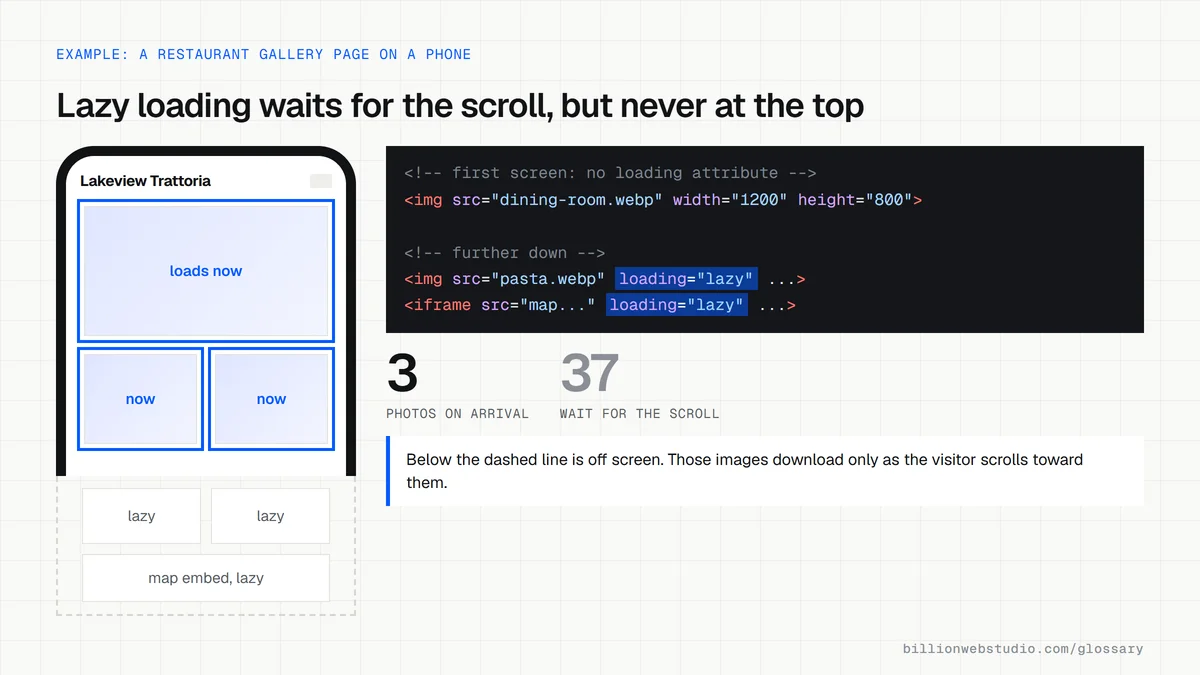
A restaurant's gallery page shows dozens of food and interior photos. The first row loads normally so the page looks complete straight away, while every photo below it gets loading="lazy" plus a fixed width and height. Visitors on mobile data see the page quickly, and images further down appear as they scroll.
Common lazy loading mistakes
- Lazy loading the hero image or logo at the top of the page, which delays the main content.
- Leaving out width and height, so images start at zero size and push content around when they arrive.
- Using scripts that only load content after a click or swipe, which search engines may never trigger.
- Building infinite scroll without separate, linkable page URLs for each chunk of content.
- Applying a plugin's lazy loading on top of the browser's own, so images load twice or not at all.
Copy this lazy loading markup
<!-- First screen: no loading attribute, so it downloads at once -->
<img src="/img/dining-room.webp" alt="Candlelit dining room with a long oak table"
     width="1200" height="800" fetchpriority="high">

<!-- Further down: the browser waits until the visitor scrolls near it -->
<img src="/img/pappardelle.webp" alt="Fresh pappardelle with slow-cooked beef ragu"
     width="600" height="400" loading="lazy">

<!-- A map embed near the footer -->
<iframe src="https://www.example.com/map-embed?place=lakeview-trattoria"
        title="Map to Lakeview Trattoria" width="600" height="450"
        loading="lazy"></iframe>
How to check lazy loading on your own page
- Open a long page in Chrome, press F12, select the Network panel, click the Img filter and reload. Count how many images download before you scroll.
- Scroll slowly down the page and watch new image rows appear in the Network panel as you approach each photo. That means lazy loading works.
- Right-click the hero image, choose Inspect and check its img tag. It should not carry loading="lazy".
- In Google Search Console, run the URL Inspection tool on the page, click Test live URL, then View tested page, and confirm the lower images appear in the rendered HTML with their real src addresses.
What good looks like: Only the images near the first screen download on arrival, lower images load as you scroll without blank gaps, the hero image has no lazy attribute, and Google's rendered HTML contains every image URL.
Free tool: Google Search Console URL Inspection
Questions to ask your web developer
“Which images and embeds are lazy loaded, and how do you decide?”
A good answer: Browser-level loading="lazy" on images, maps and videos below the first screen, with the hero and logo loading normally, decided per template rather than switched on site-wide by a plugin.
“How do you make sure Google still sees lazy-loaded content?”
A good answer: Content loads when it scrolls into view, with no click needed, and the developer checks the rendered HTML in the URL Inspection tool after launch.
Lazy loading: common questions
Is lazy loading good for SEO?
Yes, when it is set up correctly. Google supports browser-level lazy loading and IntersectionObserver, as long as content loads when it becomes visible in the viewport. Problems start when content only appears after a click or scroll event that Googlebot does not perform, or when the main image is delayed.
Should I lazy load all images?
No. Images visible on the first screen, especially the hero or Largest Contentful Paint image, should load immediately. Lazy load the images further down the page. A safe rule is to leave the first one or two images alone and defer the rest.
Does lazy loading work in all browsers?
The loading attribute for images is well supported across all major current browsers, according to web.dev. A browser that does not support it simply ignores the attribute and loads images normally, so adding it causes no harm.
Sources
Want a website that gets this right?
Every Billion Web Studio build includes technical SEO, schema and speed work as standard, with a fixed quote within 1 business day.