Speed and Core Web Vitals
What Is First Contentful Paint (FCP)?
First Contentful Paint (FCP) is a page speed metric that measures how long it takes, from the moment a visitor starts loading a page, for the first text or image to appear on screen. web.dev rates 1.8 seconds or less as good.
What First Contentful Paint means in plain English
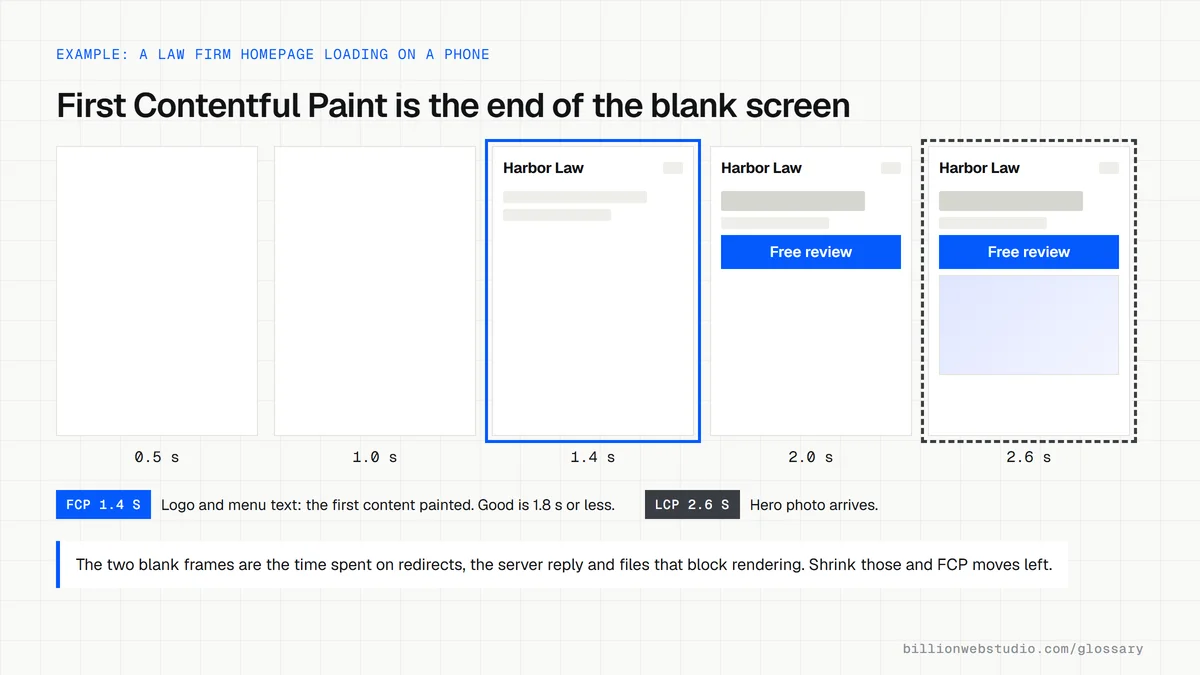
FCP marks the moment a visitor stops looking at a blank screen. web.dev counts text, images including background images, SVG elements and non-white canvas elements as content. The clock starts at navigation, so redirects, connecting to the server and time to first byte all count toward the total.
FCP only needs something to appear, such as a logo or a line of menu text. Largest Contentful Paint waits for the biggest element, usually the hero image or headline. A page can have a quick FCP and a slow LCP when the header shows promptly but the main photo arrives late.
Why First Contentful Paint matters for a business website
web.dev rates FCP as good at 1.8 seconds or less and poor above 3.0 seconds, judged at the 75th percentile of page loads on mobile and desktop separately. A slow FCP means people stare at white space and may hit back before your offer ever appears.
FCP is not one of the three Core Web Vitals. web.dev lists it with time to first byte as a supporting metric that helps diagnose loading problems behind a weak LCP. It still feeds your Lighthouse performance score, where it carries a 10% weight in the current scoring model.
A First Contentful Paint example
A law firm's site showed a white screen for over three seconds on phones. A Lighthouse report showed why: the server responded slowly, three font files and a chat widget script loaded before anything could render, and an old domain redirected twice. Moving to better hosting, removing the redirect chain, deferring the chat script and preloading one font brought text onto the screen much sooner.
How to improve First Contentful Paint
- Cut server response time with faster hosting, page caching and a CDN close to your visitors.
- Remove redirect chains so the browser reaches the final URL in a single step.
- Defer or remove scripts that block rendering, such as chat widgets and unused tracking tags.
- Inline the small amount of CSS needed for the first screen and load the rest afterward.
- Keep text visible while web fonts load by using a font-display setting such as swap.
Copy this head setup for a faster first paint
<head>
  <!-- Small critical CSS inline, so the first screen can paint at once -->
  <style>
    @font-face { font-family: "Brand"; src: url("/fonts/brand.woff2") format("woff2");
                 font-display: swap; }
    header, .hero { font-family: "Brand", Arial, sans-serif; }
  </style>
  <link rel="preload" href="/fonts/brand.woff2" as="font" type="font/woff2" crossorigin>

  <!-- Full stylesheet -->
  <link rel="stylesheet" href="/css/site.css">

  <!-- Scripts that are not needed for the first screen wait their turn -->
  <script src="/js/chat-widget.js" defer></script>
  <script src="/js/analytics.js" async></script>
</head>
How to see what delays First Contentful Paint on your page
- Run the page through PageSpeed Insights on the Mobile tab and note the real-user FCP value, along with the experimental TTFB value.
- In the diagnostics, open the Render-blocking requests insight. It lists the CSS and script files the browser must fetch before it can paint anything.
- Open the Document request latency insight to see whether redirects or a slow server response are eating into the time before the first paint.
- In Chrome DevTools, open the Performance panel, record a page load and find the FCP marker in the Timings track to see what ran before it.
What good looks like: FCP of 1.8 seconds or less for at least 75% of real visits, with few or no render-blocking files listed.
Free tool: PageSpeed Insights
Questions to ask your web developer
“Which files have to load before anything appears on screen, and why does each one need to?”
A good answer: A short list, usually one small CSS file or inlined critical CSS, with chat, tracking and other scripts marked defer or async so they never block the first paint.
“How are the web fonts loaded?”
A good answer: One or two font files in WOFF2 format, preloaded, with a font-display setting so text shows in a fallback font instead of staying invisible.
First Contentful Paint (FCP): common questions
What is a good First Contentful Paint score?
web.dev considers an FCP of 1.8 seconds or less good, between 1.8 and 3.0 seconds in need of improvement, and over 3.0 seconds poor. These thresholds apply to the 75th percentile of real page loads, so most visitors, not just those on fast connections, should see content within that time.
What is the difference between FCP and LCP?
First Contentful Paint records when anything first appears on screen, while Largest Contentful Paint records when the largest visible element finishes rendering. FCP tells you when the page stops looking blank. LCP tells you when the main content is ready, and only LCP is a Core Web Vital.
Is First Contentful Paint a Core Web Vital?
No. The Core Web Vitals are Largest Contentful Paint, Interaction to Next Paint and Cumulative Layout Shift. web.dev classes FCP as one of the other web vitals, useful as a supporting measurement for spotting what slows the early stages of a page load.
Sources
Want a website that gets this right?
Every Billion Web Studio build includes technical SEO, schema and speed work as standard, with a fixed quote within 1 business day.