Speed and Core Web Vitals
What Is a Lighthouse Score?
A Lighthouse score is a 0 to 100 rating from Google's free, open-source Lighthouse tool, which tests a web page in a simulated lab setting for performance, accessibility, best practices and SEO, with 90 or above counted as good.
What a Lighthouse score means in plain English
Lighthouse loads a page under controlled conditions, by default emulating a mid-range phone on a slowed-down mobile connection, runs a set of automated checks and scores each category separately. You can run it from the Lighthouse panel in Chrome DevTools, from the command line, or through PageSpeed Insights, which uses it for its lab results. As of October 2026, Chrome's documentation also lists a newer Agentic browsing category.
When people quote a single Lighthouse score they usually mean Performance. Chrome's documentation calls it a weighted average of lab metric scores and uses color bands: 0 to 49 is red for poor, 50 to 89 is orange for needs improvement, and 90 to 100 is green for good.
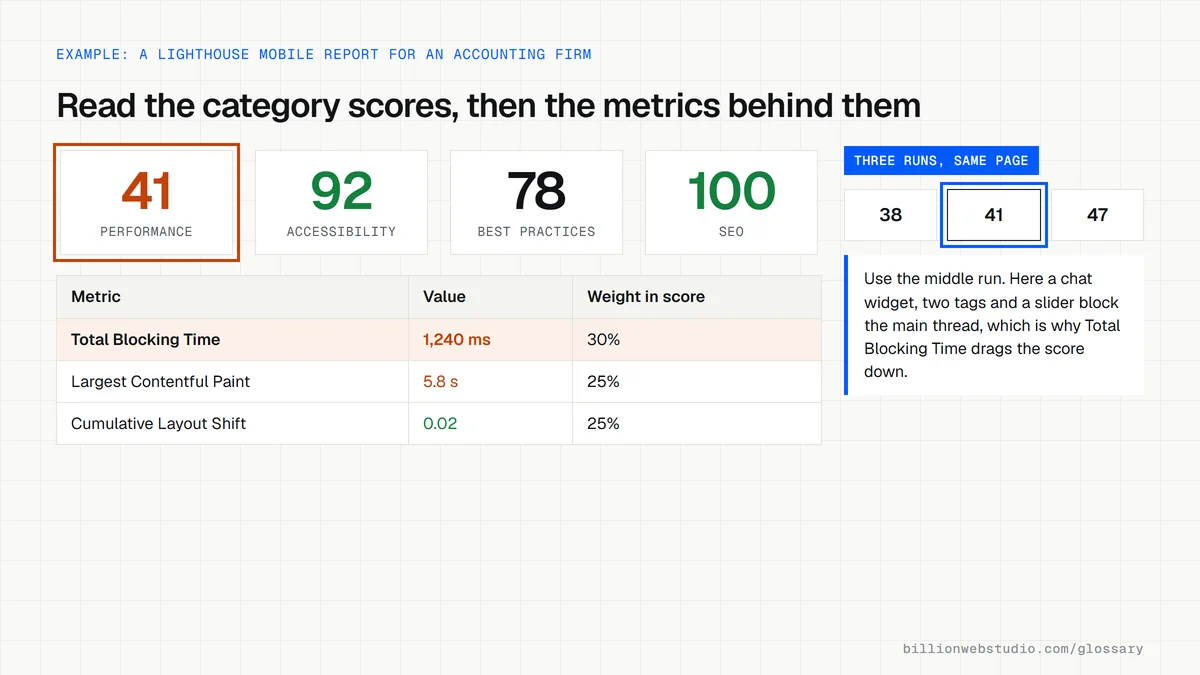
How the Lighthouse performance score is weighted
- Total Blocking Time carries 30% of the performance score in the weighting Chrome documents as current.
- Largest Contentful Paint carries 25%.
- Cumulative Layout Shift carries 25%.
- First Contentful Paint and Speed Index carry 10% each.
- Opportunities and diagnostics suggest fixes but do not count toward the score directly.
Why a Lighthouse score matters for a business website
A Lighthouse report is a fast, free way to spot problems before customers do: an oversized hero image, scripts that freeze the page, missing alt text, weak color contrast or a page blocked from indexing. It is a lab test, though, not a record of your real visitors. Google's page experience signals rely on field data from real Chrome users, which you see in Search Console and PageSpeed Insights.
An example of a Lighthouse score
An accounting firm's homepage scores 41 for performance on mobile. The report shows high Total Blocking Time because a chat widget, two analytics tags and a slider script all load at once, and the hero image is far larger than the screen. Delaying the chat widget until after the page loads, removing the slider and resizing the image lift the score into the green on the next runs.
Common Lighthouse score mistakes
- Treating one run as the truth, when Chrome notes that extensions, antivirus software, network routing, changing ads and the testing machine all make scores vary.
- Testing on a fast desktop and assuming phone visitors get the same result.
- Chasing a perfect 100 on every page while ignoring the real-user Core Web Vitals that visitors actually experience.
- Assuming a green SEO score means a page will rank, when it only confirms basic technical checks such as a title, a meta description and crawlable links.
Lighthouse, PageSpeed Insights or Search Console: which tool answers which question
| Tool | Data it uses | Best for | Watch out for |
|---|---|---|---|
| Lighthouse in Chrome DevTools | A lab test on your own computer | Testing a fix, a staging site or a page with no traffic yet | Results move with your machine, network and extensions |
| PageSpeed Insights | Real-user data from the previous 28 days plus a Lighthouse lab run | Checking one URL against real visitors and getting the diagnostics in one place | Pages with few visits have no field data of their own |
| Search Console Core Web Vitals report | Real-user data grouped by similar URLs | Spotting which groups of pages fail across the whole site | Shows groups, not single-page detail, and validation takes 28 days |
How to run a Lighthouse test on your own site in Chrome
- Open a new Incognito window (Ctrl+Shift+N, or Cmd+Shift+N on a Mac) so browser extensions do not skew the result, and load the page you want to test.
- Press F12 to open DevTools and choose the Lighthouse panel. If you cannot see it, click the double arrow at the end of the panel tabs.
- Set Mode to Navigation and Device to Mobile, tick the categories you want, and click Analyze page load.
- Run it three times and use the middle Performance score. Note the Total Blocking Time value, which carries the most weight in the score.
- Scroll to the insights and diagnostics. They do not change the score, but they list the specific files and images behind it.
What good looks like: A Performance score of 90 or more on mobile across repeated runs, no failed accessibility checks on key pages, and real-user Core Web Vitals that agree with the lab picture.
Free tool: Chrome for Developers: Lighthouse
Questions to ask your web developer
“Will you share Lighthouse reports for our key pages on mobile, both before launch and after?”
A good answer: Yes, saved HTML or JSON reports from several mobile runs of each main template, shown next to real-user Core Web Vitals once the site has traffic.
“What score do you target, and what do you do when a third-party tool drags it down?”
A good answer: A clear target for the main templates, plus an honest list of tags such as chat or booking widgets that cost points, with options to delay or replace them.
Lighthouse score: common questions
What is a good Lighthouse score?
Chrome's documentation rates 90 to 100 as good, 50 to 89 as needs improvement and 0 to 49 as poor. Mobile scores usually come out lower than desktop because Lighthouse simulates a slower device and connection. A steady score in the 90s on your key pages is a sensible target.
Is a Lighthouse score a Google ranking factor?
No. Google's page experience signals, such as Core Web Vitals, come from real-user data in the Chrome UX Report, not from a single lab test. A low Lighthouse score is still a useful warning, because the problems it finds usually slow real visitors down too.
Why does my Lighthouse score change every time I run it?
Some variation between runs is normal. Chrome lists browser extensions, antivirus software, A/B tests or changing ads, internet routing and the power of the testing machine as common causes. Run the test several times in an incognito window and compare the middle result rather than one score.
Sources
- Chrome for Developers: Introduction to Lighthouse
- Chrome for Developers: Lighthouse performance scoring
- Google for Developers: About PageSpeed Insights
- GitHub: Lighthouse releases
- Google Search Central: Understanding Core Web Vitals and Google search results
- Google Search Console Help: Core Web Vitals report
Want a website that gets this right?
Every Billion Web Studio build includes technical SEO, schema and speed work as standard, with a fixed quote within 1 business day.