Speed and Core Web Vitals
What Are Core Web Vitals?
Core Web Vitals are three Google metrics that measure how real visitors experience a web page: Largest Contentful Paint for loading speed, Interaction to Next Paint for responsiveness, and Cumulative Layout Shift for visual stability.
What Core Web Vitals mean in plain English
Core Web Vitals turn three everyday frustrations into numbers. How long until the main content shows up? When I tap something, does the page react quickly? Does the layout stay still, or does a button jump just as I reach for it? Each question has its own metric and its own target.
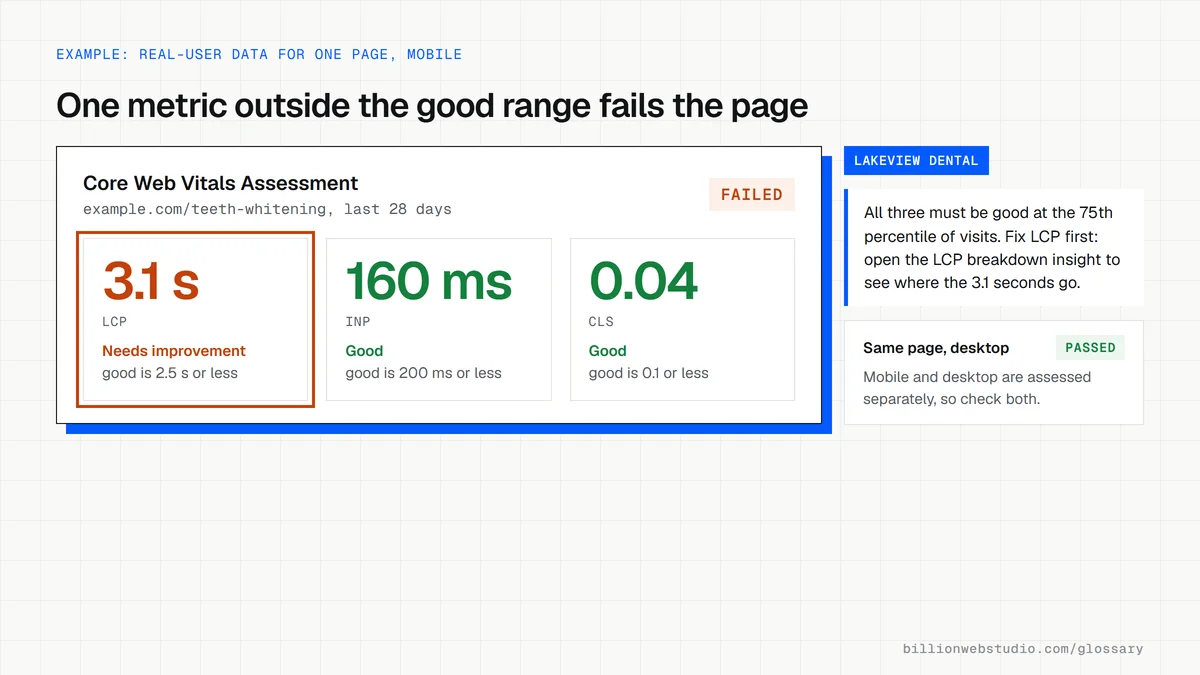
The scores come from real Chrome users, not just a lab test. Google's guidance is to measure the 75th percentile of page visits, separately for mobile and desktop, and a page passes only when all three metrics reach the good range at that level.
Core Web Vitals thresholds
- Largest Contentful Paint (LCP) is good at 2.5 seconds or less and poor above 4 seconds.
- Interaction to Next Paint (INP) is good at 200 milliseconds or less and poor above 500 milliseconds.
- Cumulative Layout Shift (CLS) is good at 0.1 or less and poor above 0.25.
- INP took over from First Input Delay (FID) as the responsiveness metric on March 12, 2024.
Why Core Web Vitals matter for a business website
Google Search Central recommends that site owners achieve good Core Web Vitals for success with Search, and says page experience aligns with what its core ranking systems seek to reward. Strong scores will not lift thin content above better answers, but weak scores put you at a disadvantage when competing pages are otherwise similar.
The bigger cost is usually to people. A slow, jumpy or laggy page loses visitors before they read your offer or finish a form. Billion Web Studio agrees Core Web Vitals targets up front on every build and tests them on real phones before launch.
How to check Core Web Vitals on your site
- Open the Core Web Vitals report in Google Search Console to see which groups of URLs pass or fail.
- Run key pages through PageSpeed Insights and read the real-user field data first, then the lab diagnostics.
- Check mobile results separately, because phones are usually slower than desktops.
- Recheck after a fix, remembering that field data reflects the previous 28 days of visits.
Core Web Vitals: the usual small business cause and where to look first
| Metric | Good at the 75th percentile | Usual cause on a small business site | Insight to open in PageSpeed Insights |
|---|---|---|---|
| Largest Contentful Paint (LCP) | 2.5 s or less | A huge or lazy-loaded hero photo, or slow hosting | LCP breakdown, LCP request discovery |
| Interaction to Next Paint (INP) | 200 ms or less | Chat, tracking and slider scripts busy when the visitor taps | INP breakdown, Third parties |
| Cumulative Layout Shift (CLS) | 0.1 or less | Images without size, late banners and cookie bars | Layout shift culprits |
How to read your Core Web Vitals pass or fail in PageSpeed Insights
- Go to pagespeed.web.dev, paste the address of an important page, such as your homepage or main service page, and click Analyze.
- Stay on the Mobile tab. At the top of the real-user section, read the Core Web Vitals Assessment line: Passed or Failed.
- Look at LCP, INP and CLS underneath and note which one is not green. If the page has too few visits of its own, the tool shows data for the whole site instead.
- Scroll to the diagnostics and open the insight that matches the failing metric: LCP breakdown, INP breakdown or Layout shift culprits.
- After a fix ships, open the Core Web Vitals report in Search Console, open the failing issue and click Validate fix to start its 28-day monitoring.
What good looks like: Passed on mobile and desktop, meaning LCP at or under 2.5 seconds, INP at or under 200 milliseconds and CLS at or under 0.1 for at least 75% of real visits.
Free tool: PageSpeed Insights
Questions to ask your web developer
“Are Core Web Vitals targets written into our project, and are they judged on real-user data or a lab test?”
A good answer: Yes: good LCP, INP and CLS on mobile, checked with lab tests and real phones before launch, then confirmed in field data once enough visits build up, since field data covers the previous 28 days.
“Which third-party scripts will the site load, and how will you stop them hurting the scores?”
A good answer: A named list of tags such as analytics, chat and booking widgets, each loaded after the main content or only when needed, with before and after measurements.
“Who watches the Core Web Vitals report after launch?”
A good answer: A named person checks the Search Console report monthly and investigates any URL group that slips to Need improvement or Poor.
Core Web Vitals: common questions
Are Core Web Vitals a ranking factor?
Google says good Core Web Vitals help with success in Search and that page experience aligns with what its core ranking systems reward. They are one signal among many, so relevance and content quality still matter more, but poor scores can hold back a page against close competitors.
Why do PageSpeed Insights and Search Console show different numbers?
PageSpeed Insights shows real-user field data for a single URL plus a simulated lab test, while Search Console groups similar URLs together and reports on the group. Lab tests run on one set device and network, so they rarely match what thousands of real visitors experienced.
What if my site has no Core Web Vitals data?
Field data appears only when enough Chrome users have visited. New or low-traffic pages may fall back to site-wide data or show none at all. In that case, use the lab results in PageSpeed Insights and test on a real phone until traffic builds up.
Sources
- web.dev: Web Vitals
- web.dev: Largest Contentful Paint (LCP)
- web.dev: Interaction to Next Paint (INP)
- web.dev: Cumulative Layout Shift (CLS)
- web.dev: Interaction to Next Paint becomes a Core Web Vital on March 12
- Google Search Central: Understanding Core Web Vitals and Google search results
- Google for Developers: About PageSpeed Insights
- Chrome for Developers: Performance insights reference
- Google Search Console Help: Core Web Vitals report
Want a website that gets this right?
Every Billion Web Studio build includes technical SEO, schema and speed work as standard, with a fixed quote within 1 business day.