Speed and Core Web Vitals
What Is Time to First Byte (TTFB)?
Time to First Byte (TTFB) is the time between a visitor requesting a web page and the first byte of the server's response reaching their browser. It shows how quickly your hosting and server begin delivering the page.
What Time to First Byte means in plain English
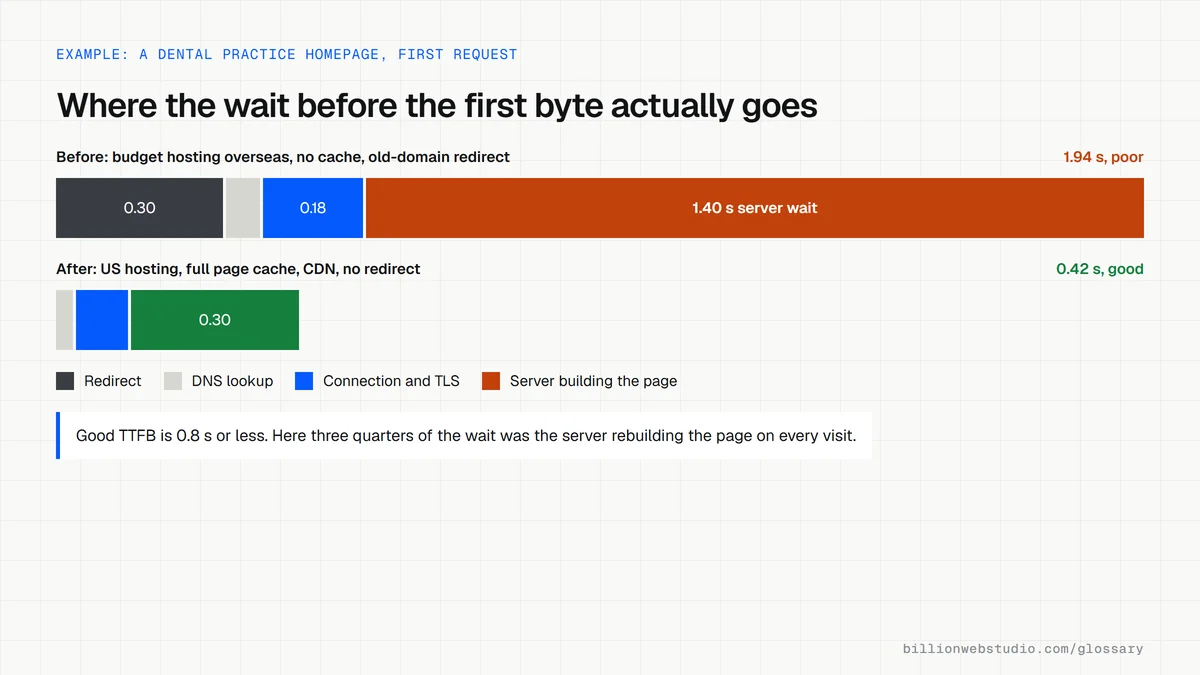
TTFB is the waiting period before anything can start to load. The clock starts when the browser begins navigating and stops when the first piece of the reply arrives. web.dev counts every step in between: any redirects, the DNS lookup that finds your server, setting up the secure connection, and the time the server spends building the page before it sends anything back.
Because it comes first, TTFB sets a floor for everything after it. The browser cannot show any text or images until the server starts sending HTML, so a slow first byte pushes back First Contentful Paint and Largest Contentful Paint, the moments visitors actually notice.
Time to First Byte thresholds
- web.dev rates TTFB as good at 0.8 seconds or less.
- Values between 0.8 and 1.8 seconds need improvement.
- Anything above 1.8 seconds is rated poor.
- TTFB is not one of the three Core Web Vitals, so it works as a diagnostic rather than a pass or fail test.
Why Time to First Byte matters for a business website
A slow server is a problem that no amount of image compression can fix. Cheap shared hosting, an overloaded database, a heavy plugin stack or a server on another continent can each add seconds before the page even begins to appear. Visitors on phones feel this most, and on a lead page the delay lands right when someone is deciding whether to wait for your offer or press back.
An example of Time to First Byte
A dental practice in Chicago runs WordPress on a budget hosting plan in Europe, and every page is rebuilt from the database on each visit. Chrome DevTools shows the browser waiting around two seconds for the server. Moving to US hosting, switching on full page caching and putting a CDN in front means most visitors receive a stored copy from a nearby server, so the first byte arrives far sooner.
How to check and improve TTFB
- In Chrome DevTools, open the Network panel, reload the page and check the main document's waiting time for the server response.
- Look at PageSpeed Insights, which reports real-user TTFB from the Chrome UX Report as an experimental metric when your page has enough traffic.
- Cut out redirect hops, so a visitor's browser lands on the final address straight away.
- Turn on page caching so the server sends a ready-made page instead of building it on every request.
- Host close to your customers, or use a CDN that serves cached pages from locations near them.
What makes up Time to First Byte, and what fixes each part
| Part of TTFB | What happens | Usual fix |
|---|---|---|
| Redirects | The browser is sent from one address to another before the real page | Link straight to the final URL and remove chains |
| DNS lookup | The browser finds the server's address | A fast DNS provider, often included with a CDN |
| Connection and TLS | The secure connection to the server is set up | A CDN nearby, HTTP/2 or HTTP/3, modern TLS |
| Server wait | The server builds the page and starts sending it | Page caching, a faster database, fewer heavy plugins, better hosting |
Copy this command to time the first byte
curl -s -o /dev/null -w "DNS: %{time_namelookup}s\nConnect: %{time_connect}s\nTLS: %{time_appconnect}s\nFirst byte: %{time_starttransfer}s\n" https://www.example.com/

# Times are cumulative from the start of the request.
# Use the final address (no redirect) and run it 3 to 5 times.
# On Windows PowerShell, type curl.exe instead of curl and NUL instead of /dev/null.
How to measure Time to First Byte from more than one place
- Run the page in PageSpeed Insights and read the experimental TTFB value in the real-user section, which reflects visitors in every location.
- In Chrome DevTools, open the Network panel, reload, click the first document request and choose the Timing tab. Read Waiting for server response.
- Repeat the test on a few different pages, such as the homepage, a blog post and a contact page, because cached and uncached pages differ.
- For a quick repeat test, run the curl command below three to five times and compare the first byte figures.
What good looks like: TTFB of 0.8 seconds or less for most real visits, with similar times on cached and uncached pages and no redirect before the final page.
Free tool: PageSpeed Insights
Questions to ask your web developer
“Is full page caching switched on, and which pages bypass it?”
A good answer: Yes, every public page is cached, and only pages that must be personal, such as the cart, checkout or account area, skip the cache.
“Where is the server, and is there a CDN in front of it?”
A good answer: Hosting in or near your main market, plus a CDN that serves cached pages from locations close to visitors, with a test result to show the difference.
Time to First Byte (TTFB): common questions
What is a good Time to First Byte?
web.dev's guidance is 0.8 seconds or less for most sites, measured on real visits. Between 0.8 and 1.8 seconds needs improvement, and above 1.8 seconds is poor. Because TTFB is not a Core Web Vital, the real test is whether the page still reaches a good Largest Contentful Paint.
Does TTFB affect SEO?
Not as a named Core Web Vital. Google's three are LCP, INP and CLS. A slow first byte does delay LCP, though, and Google's crawling documentation says that when a server slows down, its crawl capacity limit drops and Google crawls less, which matters for large sites.
Why is my TTFB slow?
The usual causes are underpowered or distant hosting, pages rebuilt from the database on every request, slow database queries, heavy plugins and redirects before the final page. Each one adds time before the server can reply. Caching, a CDN and better hosting fix most cases without redesigning the site.
Sources
Want a website that gets this right?
Every Billion Web Studio build includes technical SEO, schema and speed work as standard, with a fixed quote within 1 business day.