Speed and Core Web Vitals
What Is Largest Contentful Paint (LCP)?
Largest Contentful Paint (LCP) is a Core Web Vitals metric that measures how long the biggest image, video or block of text in the visible screen takes to appear after a visitor opens a page. Google rates 2.5 seconds or less as good.
What Largest Contentful Paint means in plain English
LCP answers one question: when did the main thing on this screen finish showing? The clock starts when the visitor begins loading the page and stops when the largest visible element is rendered. On most business sites that element is a hero photo, a banner or the headline block.
web.dev lists the elements that can count: images, images inside SVG, video poster frames or first frames, elements with a CSS background image, and block-level text. Anything below the first screen is ignored, because the visitor cannot see it yet.
Why Largest Contentful Paint matters
Google rates LCP as good at 2.5 seconds or less, needs improvement up to 4 seconds, and poor beyond that, measured at the 75th percentile of real visits on mobile and desktop separately. A slow LCP means visitors stare at an unfinished page during the moment they decide whether to stay.
Because LCP is one of the three Core Web Vitals, it feeds into the page experience signals Google considers. For lead-generation pages, the hero section usually carries the headline and call to action, so a slow LCP also delays the content most likely to win the inquiry.
A Largest Contentful Paint example
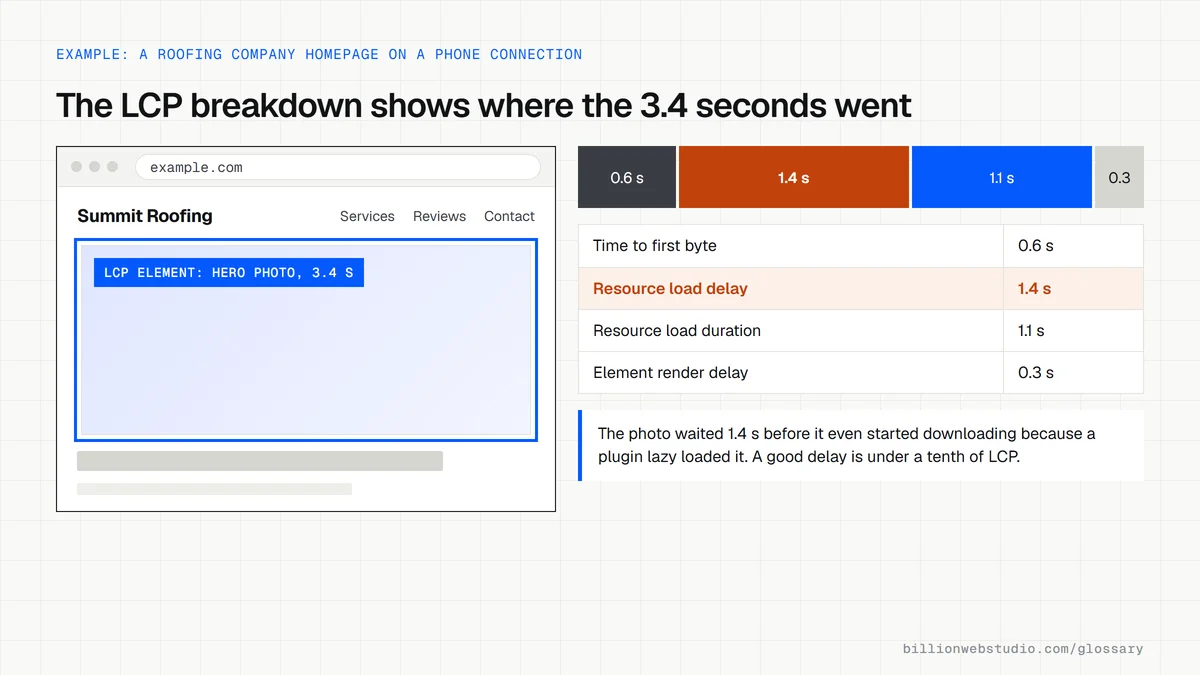
A roofing company's homepage opens with a full-width photo exported straight from a camera as a very large JPEG, set to lazy load by a plugin. On phones, that photo is the LCP element and appears last. The fix is to resize it, convert it to WebP, remove lazy loading from that one image and preload it.
Common causes of a slow LCP
- Oversized hero images that were never resized or compressed for the web.
- Lazy loading applied to the main image at the top of the page.
- Slow server response or hosting far from your visitors, with no CDN in front.
- Render-blocking CSS, fonts or scripts that hold back the first paint.
- Hero content that only appears after JavaScript runs, such as a slider built in script.
The four parts of LCP and what fixes each one
| Part of LCP | What it covers | Rough share of a good LCP | Usual fix |
|---|---|---|---|
| Time to first byte | Waiting for the server to start sending the page | About 40% | Faster hosting, page caching, a CDN |
| Resource load delay | Time before the browser starts downloading the LCP image | Under 10% | Remove lazy loading from the hero, add fetchpriority="high" |
| Resource load duration | Downloading the LCP image itself | About 40% | Resize, compress and serve WebP or AVIF |
| Element render delay | Time from download to the image showing | Under 10% | Fewer render-blocking scripts and styles |
Copy this hero image markup for a fast LCP
<!-- The hero photo is the LCP element: load it early and never lazily -->
<img src="/img/roof-crew-1600.webp"
     srcset="/img/roof-crew-800.webp 800w, /img/roof-crew-1600.webp 1600w"
     sizes="100vw"
     alt="Roofing crew laying new shingles on a two-story house"
     width="1600" height="900"
     fetchpriority="high">
<!-- Use fetchpriority="high" on one or two images at most -->
How to see which part of your LCP is slow
- Run your page through PageSpeed Insights on the Mobile tab and note the real-user LCP value.
- Scroll to the diagnostics and expand the LCP breakdown insight, which names the LCP element and splits its time into four parts.
- Find the largest part and match it to the table above: server, discovery, download or rendering.
- Open the LCP request discovery insight to see whether the LCP image is lazy loaded or missing a high fetch priority.
- Recheck after each fix, and give the field data a few weeks, because it covers the previous 28 days of visits.
What good looks like: LCP of 2.5 seconds or less on mobile for at least 75% of visits, with resource load delay and element render delay each a small slice of the total.
Free tool: PageSpeed Insights
Questions to ask your web developer
“What is the LCP element on our main templates, and how is it loaded?”
A good answer: A named element per template, usually the hero image or headline, served in a modern format at the right size, never lazy loaded, with fetchpriority set to high.
“What LCP do you measure on a mid-range phone before launch?”
A good answer: A number under 2.5 seconds from a mobile lab test on the staging site, plus a plan to confirm it in real-user data after launch.
Largest Contentful Paint (LCP): common questions
What is a good LCP score?
A good Largest Contentful Paint is 2.5 seconds or less. Between 2.5 and 4 seconds needs improvement, and anything slower than 4 seconds is poor. Google measures this at the 75th percentile of real visits, with mobile and desktop assessed separately.
How do I find the LCP element on my page?
Run the page through PageSpeed Insights and look for the Largest Contentful Paint element in the diagnostics, which names the exact image or text block. Chrome DevTools shows the same information in its Performance panel when you record a page load.
Does lazy loading hurt LCP?
It can. web.dev advises against lazy loading images likely to be visible when the page first loads, especially the LCP image, because the browser then delays fetching it. Lazy load images further down the page and let the main hero image load immediately.
Sources
Want a website that gets this right?
Every Billion Web Studio build includes technical SEO, schema and speed work as standard, with a fixed quote within 1 business day.