SEO
What Is Technical SEO?
Technical SEO is the part of search engine optimization that makes sure search engines can crawl, render and index a website, covering site speed, mobile layout, HTTPS, redirects, sitemaps, robots.txt and structured data.
What technical SEO means in plain English
If content is the goods in a shop, technical SEO is the door, the lights and the aisles. Google sets three basic requirements for a page to be eligible for indexing: Googlebot is not blocked from it, the page returns an HTTP 200 success code, and it has indexable content. Technical SEO covers those basics plus speed, mobile usability, duplicate URLs and site structure.
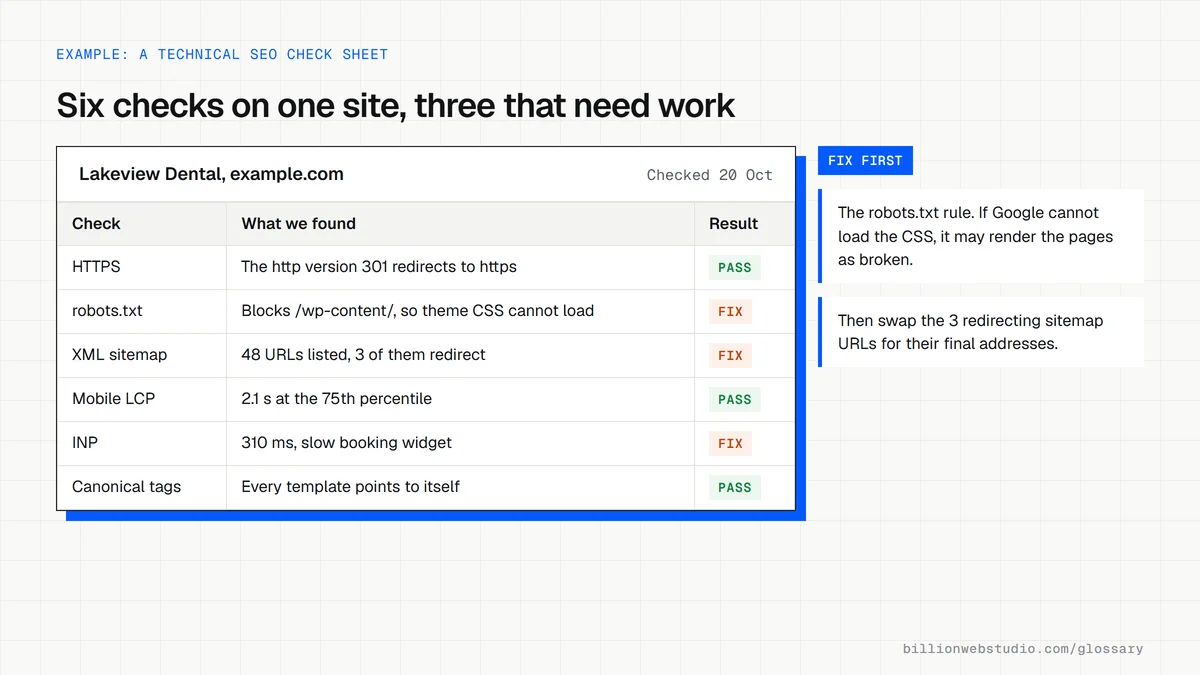
Why technical SEO matters for a business website
A brilliant service page earns nothing if Google cannot index it. Technical faults are also easy to introduce without noticing: a redesign that changes URLs, a plugin that adds noindex tags, or a slow theme that frustrates phone users. Because these problems hit every page at once, fixing them often lifts the whole site rather than a single page.
An example of a technical SEO problem
A manufacturer launches a new site where the product menu is built with JavaScript buttons rather than normal links. Google can reliably follow only links written as an a element with an href, so most product pages are never discovered. Rebuilding the menu with standard links and adding the product pages to the XML sitemap gets them crawled and indexed.
How to check technical SEO on your own site
- Open the Page indexing report in Google Search Console to see which pages are excluded and why.
- Visit yourdomain.com/robots.txt and confirm nothing important is disallowed.
- Run key pages through PageSpeed Insights to see Core Web Vitals from real visitors.
- Use the URL Inspection tool to confirm the canonical URL Google chose for an important page.
- Test product, business and article pages in the Rich Results Test for structured data errors.
Technical SEO checks and what a pass looks like
| Check | Where to look | Pass |
|---|---|---|
| Largest Contentful Paint | PageSpeed Insights, field data | 2.5 seconds or less at the 75th percentile |
| Interaction to Next Paint | PageSpeed Insights, field data | 200 milliseconds or less |
| Cumulative Layout Shift | PageSpeed Insights, field data | 0.1 or less |
| Indexing | Search Console: Indexing, then Pages | Every page you want found is indexed, or excluded for a reason you chose |
| HTTPS | Type the http:// address in the browser | It 301 redirects to the https:// version |
| XML sitemap | Search Console: Indexing, then Sitemaps | Status Success, listing only indexable URLs that return 200 |
| robots.txt | yourdomain.com/robots.txt | No Disallow rule on pages or on files needed to render them |
How to check that Google can render a key page
- In Search Console, paste the page address into the search bar at the top to open URL Inspection.
- Click Test live URL and wait for the live result.
- Click View tested page, open the Screenshot tab and confirm the main text, prices and menu links appear the way visitors see them.
- Open the More info tab in the same panel and look for page resources that could not be loaded, such as blocked scripts or stylesheets.
- Back on the result card, read Page fetch, Crawl allowed and Indexing allowed: you want Successful, Yes and Yes.
What good looks like: The live test succeeds, the screenshot matches the real page and no important resource is blocked. A page built mostly with JavaScript should still show its key text in the screenshot.
Free tool: Google Search Console URL Inspection
Questions to ask your web developer
“How will you protect our rankings during a redesign or platform move?”
A good answer: A full crawl before launch, a redirect map for every old URL that earns traffic or links, a staging site protected by a password rather than robots.txt alone, and a Page indexing check in the first week after launch.
“Which technical checks run after each release?”
A good answer: A crawl or script that flags new noindex tags, broken links, redirect chains and missing canonical tags on every release, plus a monthly look at Core Web Vitals field data.
Technical SEO: common questions
What is the difference between technical SEO and on-page SEO?
Technical SEO deals with the site as a whole: whether search engines can crawl, render and index it, how fast it loads and how URLs are handled. On-page SEO deals with the content of each page, such as its title, headings, text and images. A page needs both to rank well.
Does meeting Google's technical requirements guarantee indexing?
No. Google says a page that meets its technical requirements is only eligible to be indexed, and that indexing is not guaranteed. Google still decides whether the content is useful and original enough to store. Technical SEO removes the barriers, while content quality earns the place in the index.
Is technical SEO a one-time job?
No. A clean launch is the best starting point, but new plugins, content, redesigns and platform updates can each introduce problems later. A monthly look at Search Console's indexing and Core Web Vitals reports catches most issues early, before they cost traffic and leads.
Sources
Want a website that gets this right?
Every Billion Web Studio build includes technical SEO, schema and speed work as standard, with a fixed quote within 1 business day.