Speed and Core Web Vitals
What Is Cumulative Layout Shift (CLS)?
Cumulative Layout Shift (CLS) is a Core Web Vitals metric that scores how much visible content unexpectedly moves around while a page is open. Google rates a CLS of 0.1 or less as good and anything above 0.25 as poor.
What Cumulative Layout Shift means in plain English
You start reading a paragraph, an image loads above it, and the text drops out of view. Or you reach for a button and an ad pushes it down, so you tap the wrong thing. Each of those unexpected moves is a layout shift, and CLS adds them up into one score.
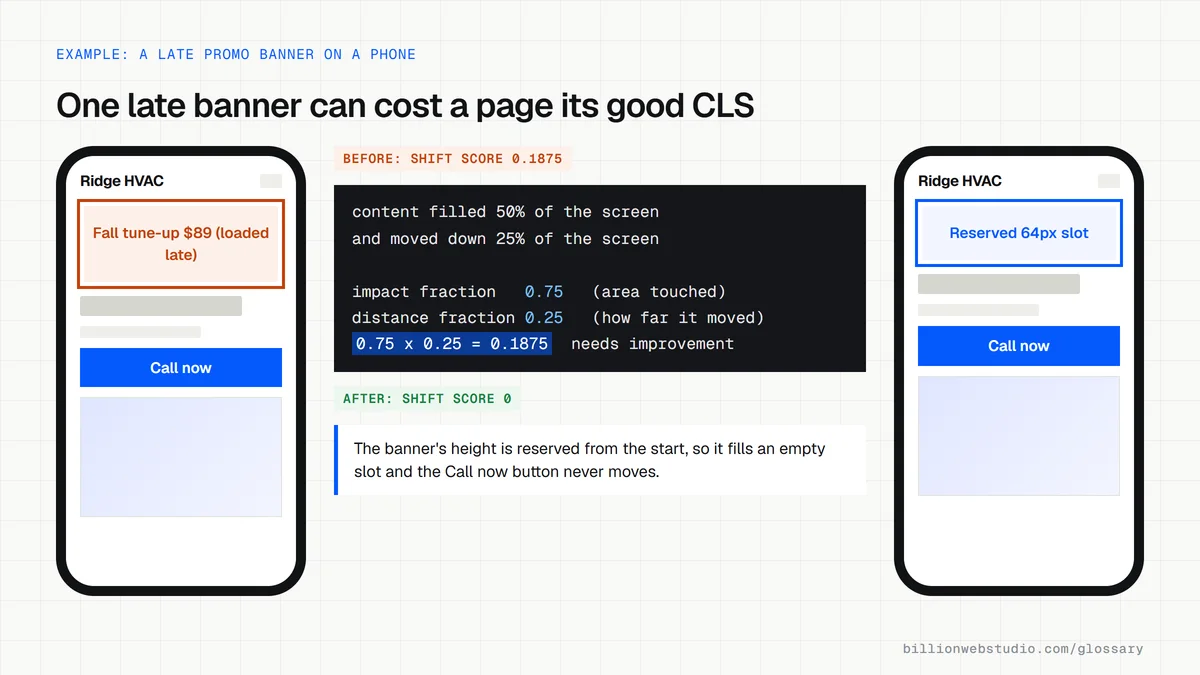
Each shift is scored by how much of the screen moved and how far it moved. Shifts that happen close together are grouped into session windows, with gaps under one second and a five-second cap, and CLS reports the worst window. Movement within half a second of a tap, click or keypress is excluded, because the user expected it.
Why Cumulative Layout Shift matters
Layout shift costs more than looks. Misclicks send visitors to the wrong page, add the wrong item to a cart or open an ad by accident. Text that jumps while someone reads makes the site feel broken, and a form that moves mid-entry is easy to abandon.
CLS is one of the three Core Web Vitals, measured at the 75th percentile of real visits on mobile and on desktop. A score of 0.1 or less is good, up to 0.25 needs improvement, and above 0.25 is poor.
A Cumulative Layout Shift example
An HVAC company's service page loads its text first, then a promotional banner appears at the top a moment later and pushes everything down, including the Call Now button. Reserving the banner's height in the layout from the start, so it fills an empty slot instead of shoving content, removes the shift.
Common causes of layout shift
- Images and videos without width and height set, so the browser cannot reserve their space.
- Ads, embeds and iframes that load without a fixed-size container.
- Banners, cookie notices or promos injected above existing content after the page appears.
- Web fonts that swap in with different sizing from the fallback font.
- Animations that change an element's top or left position instead of using transforms.
Copy this markup that reserves space and prevents layout shift
<!-- 1. Images: real width and height let the browser reserve the box -->
<img src="/img/technicians.webp" alt="Two HVAC technicians beside a service van"
     width="1200" height="800" style="max-width:100%;height:auto">

<!-- 2. A promo banner that loads later: hold its slot open from the start -->
<div class="promo-slot" style="min-height:64px"></div>

<!-- 3. Video or map embeds: fix the shape with aspect-ratio -->
<iframe src="https://www.example.com/video/furnace-service"
        title="How we service a gas furnace"
        style="width:100%;aspect-ratio:16/9;border:0" loading="lazy"></iframe>
How to find what is shifting on your page with Chrome DevTools
- Open the page in Chrome, press F12 and select the Performance panel. The live metrics view shows a local CLS value straight away.
- Reload the page and scroll slowly to the bottom, as a visitor would, then read the CLS card again.
- Open the Layout shifts tab under the metric cards. Each row lists one shift and its score, so you can see which moment moved the page most.
- Repeat with mobile emulation on (the phone icon in the DevTools toolbar), because banners and ads often behave differently on small screens.
- For real-user numbers, run the page in PageSpeed Insights and open the Layout shift culprits insight.
What good looks like: A CLS of 0.1 or less, with the Layout shifts tab showing no shift bigger than a few hundredths while the page loads and while you scroll.
Free tool: Chrome DevTools Performance panel
Questions to ask your web developer
“Do our templates reserve space for every image, video, ad and embed before it loads?”
A good answer: Yes: images carry width and height, embeds sit in boxes with a fixed aspect ratio, and ad or promo slots have a minimum height set in the CSS.
“How do the cookie notice, promo bar and chat button appear?”
A good answer: They overlay the page, for example fixed to the bottom of the screen, instead of being inserted above content that is already showing.
“How do you load the web fonts?”
A good answer: A small number of font files, preloaded, with a fallback font sized to match so text barely moves when the brand font arrives.
Cumulative Layout Shift (CLS): common questions
What is a good CLS score?
A good Cumulative Layout Shift score is 0.1 or less. Scores above 0.1 and up to 0.25 need improvement, and anything above 0.25 is poor. Google looks at the 75th percentile of real visits, assessing mobile and desktop separately.
What causes cumulative layout shift?
The usual culprits are images without set dimensions, ads and embeds without reserved space, content injected above what is already on screen, and web fonts that change size when they load. Each makes the browser move existing content after the visitor has started looking at it.
Do layout shifts after a click count toward CLS?
Usually not. Shifts that happen within 500 milliseconds of a tap, click or keypress are flagged as expected and excluded, such as an accordion opening when clicked. Scrolling and pinch-zoom do not count as that kind of input, so shifts during them can still count.
Sources
Want a website that gets this right?
Every Billion Web Studio build includes technical SEO, schema and speed work as standard, with a fixed quote within 1 business day.