Speed and Core Web Vitals
What Is Interaction to Next Paint (INP)?
Interaction to Next Paint (INP) is a Core Web Vitals metric that measures how quickly a page visibly responds when someone clicks, taps or types. Google rates an INP of 200 milliseconds or less as good and above 500 milliseconds as poor.
What Interaction to Next Paint means in plain English
INP times the gap between an action and the screen showing a response: you tap Add to cart, and how long until something changes? It watches clicks, taps and key presses across the whole visit and reports one of the slowest, ignoring rare outliers. Hovering and scrolling are not measured.
INP became a Core Web Vital on March 12, 2024, replacing First Input Delay. FID only measured the delay before the browser started handling the first interaction, so a page could pass while still feeling sluggish. INP covers every interaction and the full time until the next frame is painted.
Why Interaction to Next Paint matters
A slow response feels like a broken site. Visitors tap a menu twice, abandon a filter that seems frozen, or give up on a form when each keystroke lags. INP turns that frustration into a number that Google treats as one of its three Core Web Vitals.
The thresholds are measured at the 75th percentile of real visits, on mobile and desktop separately: 200 milliseconds or less is good, up to 500 milliseconds needs improvement, and slower than that is poor. Phones with slower processors usually score worse than desktops.
An Interaction to Next Paint example
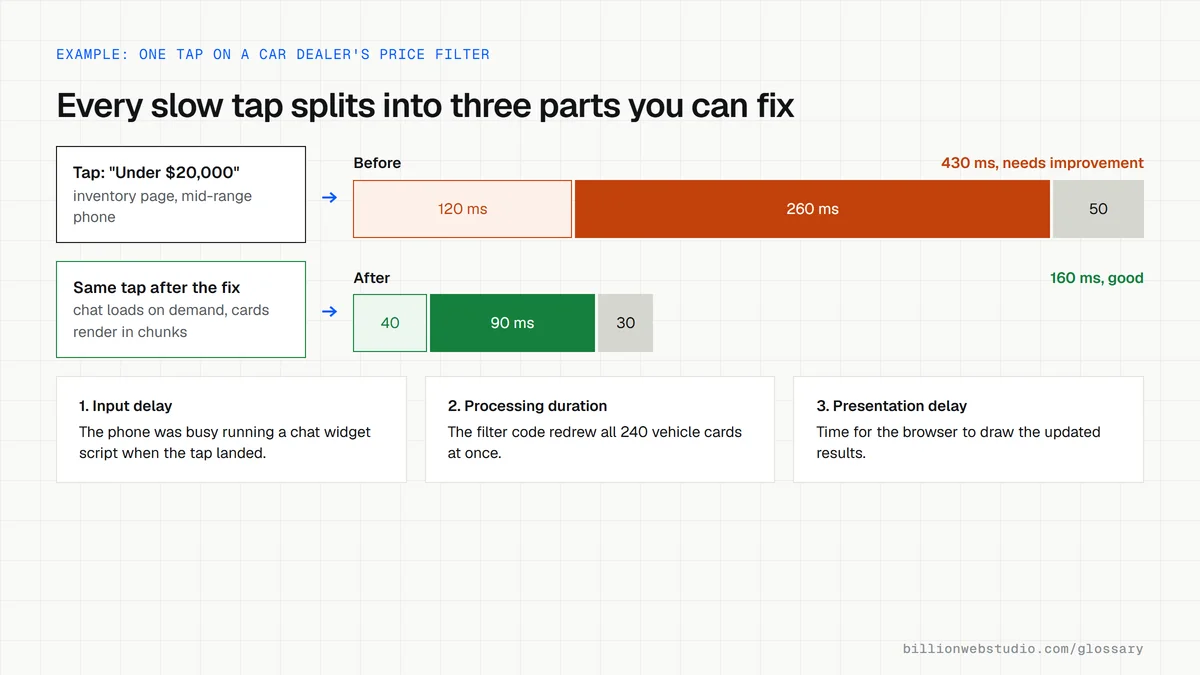
A car dealership's inventory page lets shoppers filter by make, price and mileage. Each tap triggers a large script that re-renders every vehicle card while chat, analytics and ad tags also run, so the page freezes briefly. Breaking that work into smaller pieces and loading the chat widget only when needed makes filters respond quickly.
Common causes of a poor INP
- Long JavaScript tasks that block the browser from responding to input.
- Too many third-party tags, such as chat widgets, trackers and ad scripts, competing for the processor.
- Event handlers that redo large amounts of work, like re-rendering a whole page for one change.
- Very large pages with thousands of elements that are slow to update.
- Plugins or page builders that add heavy scripts to every page whether needed or not.
Copy this pattern that lets the page respond before heavy work
// Hand control back to the browser so it can paint, then continue.
function yieldToMain() {
  if (globalThis.scheduler?.yield) {
    return scheduler.yield();
  }
  // Fall back for browsers without scheduler.yield
  return new Promise((resolve) => setTimeout(resolve, 0));
}

filterForm.addEventListener("change", async () => {
  showLoadingState();      // quick visual feedback first
  await yieldToMain();     // let the browser paint that feedback
  renderVehicleCards();    // then run the expensive update
  await yieldToMain();
  sendFilterAnalytics();   // work the visitor never sees goes last
});
How to test Interaction to Next Paint on your own page
- Open the page in Chrome, press F12 and select the Performance panel. The INP card stays empty until you interact.
- Use the page the way a customer would: open the menu, tap filters, type in the form and press the main buttons.
- Read the local INP card, then open the Interactions tab to see each tap or key press with its duration.
- Expand the slowest interaction to see its input delay, processing duration and presentation delay.
- For a phone-like test, set CPU throttling in the Performance panel settings, then check real-user INP for the page in PageSpeed Insights.
What good looks like: INP of 200 milliseconds or less, with no single interaction in the Interactions tab much above that, even with CPU throttling on.
Free tool: Chrome DevTools Performance panel
Questions to ask your web developer
“Which scripts run when a visitor taps our main buttons and filters?”
A good answer: A clear answer naming each script, the time it takes on a mid-range phone, and how the heavy work is split up so the screen updates first.
“How do you load chat, analytics, ad and booking widgets?”
A good answer: Only the tags the business uses, loaded after the page is ready or when the visitor opens them, with INP measured before and after each new tag is added.
Interaction to Next Paint (INP): common questions
What is a good INP score?
A good Interaction to Next Paint is 200 milliseconds or less. Above 200 and up to 500 milliseconds needs improvement, and anything slower than 500 milliseconds is poor. Google assesses the 75th percentile of real visits for mobile and desktop separately.
What is the difference between INP and FID?
First Input Delay measured only the wait before the browser began handling a visitor's first interaction. Interaction to Next Paint measures every click, tap and key press during the visit, including processing and the time to draw the result. INP replaced FID as a Core Web Vital on March 12, 2024.
Why is my INP poor on mobile but fine on desktop?
Phones usually have much less processing power than computers, so the same JavaScript takes longer to run. Google reports mobile and desktop separately, which is why a page can pass on desktop and fail on mobile. Reducing script work helps both.
Sources
Want a website that gets this right?
Every Billion Web Studio build includes technical SEO, schema and speed work as standard, with a fixed quote within 1 business day.