Speed and Core Web Vitals
What Is WebP?
WebP is an image format developed by Google that stores photos and graphics in smaller files than JPEG or PNG at similar visual quality, while also supporting transparency and animation. All major current browsers display WebP images.
What WebP means in plain English
WebP is a file type, like JPEG or PNG, designed for the web. It offers two kinds of compression. Lossy WebP throws away detail the eye barely notices, much like JPEG, while lossless WebP keeps every pixel exactly, like PNG. Both modes can include transparent backgrounds, and WebP can also hold short animations.
Google's WebP documentation reports that lossless WebP files are 26% smaller than PNGs, and lossy WebP files are 25 to 34% smaller than comparable JPEGs at equivalent quality. Actual savings vary from image to image.
Why WebP matters for a business website
Images are often the heaviest part of a page. Smaller image files download faster, especially on phones, which helps the main photo appear sooner and improves Largest Contentful Paint. Lighter pages also use less of your visitors' data and your hosting bandwidth.
Support is no longer a barrier. MDN notes WebP works in current versions of Chrome, Edge, Firefox, Opera and Safari, with older Macs needing Safari 14 on macOS Big Sur or later. WordPress has accepted WebP uploads since version 5.8.
A WebP example
An online furniture store has hundreds of product photos saved as large JPEGs, and category pages load slowly on mobile. The developer resizes each photo for its display size and serves WebP versions, keeping a JPEG fallback through the picture element. Category pages get lighter, and nothing changes visually for shoppers.
Common WebP mistakes
- Converting an oversized image to WebP without first resizing it to the size it is displayed at.
- Re-saving already compressed JPEGs at low quality, which stacks visible artifacts.
- Using WebP for logos and icons that would be sharper and smaller as SVG files.
- Uploading WebP files whose names and alt text say nothing about the image.
Copy these commands to convert images with Google's cwebp tool
# cwebp is Google's free WebP encoder (part of libwebp).
# -q sets quality from 0 to 100 (default 75).

# Product photo: resize to 1600 px wide (height follows) and save as lossy WebP
cwebp -q 80 -resize 1600 0 oak-sofa-3-seat.jpg -o oak-sofa-3-seat.webp

# Cut-out product image with a transparent background: keep every pixel
cwebp -lossless oak-chair-cutout.png -o oak-chair-cutout.webp

# Check the result before replacing the original on the site
How to check whether your site serves WebP images
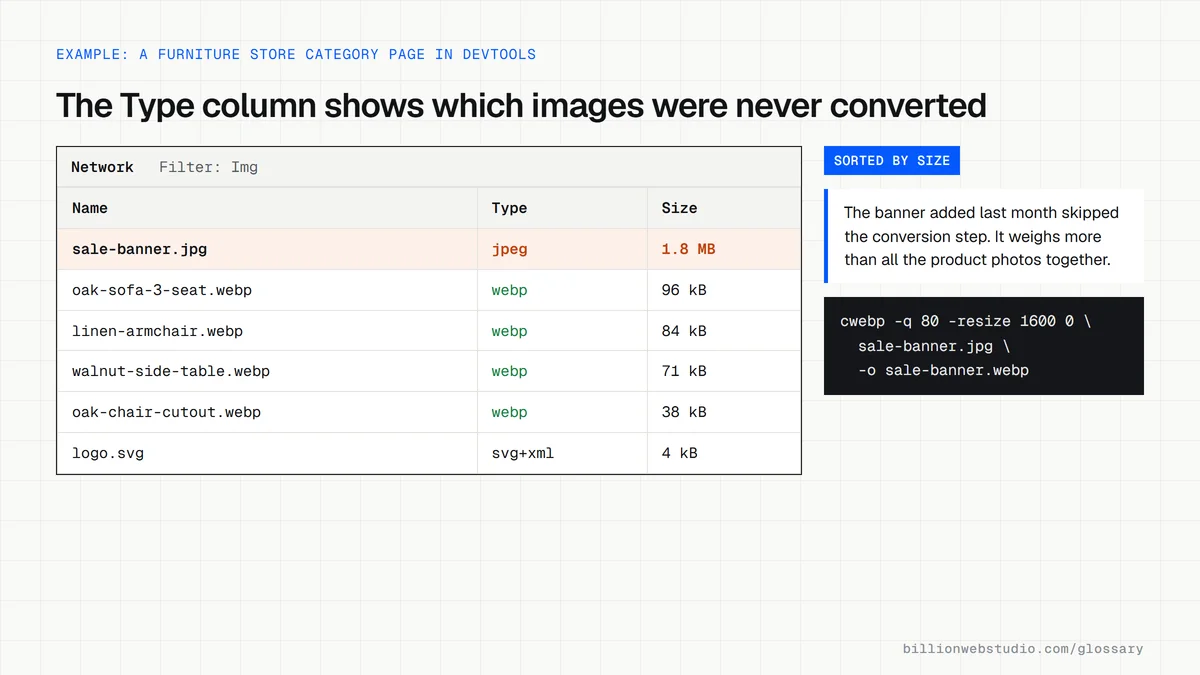
- Open a product or gallery page in Chrome, press F12 and select the Network panel.
- Click the Img filter and reload the page.
- Read the Type column for each image: webp or avif is good, while jpeg and png show images that were never converted.
- Click the Size column header to sort by size and look at the biggest files first, since those cost the most time on mobile.
- On WordPress, open Media > Library and switch to list view, where each file name shows its extension, such as .jpg or .webp.
What good looks like: Photos arrive as webp or avif at about the size they are shown, and no single image on the page weighs more than a few hundred kilobytes.
Free tool: Google for Developers: WebP
Questions to ask your web developer
“Will new uploads be converted to WebP automatically, or do staff have to do it?”
A good answer: Automatic, through the CMS, a plugin or an image CDN, with the original kept as a backup and several sizes generated for phones and desktops.
“What do browsers or tools that cannot show WebP receive?”
A good answer: A JPEG or PNG fallback through the picture element or server negotiation, and plain JPEG or PNG in emails and files sent to print.
WebP: common questions
Is WebP better than JPEG?
For most website images, yes. Google reports lossy WebP files are 25 to 34% smaller than comparable JPEGs at equivalent quality, and WebP also supports transparency and animation, which JPEG does not. JPEG remains useful for compatibility with older software and for print workflows.
Can I use WebP images on WordPress?
Yes. WordPress added WebP upload support in version 5.8, so you can add WebP files to the media library like JPEG or PNG, provided your hosting server's image library supports the format. Many image optimization plugins can also convert existing uploads to WebP automatically.
Is WebP or AVIF better for websites?
Both are modern formats that beat JPEG and PNG. MDN notes AVIF offers slightly better compression but is not quite as widely supported and lacks progressive rendering. WebP is the safer default today, and some sites serve AVIF first with WebP as a fallback.
Sources
Want a website that gets this right?
Every Billion Web Studio build includes technical SEO, schema and speed work as standard, with a fixed quote within 1 business day.