Building and hosting
What Is an SSL Certificate?
SSL certificate stands for Secure Sockets Layer.
An SSL certificate is a small data file, issued by a trusted certificate authority, that proves a website's identity and lets browsers open an encrypted HTTPS connection to it. Modern certificates actually use TLS, the successor to SSL, but the old name stuck.
What an SSL certificate means in plain English
When a browser connects to your site, it asks for proof that the server really belongs to your domain. The certificate is that proof. A certificate authority (CA) issues it after checking that you control the domain, and it contains a public key the browser uses to set up an encrypted session that outsiders cannot read or alter.
The name is out of date. SSL (Secure Sockets Layer) has been superseded by TLS (Transport Layer Security), so today's certificates are really TLS certificates. Hosts and sellers still say SSL because buyers search for it. Certificates come in three validation levels: domain validated (DV), organization validated (OV) and extended validation (EV). DV is enough for most business sites.
Why an SSL certificate matters for your business
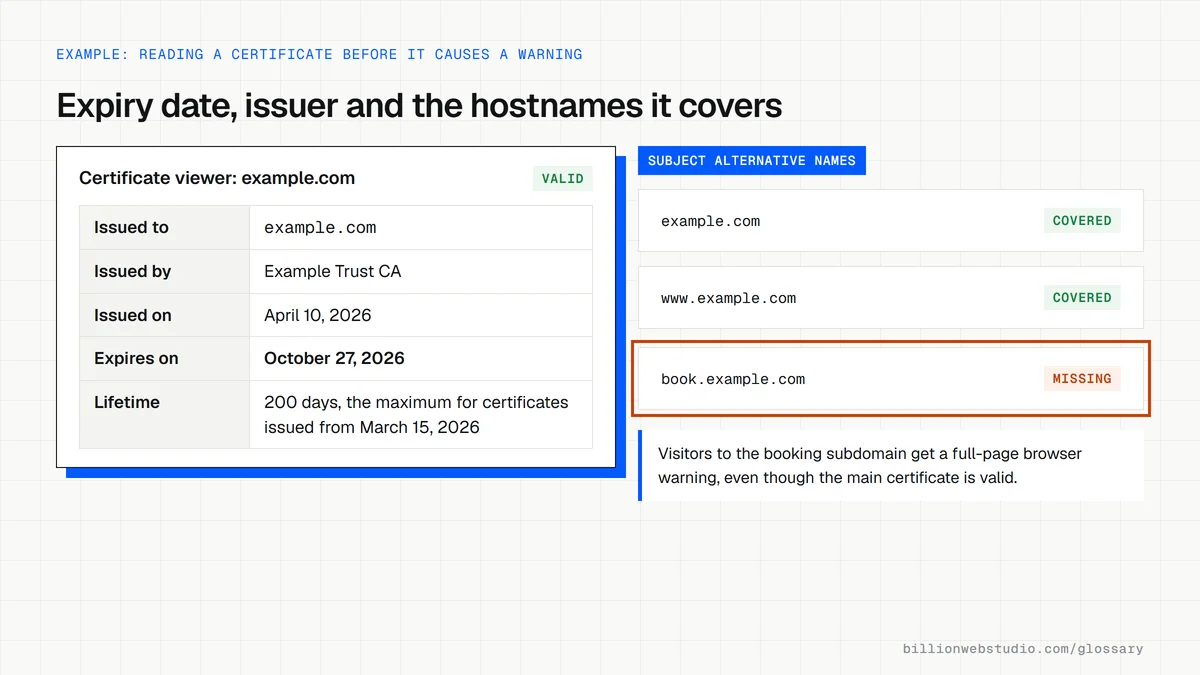
Without a valid certificate, browsers flag your site. Chrome tells visitors a site without a private connection is not secure, and an expired certificate triggers a full-page warning. Either one puts people off your contact form or checkout. Google also asks whether pages are served securely as part of its page experience guidance, so the certificate supports trust, leads and search at once.
SSL certificate lifetimes are getting shorter
Every certificate has an expiry date, and the industry is cutting how long they can last. Under CA/Browser Forum rules, publicly trusted certificates issued from March 15, 2026 can be valid for at most 200 days. That limit falls to 100 days from March 15, 2027 and to 47 days from March 15, 2029. Renewal now has to be automatic.
Common SSL certificate mistakes
- Renewing by hand and letting the certificate expire, which shows every visitor a browser security warning.
- Covering example.com but not www.example.com or the other subdomains you actually use.
- Leaving old http:// links to images or scripts, which causes mixed content warnings on secure pages.
- Forgetting to redirect HTTP pages to HTTPS, so two versions of every page stay live.
- Assuming a paid certificate encrypts better than a free one, when the encryption is the same.
Copy these CAA DNS records
; CAA records for example.com: add each one as type CAA in your DNS panel
; Replace letsencrypt.org with the authority your host actually uses

; Only this authority may issue certificates for example.com and its subdomains
example.com.  3600  IN  CAA  0 issue "letsencrypt.org"

; No authority may issue wildcard certificates
example.com.  3600  IN  CAA  0 issuewild ";"

; Where authorities can report refused or suspicious requests
example.com.  3600  IN  CAA  0 iodef "mailto:security@example.com"
How to check your SSL certificate's expiry date and coverage
- Open your site in Chrome on a computer and click the View site information icon to the left of the address.
- Choose Connection is secure, then Certificate is valid. The viewer shows who the certificate was issued to, the issuing authority, and the Issued On and Expires On dates.
- Open the Details tab and select Certificate Subject Alternative Name. Every hostname you use, such as example.com and www.example.com, must be listed.
- Search your domain on crt.sh, a public Certificate Transparency log search, to see every certificate issued for it, including ones for subdomains you may have forgotten.
- Look up your domain's CAA records in the Google Admin Toolbox Dig tool. If any exist, they must name the certificate authority your host uses, or renewals will be refused.
What good looks like: Every hostname you serve is listed under Subject Alternative Name, the expiry date is weeks away, and your host confirms renewal is automatic, which matters now that certificates issued from March 15, 2026 last at most 200 days.
Free tool: crt.sh Certificate Transparency search
Questions to ask your web developer
“How is the certificate renewed, and who is alerted if renewal fails?”
A good answer: Renewal is automated through ACME, the protocol Let's Encrypt and many other authorities use, or through the host's managed certificates, and expiry alerts go to a shared company address rather than one person's inbox.
“Exactly which hostnames does the certificate cover?”
A good answer: They list each one, including www and every subdomain in use such as booking or shop addresses, and say whether that is done with a wildcard or separate certificates.
“Does every HTTP address redirect to HTTPS in one step?”
A good answer: Yes: every http:// address and non-preferred hostname goes in a single 301 to the preferred https:// version, and the browser console shows no mixed content warnings.
SSL certificate: common questions
Is an SSL certificate free?
Often, yes. Let's Encrypt is a free, automated certificate authority run by a nonprofit, and many hosts install and renew its certificates for you. Paid certificates add organization checks or warranties, but they do not encrypt traffic any more strongly than a free domain-validated certificate does.
What is the difference between SSL and HTTPS?
The SSL certificate is the credential installed on your server. HTTPS is the secure version of the web protocol, and it uses that certificate to encrypt traffic between a browser and your site. The certificate has to be in place before your pages can load over HTTPS.
How do I check if my SSL certificate is valid?
Open your site in Chrome and click the icon to the left of the web address. It shows whether the connection is secure, and the certificate details list the issuer and expiry date. Check both the www and non-www versions of your domain, since each needs coverage.
Sources
- MDN Web Docs: SSL (Secure Sockets Layer)
- CA/Browser Forum: Baseline Requirements for TLS Server Certificates
- CA/Browser Forum: Ballot SC-081v3, reducing certificate validity periods
- Google Chrome Help: Check if a site's connection is secure
- Let's Encrypt: About
- Google Search Central: Understanding page experience in Google Search results
- Let's Encrypt: Certificate Authority Authorization (CAA)
- RFC 8659: DNS Certification Authority Authorization (CAA) Resource Record
Want a website that gets this right?
Every Billion Web Studio build includes technical SEO, schema and speed work as standard, with a fixed quote within 1 business day.