Building and hosting
What Is Web Hosting?
Web hosting is a service that stores a website's files on a server connected to the internet, so anyone can load its pages at any time. Businesses rent that server space from a hosting provider, usually on a monthly or yearly plan.
What web hosting means in plain English
A website is a collection of files: pages, images, code and often a database. Those files need to live on a computer that is switched on and online around the clock, called a server. A hosting provider owns and runs servers in data centers and rents you space on them, along with the power, network, security and backups that keep the site reachable.
Hosting comes in several forms. Shared hosting puts many sites on one server and costs the least. A virtual private server (VPS) reserves a slice of a machine for you. Dedicated hosting gives you a whole machine. Managed hosting for a platform such as WordPress adds updates and support, while cloud platforms spread a site across many servers.
Why web hosting matters for your business
Your host affects how fast pages load, how often the site goes down, and how it copes with a traffic spike from an ad campaign. A slow server delays every page, which drags down Core Web Vitals, and Google says its ranking systems use those metrics. Downtime costs leads directly, because a visitor who meets an error page usually tries the next company instead.
A web hosting example
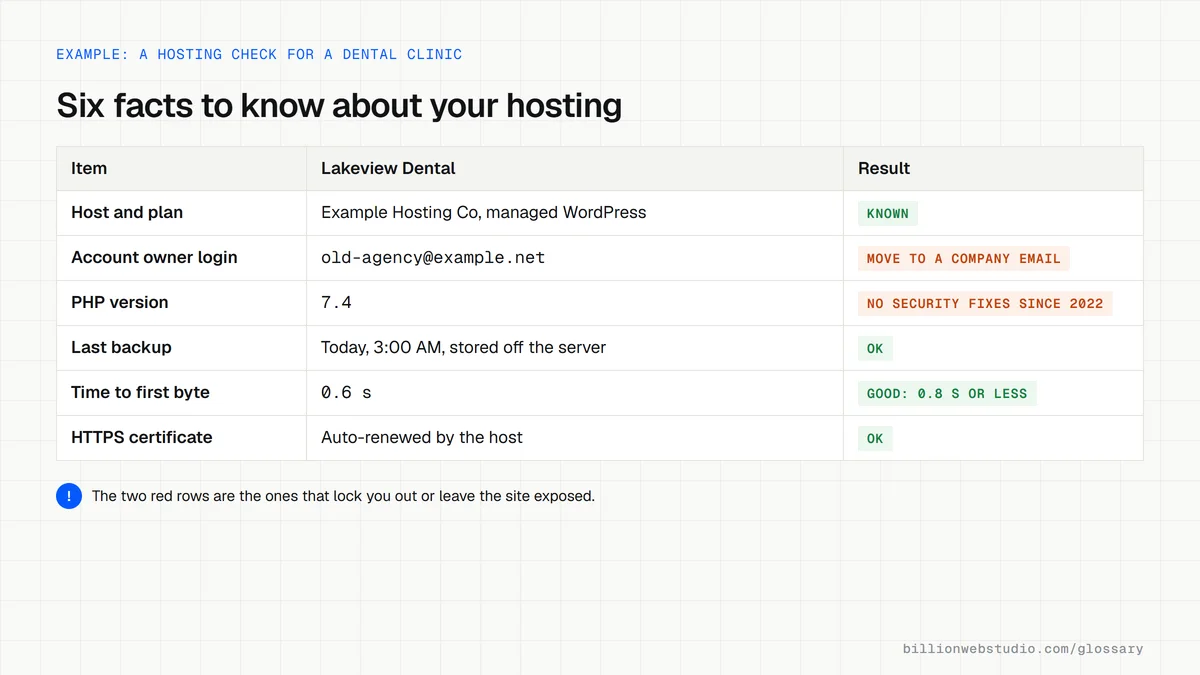
A dental clinic runs its WordPress site on a managed WordPress plan. The host keeps the server software updated, takes daily backups and installs a free certificate for HTTPS. When the clinic launches a whitening offer and traffic jumps for a week, the plan handles the extra visitors without slowing down, and the clinic still pays a predictable monthly fee.
How to check your web hosting
- Log in to the hosting account and confirm it is in your company's name with your own billing details.
- Ask your host how often backups run and how quickly one can be restored.
- Test your homepage in PageSpeed Insights and look at how long the server takes to respond.
- Confirm the plan includes HTTPS and current software versions for the platform your site runs on.
- Set up an uptime monitor so you hear about outages before your customers do.
Types of web hosting and which business each suits
| Hosting type | Who manages the server | Suits | Watch for |
|---|---|---|---|
| Shared hosting | The host; many sites share one server | Small, quiet brochure sites | A busy neighbor site can slow yours |
| Managed WordPress hosting | The host, including updates and backups | Most small business WordPress sites | Plugin restrictions and a higher price than shared |
| VPS (virtual private server) | You or your developer, unless sold as managed | Growing stores and custom applications | Someone must patch and monitor the server |
| Cloud or CDN platform | The platform, spread across many servers | Static and framework sites, sudden traffic spikes | Usage-based bills can climb with traffic |
| Dedicated server | You or your developer, on a whole machine | High-traffic or compliance-heavy sites | Highest cost and full upkeep responsibility |
How to find out who hosts your site and how fast it responds
- Open the Google Admin Toolbox Dig tool, enter your domain and click NS to see which company runs your DNS, then click A to get the server's IP address.
- Look up that IP address in a regional internet registry search such as search.arin.net to see which network owns it, usually your host or a CDN in front of it.
- Run your homepage through PageSpeed Insights and read Time to First Byte in the real-user data and the Document request latency insight in the lab results.
- In your hosting control panel, find the PHP or Node.js version your site runs and the backup schedule, and note when the last backup completed and where it is stored.
What good looks like: You know the host and can reach the account, field TTFB is 0.8 seconds or less, Lighthouse does not report a server response over 600 milliseconds, the server software still receives security fixes, and a recent backup sits off the server.
Free tool: Google Admin Toolbox Dig
Questions to ask your web developer
“Where are backups stored, how long are they kept, and how fast can you restore one?”
A good answer: Daily backups on separate storage, kept for a stated number of days, with a restore they have actually tested and a stated time to bring the site back.
“Which server software versions does the plan run, and who upgrades them?”
A good answer: They name the PHP or Node.js version, confirm it is still a supported branch receiving security fixes, and say who upgrades it and how much notice you get.
“What happens when traffic spikes, and what does it cost?”
A good answer: They explain whether the plan has fixed resource limits or scales automatically, how any overage is billed, and whether a CDN caches pages in front of the server.
Web hosting: common questions
What is the difference between web hosting and a domain name?
A domain name is the address people type, and web hosting is where the website's files actually live. You usually pay for them separately and point the domain's DNS records at the host. Many companies sell both, but keeping each in an account you control makes switching providers easier.
Can I host a website for free?
Yes, some platforms offer free plans, but they usually limit storage, show their own branding or put your site on their subdomain, and offer little support. For a business site that needs a custom domain, steady speed and backups, a paid plan is normally worth the modest cost.
Which type of web hosting is best for a small business?
For most small business sites, managed hosting built for the platform you use is the safest choice, because the provider handles updates, security and backups. Shared hosting suits very small, quiet sites. Busy online stores and web applications often need a VPS or cloud hosting instead.
Sources
Want a website that gets this right?
Every Billion Web Studio build includes technical SEO, schema and speed work as standard, with a fixed quote within 1 business day.