Building and hosting
What Is a CDN?
CDN stands for Content Delivery Network.
A CDN (content delivery network) is a group of servers in many locations that store copies of a website's files and deliver them from the server closest to each visitor, so pages load faster and cope better with heavy traffic.
What a CDN means in plain English
If your website lives on one server in Virginia, a visitor in Sydney waits while every image and script crosses the Pacific. A CDN keeps cached copies of those files on servers around the world, often called edge locations. Each visitor is served from a nearby location, so the data travels a far shorter distance.
Most CDNs cache static files such as images, stylesheets, JavaScript and fonts, and many can cache whole pages too. Your original server, called the origin, stays the master copy. When a file changes, the CDN fetches the new version once the old copy expires or is purged, so visitors see the update.
Why a CDN matters for your business
Speed affects whether people stay. By cutting the distance data travels, a CDN helps pages load quickly for visitors far from your server, which supports Core Web Vitals such as Largest Contentful Paint. It also spreads the load during a traffic spike, and many providers filter malicious traffic before it reaches your origin, which helps keep a modest host online.
A CDN example
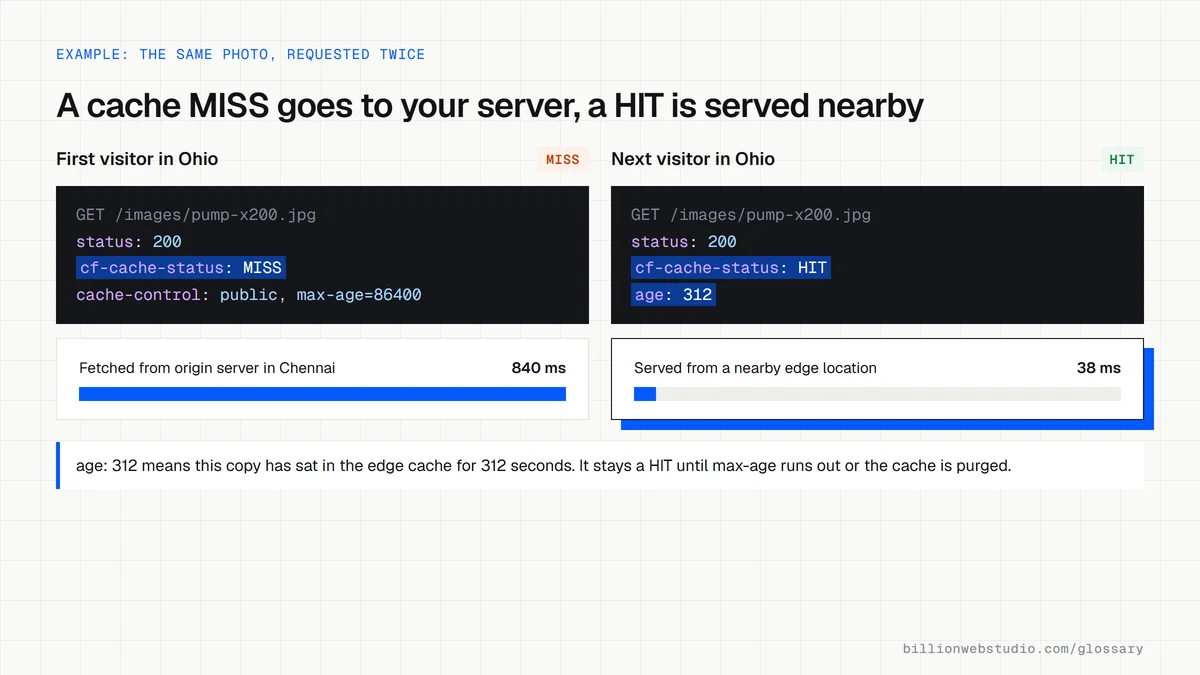
A manufacturer based in Chennai sells to buyers in the United States and Europe, and its product pages are full of large photos. With a CDN in front of the site, those images are served from servers in North America and Europe instead of India. An engineer in Ohio now gets the same quick page as a buyer down the road.
Common CDN mistakes
- Expecting a CDN to fix a slow server, when pages that cannot be cached still wait on the origin.
- Forgetting to purge the cache after an update, so visitors keep seeing old prices or text.
- Caching pages that must stay private, such as carts, checkouts or account areas.
- Uploading huge uncompressed images and hoping the CDN will make them small.
How to read the CDN cache status on a response
| Header value | Seen on | What it means | What to do |
|---|---|---|---|
| HIT | Cloudflare, Vercel | Served from the CDN's cached copy | Nothing. This is the goal for images, CSS and scripts |
| Hit from cloudfront | Amazon CloudFront (x-cache) | Served from the cache at the edge location that took the request | Nothing for static files |
| MISS | Cloudflare, Vercel | Not in the cache, so your origin server answered | Reload. If it stays MISS, check the Cache-Control header |
| BYPASS | Cloudflare, Vercel | The cache was skipped and the origin answered | Expected on carts, logins and checkouts |
| DYNAMIC | Cloudflare | Treated as not cacheable and sent straight to the origin | Normal for HTML pages unless you add a cache rule |
| STALE | Cloudflare, Vercel | An expired copy was served: on Cloudflare because the origin could not be reached, on Vercel while it refreshed in the background | On Cloudflare, check that your server is up |
How to check whether a CDN is serving your pages
- Open a page of your site in Chrome, press F12 (Cmd+Option+I on a Mac) and choose the Network tab.
- Reload the page, click the first row (the page itself) and open the Headers tab.
- Under Response Headers, look for a cache status header such as cf-cache-status (Cloudflare), x-vercel-cache (Vercel) or x-cache (Amazon CloudFront and several other CDNs).
- Click an image row and read the same header. Reload once more, because the first request after a change is often a MISS.
- Look for an age header as well: it shows in seconds how long that copy has been sitting in the cache.
What good looks like: Images, stylesheets, scripts and fonts show HIT on the second load, while carts, checkouts and account pages show BYPASS, DYNAMIC or MISS, so private data is never served from the cache.
Questions to ask your web developer
“Which files and pages will the CDN cache, and which will it never cache?”
A good answer: A written list: static files cached for a long time, public pages cached for a short time or purged on publish, and carts, logins, checkouts and forms excluded.
“How does the cache get cleared when we change a price or a page?”
A good answer: Publishing in the CMS triggers an automatic purge of the changed URLs, and they show you the manual purge button for emergencies.
“What does the CDN do if our server goes down?”
A good answer: They explain whether cached pages keep serving while the origin is unreachable, how long for, and who gets the alert.
CDN: common questions
Do I need a CDN for a small business website?
Not always. If nearly all your customers are close to your server and your host is fast, the gain may be small. Many hosting platforms now include a CDN by default, so check your plan before paying for one. Sites with visitors spread across regions benefit the most.
Is a CDN the same as web hosting?
No. Web hosting stores the original copy of your site on an origin server. A CDN sits in front of that host and delivers cached copies from many locations. You still need hosting; the CDN makes it faster and better able to handle sudden traffic.
Does a CDN help SEO?
Indirectly. Using a CDN is not a ranking factor in itself, but faster pages improve Core Web Vitals, which Google says its ranking systems use. A CDN can also absorb traffic spikes that might otherwise make your server return errors while Googlebot is crawling.
Sources
Want a website that gets this right?
Every Billion Web Studio build includes technical SEO, schema and speed work as standard, with a fixed quote within 1 business day.