Building and hosting
What Is Frontend?
Frontend is the part of a website or web app that runs in the visitor's browser: the layout, text, images, buttons, menus and forms people see and use. Frontend code is written mainly in HTML, CSS and JavaScript.
What frontend means in plain English
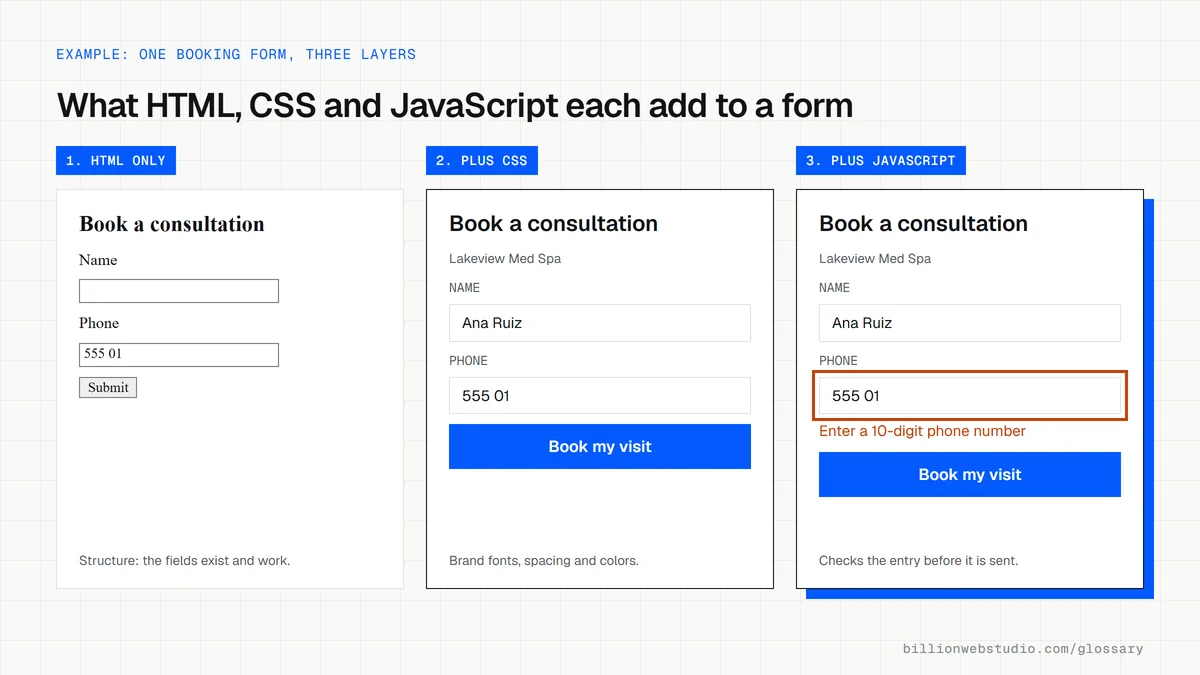
If a website were a restaurant, the frontend would be the dining room and the backend the kitchen. Frontend code has three main jobs: HTML gives each page its structure, CSS controls colors, fonts and layout, and JavaScript adds behavior such as menus that open, sliders and form checks.
MDN calls this client-side code, because it runs on the visitor's device rather than on your server. Frontend developers often use frameworks such as React or Vue to organize larger interfaces, and they turn the designer's mockups into pages that work on every screen size.
Why the frontend matters for a business website
The frontend is everything a prospect judges you by. How quickly the main content appears, whether buttons respond, whether text is readable on a phone and whether forms are easy to finish are all frontend work, and each one affects whether a visitor becomes a lead.
Most Core Web Vitals problems live in the frontend too: oversized images, layout that jumps as ads load, and heavy scripts that delay taps. Accessibility is largely a frontend responsibility as well, from color contrast to keyboard navigation and labeled form fields.
A frontend example
A med spa's homepage shows a hero photo, a short headline, a Book Consultation button and a list of treatments. All of that is frontend. When a visitor taps the button, frontend code opens the booking form and checks that the phone number is valid. Saving the booking and emailing staff is handled by the backend.
How to check your website's frontend
- Open your site on a mid-range phone over mobile data and note how long the main content takes to appear.
- Tap every button, menu and form field to confirm each one responds without delay.
- Run PageSpeed Insights on your key pages and read the Core Web Vitals results.
- Try navigating a page using only the Tab and Enter keys to spot accessibility gaps.
Which frontend problem shows up in which Core Web Vital
| Metric | Good | Poor | Frontend cause to look for |
|---|---|---|---|
| Largest Contentful Paint (LCP) | 2.5 s or less | Over 4 s | An oversized or lazy loaded hero image, render-blocking CSS or web fonts |
| Interaction to Next Paint (INP) | 200 ms or less | Over 500 ms | Heavy JavaScript, chat widgets and tag scripts that hold up taps |
| Cumulative Layout Shift (CLS) | 0.1 or less | Over 0.25 | Images without width and height, late banners and swapping fonts |
How to check how heavy your homepage frontend is
- Open your homepage in Chrome, press F12 (Cmd+Option+I on a Mac) and choose the Network tab.
- Tick Disable cache, then reload so every file downloads as it would for a first-time visitor.
- Read the summary bar at the bottom of the panel: number of requests, kB transferred and total resources.
- Click the Size column header to sort by size and note the largest images and scripts.
- Use the filter buttons (JS, CSS, Img, Font) to see which kind of file makes up most of the weight.
What good looks like: Lighthouse suggests keeping a page's total download below 1,600 KiB and flags any page whose network requests exceed 5,000 KiB.
Questions to ask your web developer
“Which framework or theme will you use, and how much JavaScript will a typical page load?”
A good answer: They name the stack, explain why it suits the site, and set a page weight budget they check in Lighthouse before launch.
“How will you test on real phones and with a keyboard?”
A good answer: They test on at least one mid-range Android phone and one iPhone, run an accessibility checker, and fix anything that cannot be reached with Tab and Enter.
“Who adds third-party scripts such as chat or tracking after launch?”
A good answer: Every new tag goes through one person or a tag manager, and INP is checked before and after it is added.
Frontend: common questions
What is the difference between frontend and backend?
The frontend is the part of a website that runs in the browser and that visitors see and click. The backend runs on a server and handles data, logic, logins and integrations. A contact form's fields are frontend, while saving and emailing the message is backend work.
Is frontend the same as UI design?
Not quite. UI design decides how the interface should look and behave, usually in a design tool. Frontend development turns that design into working code in the browser. A frontend developer builds what a UI designer specifies, though some professionals handle both roles.
What languages are used for frontend development?
The core languages are HTML for structure, CSS for styling and JavaScript for interactivity. Many teams also use TypeScript, a typed version of JavaScript, and frameworks such as React, Vue or Svelte to build and organize larger interfaces.
Sources
Want a website that gets this right?
Every Billion Web Studio build includes technical SEO, schema and speed work as standard, with a fixed quote within 1 business day.