Building and hosting
What Is Server-Side Rendering (SSR)?
Server-side rendering (SSR) stands for Server-Side Rendering.
Server-side rendering (SSR) is a way of building web pages in which the server creates the finished HTML for each request and sends it to the browser, so visitors and search engines see the content without waiting for JavaScript to assemble it.
What server-side rendering means in plain English
MDN defines server-side rendering as generating HTML on the server and sending it to the client. The opposite approach, client-side rendering, sends a mostly empty page plus JavaScript, and the browser builds the content itself. Many modern sites mix both, rendering on the server first and adding interactivity afterwards.
That last step is called hydration: scripts run in the browser to attach clicks, menus and forms to the server-built HTML. SSR also differs from static rendering, where pages are built once ahead of time rather than freshly on each request.
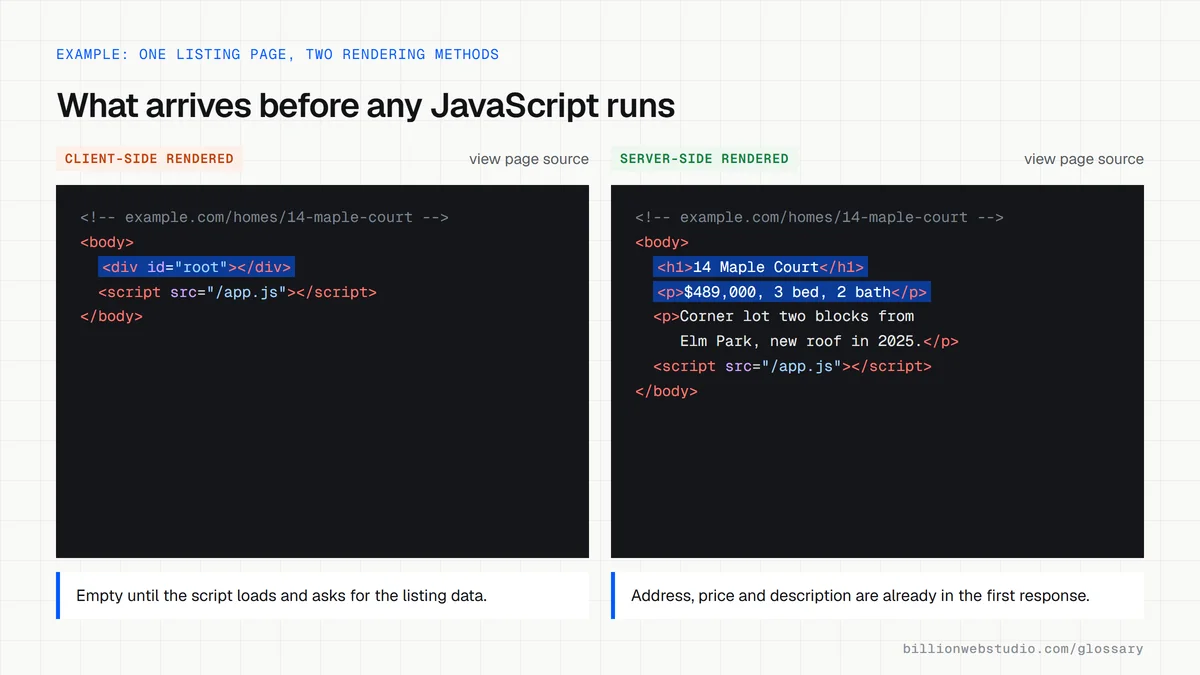
Why server-side rendering matters for SEO and speed
Google's JavaScript SEO guide says server-side or pre-rendering is still a great idea because it makes a site faster for users and crawlers, and notes that not every bot can run JavaScript. If your key content only appears after scripts execute, some crawlers and link previews may never see it.
web.dev explains that SSR generally produces a fast first paint of content, but building pages per request takes server time and can raise time to first byte. Heavy hydration can also hurt responsiveness, so SSR works best with lean JavaScript and caching.
A server-side rendering example
A real estate agency lists hundreds of homes that change daily. With client-side rendering, each listing page arrives empty and fills in once scripts load. Switching to server-side rendering means the price, address, photos and description are already in the HTML when the page arrives, so buyers see details sooner and search engines index each listing reliably.
How to check rendering on your own site
- Open a key page, choose View Page Source, and search for a sentence from the main content.
- If that sentence is missing from the source, the content is probably rendered in the browser.
- Use the URL Inspection tool in Google Search Console to see the HTML Google rendered.
- Compare time to first byte before and after any rendering change to catch slow server responses.
SSR vs static vs client-side rendering: which to use
| Method | When the HTML is built | Best for | Trade-off |
|---|---|---|---|
| Server-side rendering (SSR) | On the server for each request | Pages that change often or differ per visitor, such as live listings | Server work on every request can raise time to first byte |
| Static rendering | Once, at build time | Service pages, about pages, most blog posts | Content changes need a rebuild |
| Static with timed refresh (ISR in Next.js) | At build, then regenerated after a set time | Large catalogs that change a few times a day | Some visitors get the older copy until it refreshes |
| Client-side rendering (CSR) | In the browser after JavaScript runs | Logged-in dashboards that search engines do not need | Crawlers and link previews may get an empty page |
How to check if your pages are rendered on the server
- Open a key page in Chrome, press F12, then press Ctrl+Shift+P (Cmd+Shift+P on a Mac), type Disable JavaScript and press Enter.
- Reload with DevTools still open. If the headline, prices and body text still appear, they come from the server's HTML; a blank page or a lone spinner means the content is built in the browser.
- Open the Command Menu again and run Enable JavaScript when you are done.
- Test the same URL in PageSpeed Insights. Read Time to First Byte (TTFB) in the real-user data at the top, and the Document request latency insight in the lab results, to see whether server rendering slows the first response.
What good looks like: Main content is visible with JavaScript disabled, field TTFB is 0.8 seconds or less (web.dev's good threshold; above 1.8 seconds is poor), and Lighthouse does not flag the server taking longer than 600 milliseconds to respond.
Free tool: PageSpeed Insights
Questions to ask your web developer
“Which page types will be rendered per request, and which can be cached?”
A good answer: They list page types and justify each: listings that change through the day are cached and refreshed, while only pages with per-visitor data skip the cache, so server time is spent where content actually differs.
“What happens to time to first byte when traffic spikes?”
A good answer: They describe caching at the CDN or framework level, show TTFB from a load test or field data, and hold it to a target such as web.dev's 0.8 second good threshold.
“How much JavaScript has to hydrate each page?”
A good answer: They can state the script size for key templates, keep static sections free of client JavaScript, and check Interaction to Next Paint (INP) in real-user data after launch.
Server-side rendering (SSR): common questions
What is the difference between SSR and CSR?
With server-side rendering (SSR), the server sends finished HTML for each page. With client-side rendering (CSR), the server sends a minimal page and JavaScript builds the content in the browser. SSR usually shows content sooner and is easier for crawlers, while CSR can feel smoother after the first load.
Is server-side rendering better for SEO?
Usually, yes. Server-rendered pages put the content directly in the HTML, so search engines and bots that do not run JavaScript can read it straight away. Google can render JavaScript, but its own documentation still recommends server-side or pre-rendering for speed and wider crawler support.
Is server-side rendering the same as a static site?
No. A static site builds its pages once, ahead of time, and serves the same files to everyone. Server-side rendering builds each page when it is requested, which allows fresh or personalized content. Frameworks such as Next.js let one site use both methods on different pages.
Sources
Want a website that gets this right?
Every Billion Web Studio build includes technical SEO, schema and speed work as standard, with a fixed quote within 1 business day.