Conversion and analytics
What Is Click-Through Rate (CTR)?
Click-through rate (CTR) stands for Click-Through Rate.
Click-through rate (CTR) is the percentage of people who click a link after seeing it, calculated as clicks divided by impressions. CTR is used for search results, ads and emails to show how compelling a listing or message is.
What click-through rate means
Every time your link is shown, that is an impression. Every time someone clicks it, that is a click. Divide clicks by impressions and multiply by 100 to get CTR. If a page appears 2,000 times in Google and gets 60 clicks, its CTR is 3%. Google Search Console calculates CTR exactly this way.
CTR measures how persuasive a listing is, not what happens after the click. A page can earn a strong CTR and still lose visitors if the content does not match the promise in its title. That is why CTR is best read alongside engagement and conversion data in your analytics.
Why click-through rate matters for a business website
Ranking alone does not bring visitors; people still have to choose your result. A higher CTR from the same position means more traffic without any change in rankings. Watching CTR over time also shows when search features, such as AI Overviews, ads or map results, are drawing attention away from your listing.
A click-through rate example
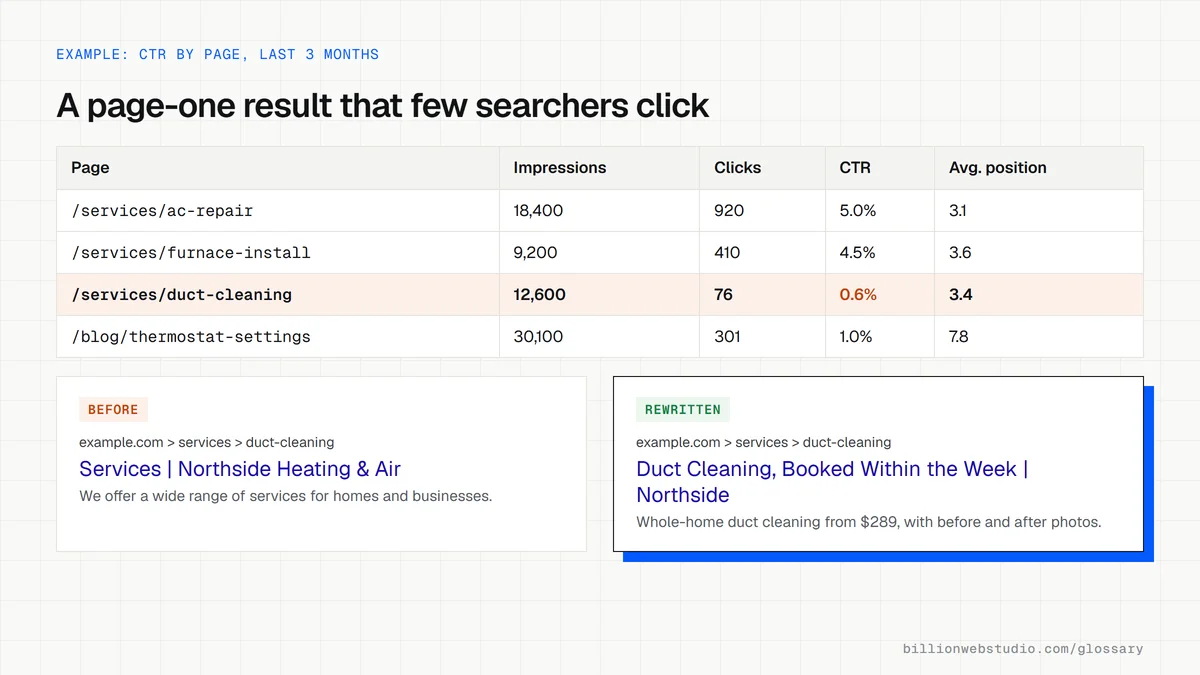
An accounting firm sees in Search Console that its tax preparation page ranks on page one for a local query but gets few clicks. The title tag reads only Services followed by the firm name. The team rewrites it to name the service, the city and a clear benefit, adds a matching meta description, then compares CTR over the next four weeks.
How to improve click-through rate
- Write title tags that name the exact service or answer the searcher is looking for.
- Use meta descriptions that give a reason to click, knowing Google may show different text from the page instead.
- Add valid structured data so the page can be eligible for rich results where they apply.
- Compare CTR by query in Search Console, since position strongly affects it.
- Keep the page content consistent with the title, so extra clicks do not turn into quick exits.
Work out your Click-through rate
Click-through rate calculator
How to find your low CTR pages in Search Console
- Open Google Search Console, pick your property and go to Performance, then Search results.
- Click the Average CTR and Average position boxes above the chart so both columns appear in the table.
- Set the date range to the last 3 months and open the Pages tab.
- Sort by Impressions and look for pages with an average position between 1 and 10 whose CTR is clearly lower than other pages at a similar position.
- Click one of those pages, switch to the Queries tab and read the searches it shows for, then compare them with the page's title and description in a live search.
What good looks like: Pages at similar positions earn similar CTRs on your site, and no page-one result collects thousands of impressions with almost no clicks. Google publishes no official CTR target, so your own pages are the benchmark.
Free tool: Search Console Performance report
Questions to ask your web developer
“When you rewrite a title tag to lift CTR, how will you measure whether it worked?”
A good answer: They note the date of the change, compare the same queries over the same number of weeks before and after in Search Console, and check average position at the same time, so a ranking change is not mistaken for a CTR gain.
“Which of our pages show in search often but get few clicks, and why?”
A good answer: They name specific URLs from the Pages tab with impressions, position and CTR, and give a reason for each, such as a title that does not match the query, a missing price or location, or ads and AI Overviews taking the space above.
“How are the title and description set on each page?”
A good answer: Every page has its own title and meta description field in the CMS, with a sensible default pattern for new pages, so nothing goes live with a generic Home or Services title.
Click-through rate (CTR): common questions
What is a good click-through rate?
It depends on position, query type, device and what else appears on the results page, such as ads or AI Overviews. Rather than chasing a universal figure, compare each page's CTR with pages at similar positions on your own site, and with its own history in Search Console.
How is CTR calculated in Google Search Console?
Search Console calculates CTR as clicks divided by impressions. An impression is counted when a link to your site is shown in results, and a click when someone follows it to your site. Clicks on external links inside AI Overviews are included in these totals.
Sources
Want a website that gets this right?
Every Billion Web Studio build includes technical SEO, schema and speed work as standard, with a fixed quote within 1 business day.